# Hreflang Manager: multilingual and multistore hreflang tags
> Overview Hreflang Manager writes the tags of your pages to tell Google about the language and regional versions of the same page. It writes only one set per page, only…
- Page:
- Language: en
- Last updated: 2026-11-14
- Other languages: [fr](https://www.datafirefly.com/documentation/datafireflyhreflang/index.md), [es](https://www.datafirefly.com/es/documentation/datafireflyhreflang/index.md), [it](https://www.datafirefly.com/it/documentation/datafireflyhreflang/index.md), [nl](https://www.datafirefly.com/nl/documentation/datafireflyhreflang/index.md), [de](https://www.datafirefly.com/de/documentation/datafireflyhreflang/index.md), [pl](https://www.datafirefly.com/pl/documentation/datafireflyhreflang/index.md), [pt](https://www.datafirefly.com/pt/documentation/datafireflyhreflang/index.md)
- Index:
## Overview
Hreflang Manager writes the `` tags of your pages to tell Google about the language and regional versions of the same page. It writes only one set per page, only on canonical, indexable pages, and only to versions that actually exist.
Compatible with PrestaShop 1.7.8 to 9.x, single store and multistore (one or more domains). Version 2.0.0 contains no override and does not modify any theme file.
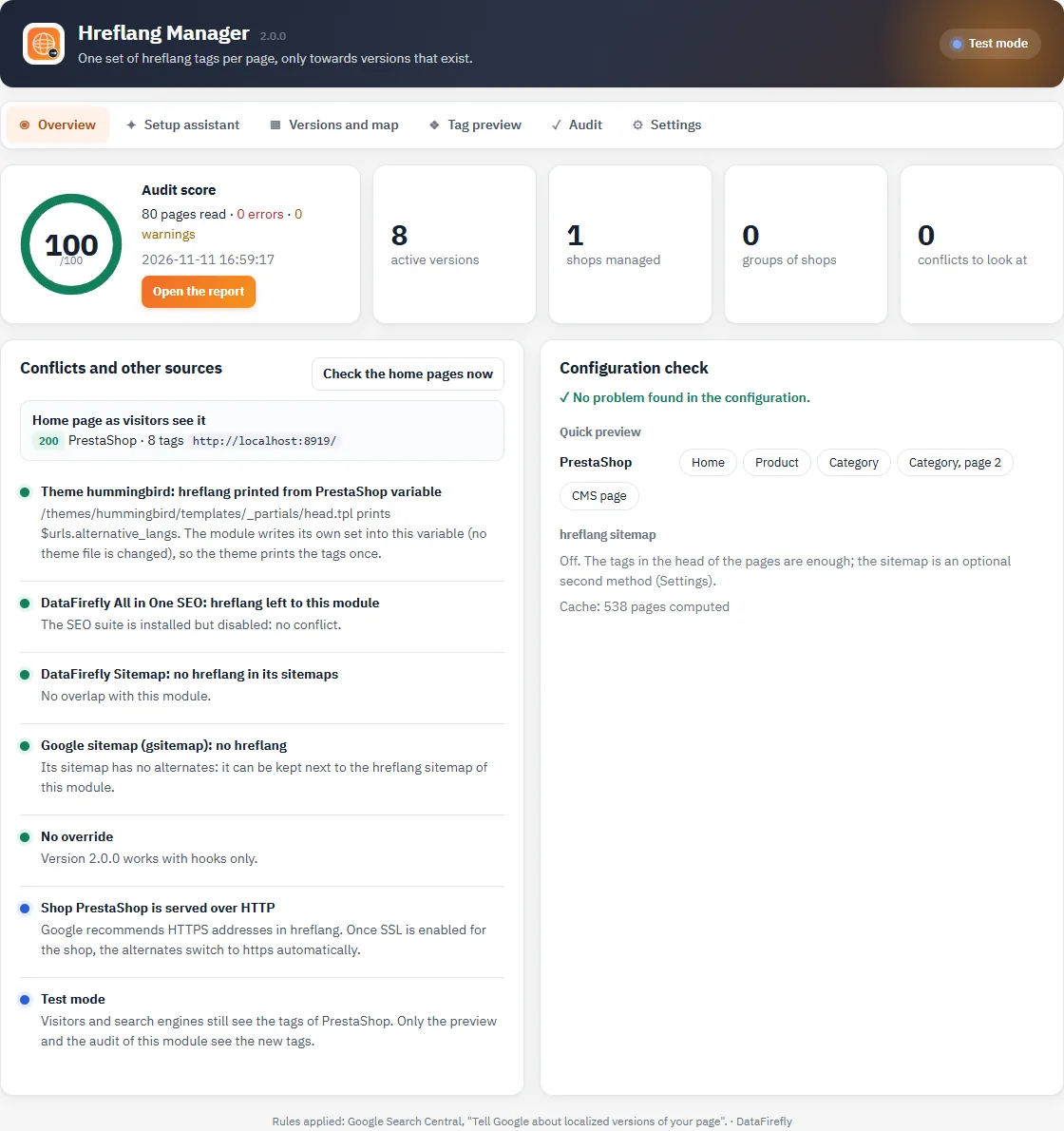
Hreflang Manager overview
## What's new in version 2.0
- **No more override**: the module works with hooks. The 1.0.0 FrontController override is removed during the upgrade.
- **One set of tags**: written into the theme variable or through the displayHeader hook, with a guard that removes duplicates.
- **Verified versions**: nothing to an inactive, untranslated or unavailable product; nothing on 404s, noindex pages, filtered lists and combinations.
- **Redesigned back office**: setup assistant, language × country → shop map, tag preview, scored audit, conflict detection, test mode.
- Optional hreflang XML sitemap, per-page cache, PrestaShop 1.7.8 compatibility and interface in 8 languages.
## Installation and upgrade
1. In **Modules > Module Manager**, click **Upload a module** and send the ZIP file.
2. The module opens in **Shop Parameters > Traffic & SEO > Hreflang Manager**.
3. As long as no version is configured, it changes nothing on your pages. Start the **Setup assistant**.
Upgrading from 1.0.0 keeps your versions and groups. Incorrectly written values are fixed when the fix is certain (`en_UK` becomes `en-GB`, `fr_BE` becomes `fr-BE`), a single x-default is kept per group, the old override is removed by PrestaShop's upgrade procedure and the menu moves under Traffic & SEO. A report is shown in the overview.
In multistore, install the module in the "All shops" context and make sure it is enabled in every shop of a group: otherwise its pages do not link to the other versions and Google ignores the pairs. The conflict detector flags this.
## Setup assistant
The setup assistant reads your shops, their domains (HTTP or HTTPS), their country and their active languages, then suggests an hreflang value for each shop and language pair:
- a language sold in only one shop gets the language alone (`fr`): it targets all French speakers;
- a language sold in several shops gets the country of each shop (`fr-FR`, `fr-BE`) so that Google shows the right shop;
- the suggested x-default is the main language of the default shop.
Values are checked as you type. Nothing changes on your pages until you save.
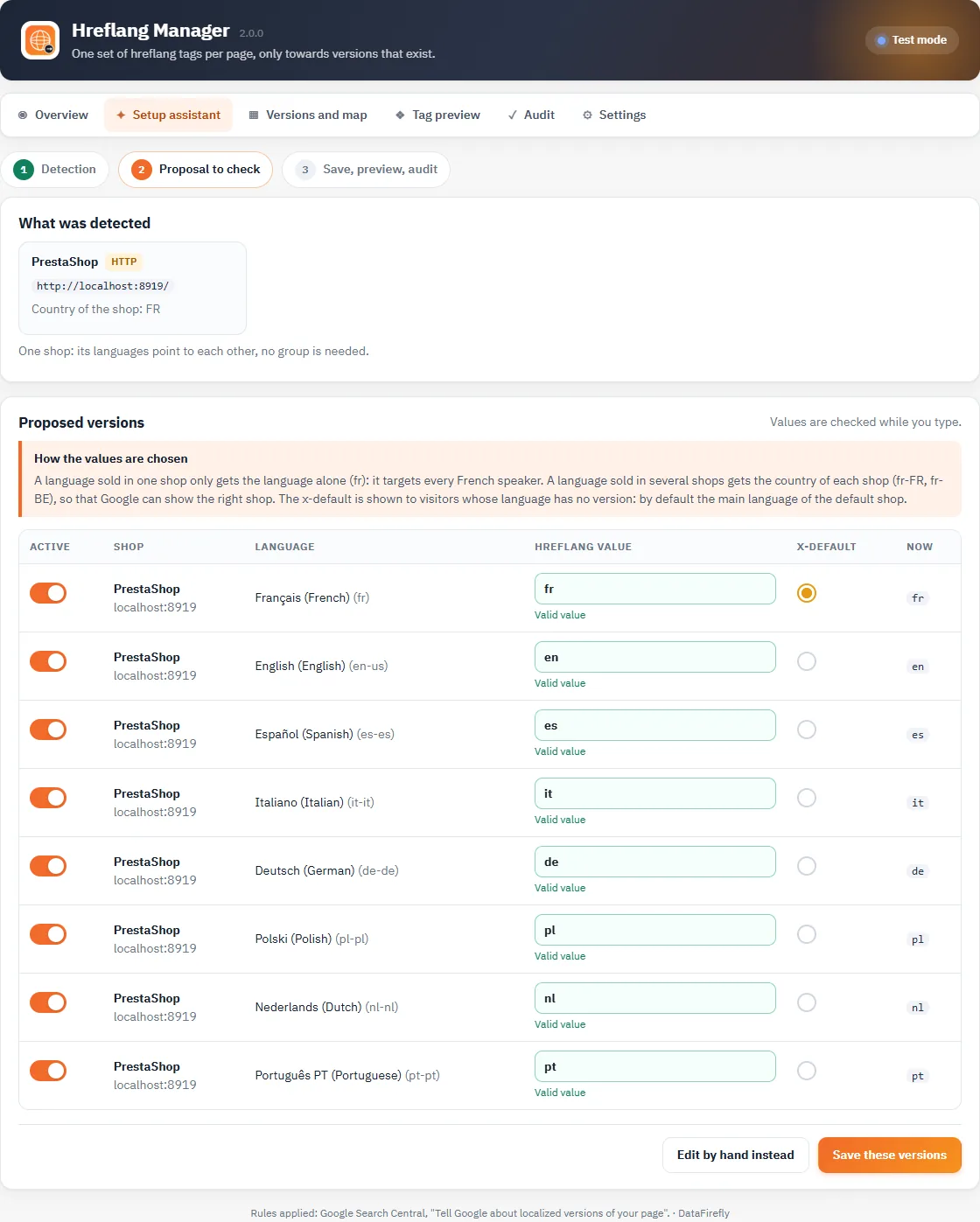
Setup assistant
## Versions, groups and map
Each row is a version: a shop, a language, an hreflang value, an optional public origin (if the shop is served under another domain), an active switch and the x-default choice. Only one x-default version per group.
The **language × country → shop map** shows which shop serves which market. Greyed-out versions are not printed (inactive, or language disabled in the shop).
**Groups** link shops that point to each other. Content is matched by id (shared catalog) or only by **manual mapping** (separate catalogs). A mapping links two ids of a product, category, CMS page, brand or supplier; it works both ways and stays consistent across the whole group.
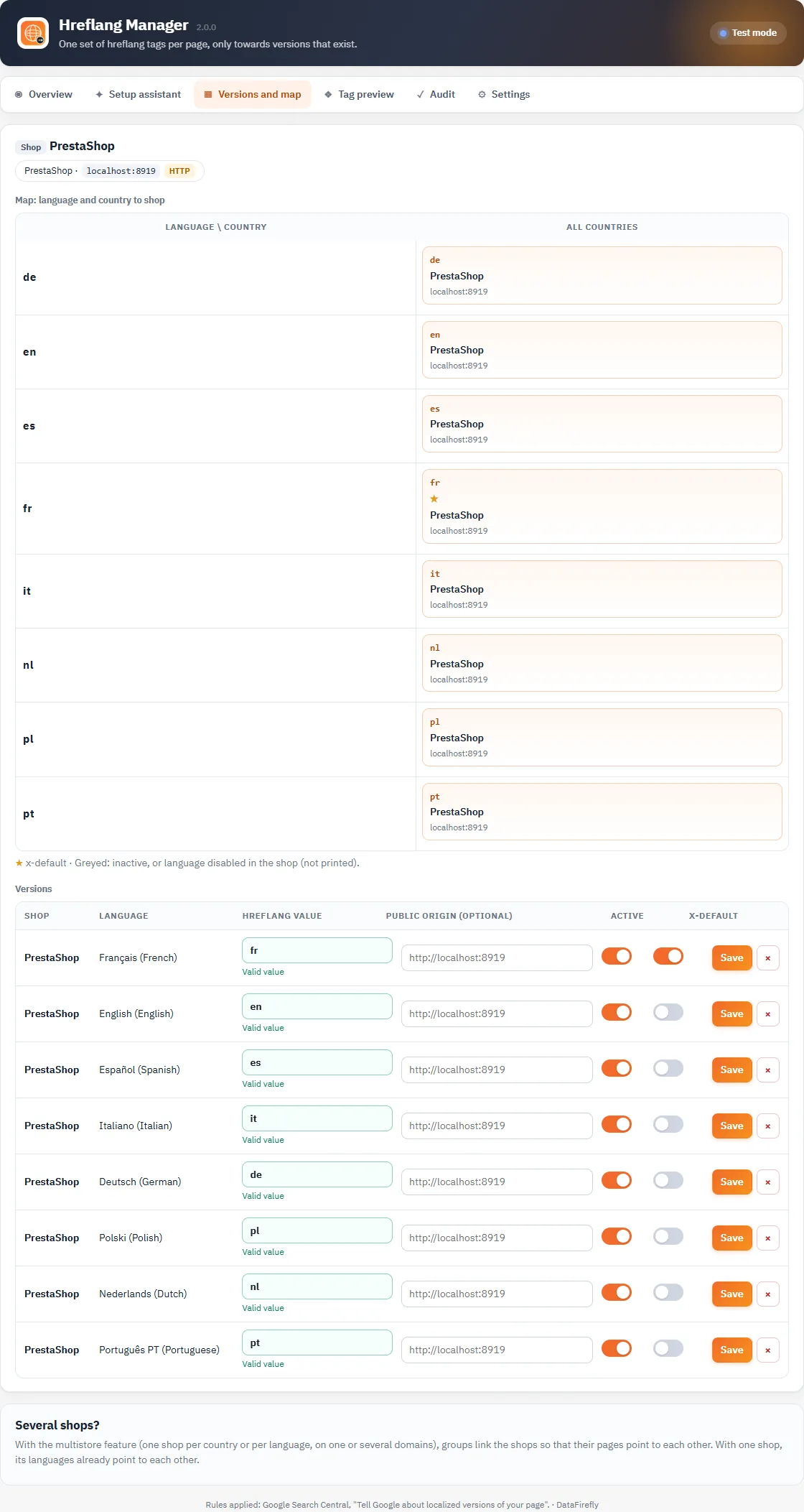
Versions and language × country to shop map, with live validation of hreflang values
## Rules applied
The module follows the Google Search Central guidelines on localized versions:
- **Absolute URLs** with the protocol and domain of each shop; spaces and forbidden characters encoded.
- **Self-reference** and **return links**: each version lists all the others and itself, with the same set on all versions.
- **Valid codes**: ISO 639-1 language, optional ISO 3166-1 alpha-2 country, optional ISO 15924 script. `en-UK`, underscores, a country alone or `es-419` are rejected with a suggestion.
- **Existing versions only**: product active and visible, category active and accessible to visitors, CMS page active and indexable, brand or supplier active, translated into the target language.
- **Canonical, indexable pages only**: no tags on 404s, noindex pages, filtered or sorted lists, combination URLs, cart, account and search, nor when the canonical tag points to another address.
- **Pagination**: page 2 of a category points to page 2 of the other versions (configurable).
## Tag preview
Enter a URL of your shop or pick an example (home, product, category, page 2, CMS page). The module reads the page from the server and displays the diagnosis (canonical page, noindex, missing version…), each tag with its check and, side by side, the expected head and the head actually printed. Only the domains of your installation can be read.
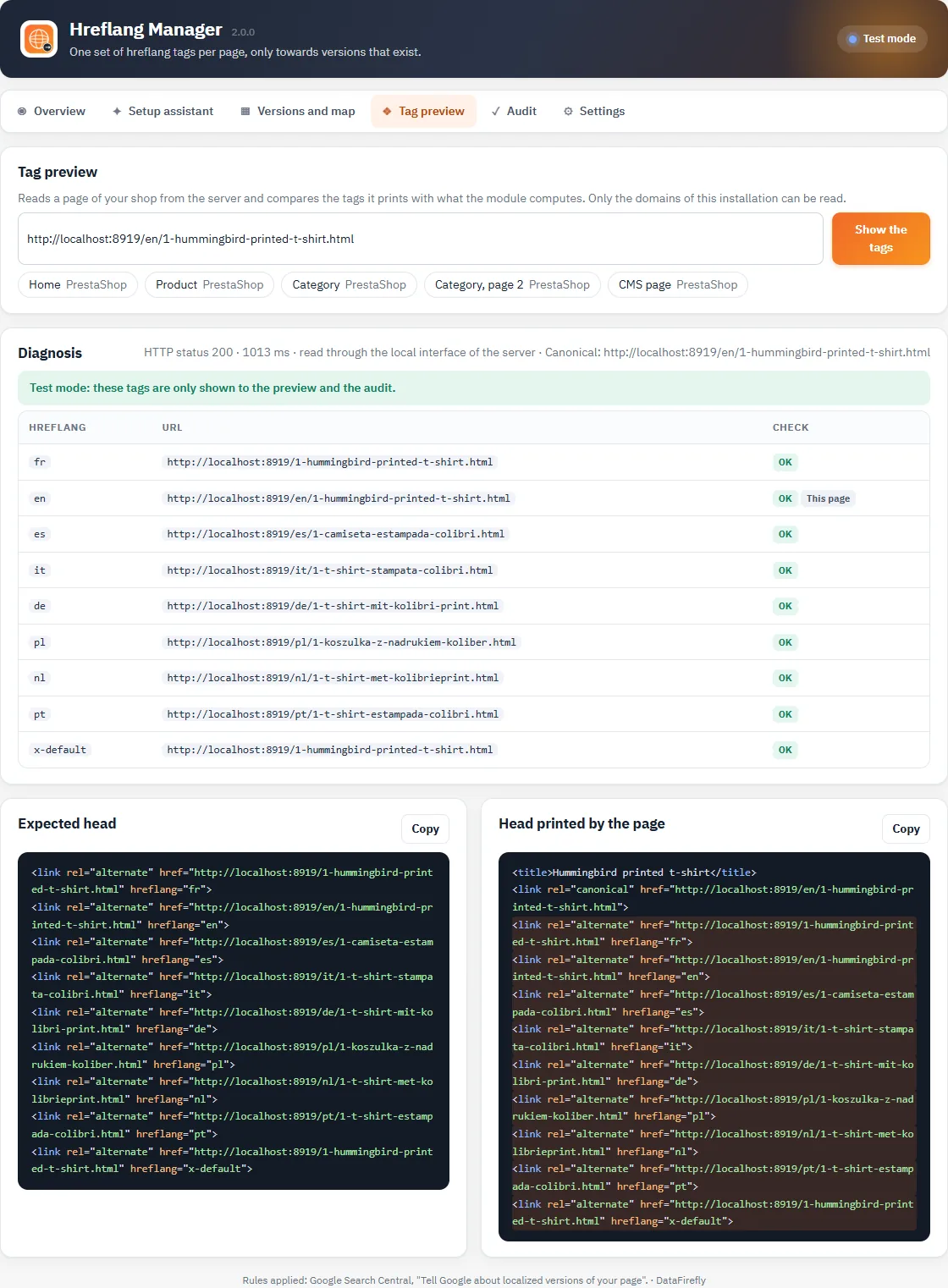
Tag preview of a product page
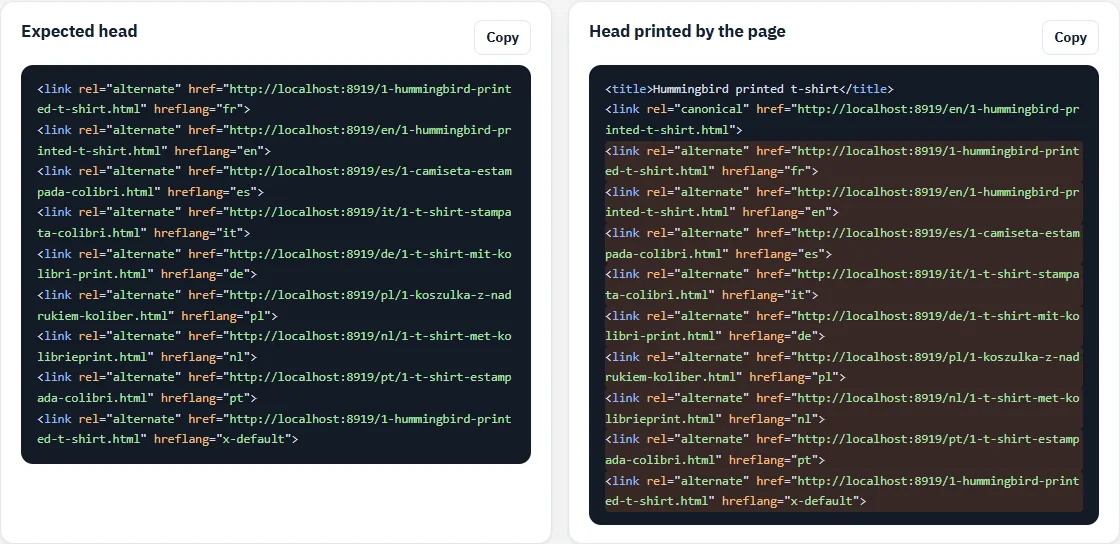
Excerpt of the head section source code
## Audit
The audit reads a sample of pages from your own domains (home, products, categories with page 2, CMS pages, brands, suppliers, other pages), each in all its versions, then checks: 200 response, indexable, canonical tag, values, absolute URLs, self-reference, return links, duplicates, x-default and a single set per page. It displays a score, the errors and warnings grouped by rule with the fix to apply, the audit history and a CSV export.
Run with the module set to "Off", the audit evaluates PrestaShop's native tags: the screenshot below shows this result on a demo shop (missing return links on page 2, no x-default).
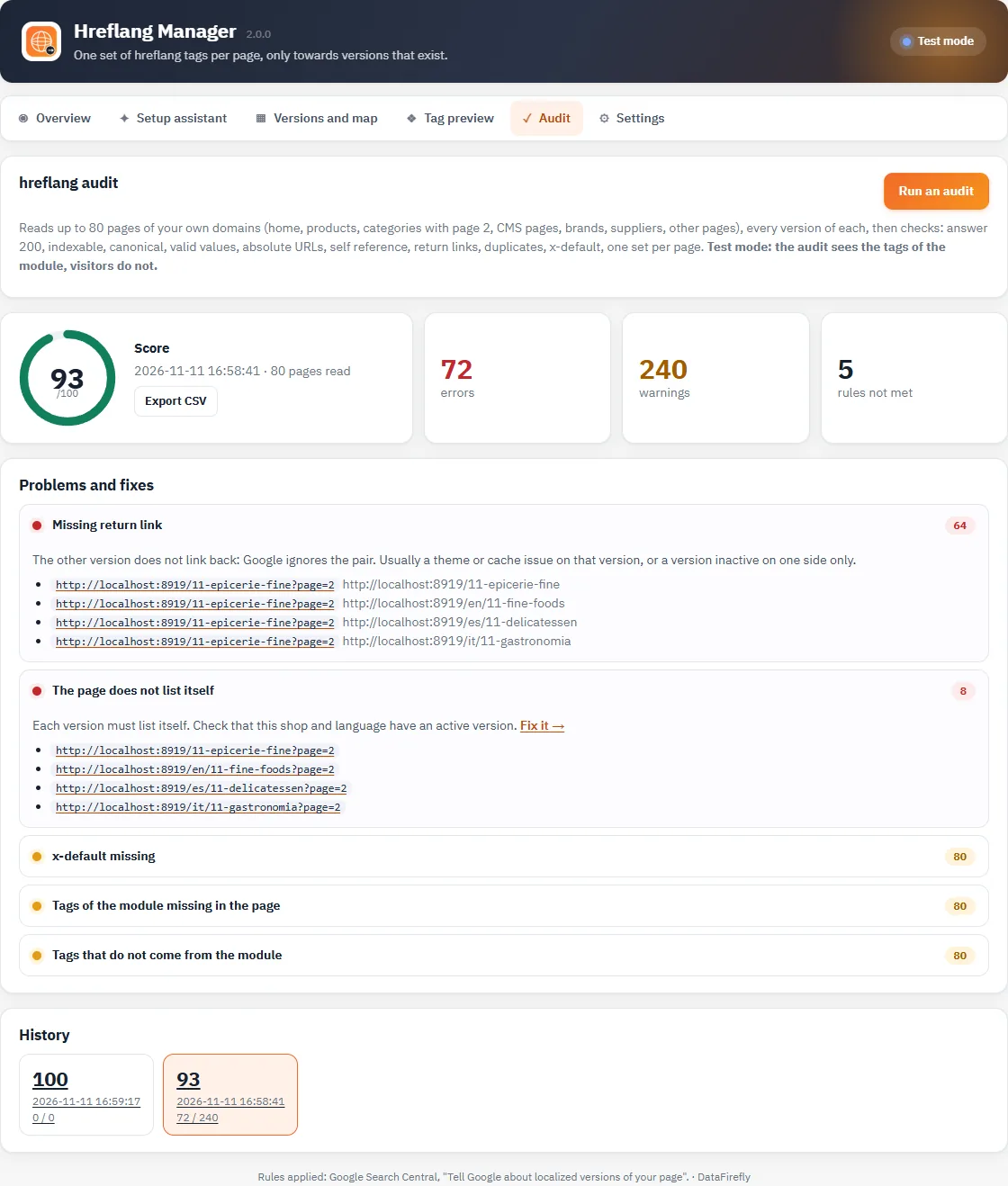
hreflang audit of the native PrestaShop tags
The audit calls no external service and only reads the addresses declared in your shops. If the server cannot reach its own domain (Docker, NAT, local DNS), the request goes through the server's local interface with the same host name.
## Conflicts and other sources
The overview lists what can produce hreflang tags in addition to the module, without ever changing their settings:
- the **theme** (Classic, Hummingbird and most themes print `$urls.alternative_langs`);
- **DataFirefly All in One SEO** if its "Manage hreflang" option is on: the guard keeps a single set and a button runs Hreflang Manager last;
- sitemaps from **DataFirefly Sitemap** or the SEO suite that contain alternates;
- other modules containing hreflang code, the old 1.0.0 override, a module disabled in a shop of the group, shops served over HTTP.
The **Check the home pages now** button reads the home page of each shop as a visitor would and counts the tags and duplicates.
## Settings
- **Status**: Live, Test mode (visitors and search engines keep the original tags, only the preview and audit see the new ones) or Off.
- **Where to print the tags**: automatic (theme variable if the theme prints it, otherwise displayHeader hook), theme variable or hook.
- **Anti-duplicate guard** and **removal of PrestaShop tags** where the module prints none (404, noindex, filtered lists…).
- **Pagination**, **canonical tag compliance**, other pages with versions (best sales, new products, prices drop, contact, stores, brand and supplier lists) and allowed module pages (module/controller).
- **Hreflang XML sitemap**: optional, one per shop, at `/module/datafireflyhreflang/sitemap`. Each address lists all its versions with `xhtml:link`, including itself. Submit it yourself in Google Search Console or robots.txt.
- **Cache**: a page's alternates are computed once, then read in a single query; they are recomputed when a product, category, CMS page, brand or supplier is saved, and entirely when a version, group, language or shop changes.
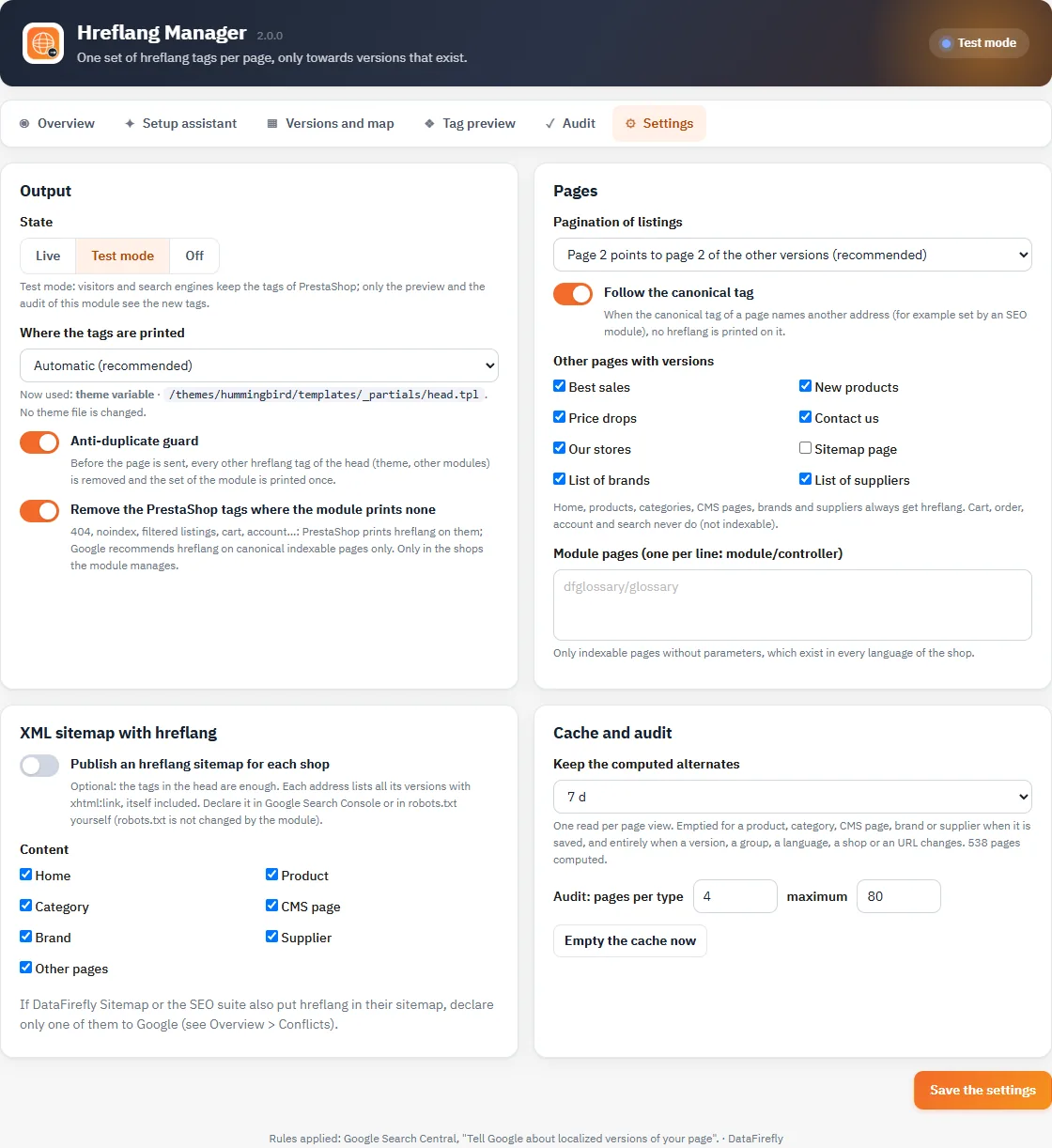
Settings
If DataFirefly Sitemap or the SEO suite also put hreflang in their sitemap, submit only one of these sitemaps to Google, or check that they say the same thing.
## Security and permissions
- Every change requires the "Edit" permission on the Hreflang Manager tab and the back office security token; a read-only profile can view, preview and export.
- The preview and audit reject any address outside the shop's domains (no access to arbitrary URLs).
- URLs printed in the head are escaped; the CSV export neutralizes cells starting with `=`, `+`, `-` or `@`.
## Uninstallation
Uninstalling deletes the module's 6 tables (versions, groups, group shops, mapping, cache, audits), its settings and its tab. There are no theme files or overrides to clean up.
## Troubleshooting
### No tags on a page
Open the preview on that URL: the diagnosis gives the reason (noindex page, filtered page, combination page, canonical to another address, single version, language without a version, test mode…).
### Duplicate tags
Turn on the anti-duplicate guard, then check "Conflicts and other sources": a module or the theme prints its own tags.
### Missing return links in the audit
A version is inactive on one side only, the module is disabled in a shop of the group, or a full-page cache is serving an old page. Clear the module's cache (Settings) and the shop's cache.