# DataFirefly Specific Price Cleaner: clean expired, duplicate and orphan specific prices
> Installation Install the module from Modules > Module Manager > Upload a module by sending the ZIP file. On installation, the module creates its tables and adds the Catalog >…
- Page:
- Language: en
- Last updated: 2026-11-16
- Other languages: [fr](https://www.datafirefly.com/documentation/dfspecificpricecleaner/index.md), [es](https://www.datafirefly.com/es/documentation/dfspecificpricecleaner/index.md), [de](https://www.datafirefly.com/de/documentation/dfspecificpricecleaner/index.md), [it](https://www.datafirefly.com/it/documentation/dfspecificpricecleaner/index.md), [pl](https://www.datafirefly.com/pl/documentation/dfspecificpricecleaner/index.md), [nl](https://www.datafirefly.com/nl/documentation/dfspecificpricecleaner/index.md), [pt](https://www.datafirefly.com/pt/documentation/dfspecificpricecleaner/index.md)
- Index:
## Installation
Install the module from **Modules > Module Manager > Upload a module** by sending the ZIP file. On installation, the module creates its tables and adds the **Catalog > Specific prices cleanup** tab. It does not change any price on installation.
To upgrade from 1.0.x, simply upload the new ZIP. The history and backups of 1.0.x are kept, as well as the cron settings (on/off, mode, frequency). Open the **Schedule** tab after the upgrade to check that they suit you.
## The dashboard
The **Health** page analyses the specific price table, on the whole catalogue or on a chosen scope (shop, category, product IDs). It shows:
- the number of specific prices, including the prices active right now;
- the number of rows that can be cleaned safely with the default cleanup (expired, duplicates, orphans);
- what is never deleted by default: prices bound to an active cart, catalog price rules, upcoming prices, prices without an end date, prices used by another module;
- the detail by category of problem, with the deletable and protected rows of each;
- priority conflicts and expired catalog price rules, to review by hand;
- the current size of the table, as measured by the database.
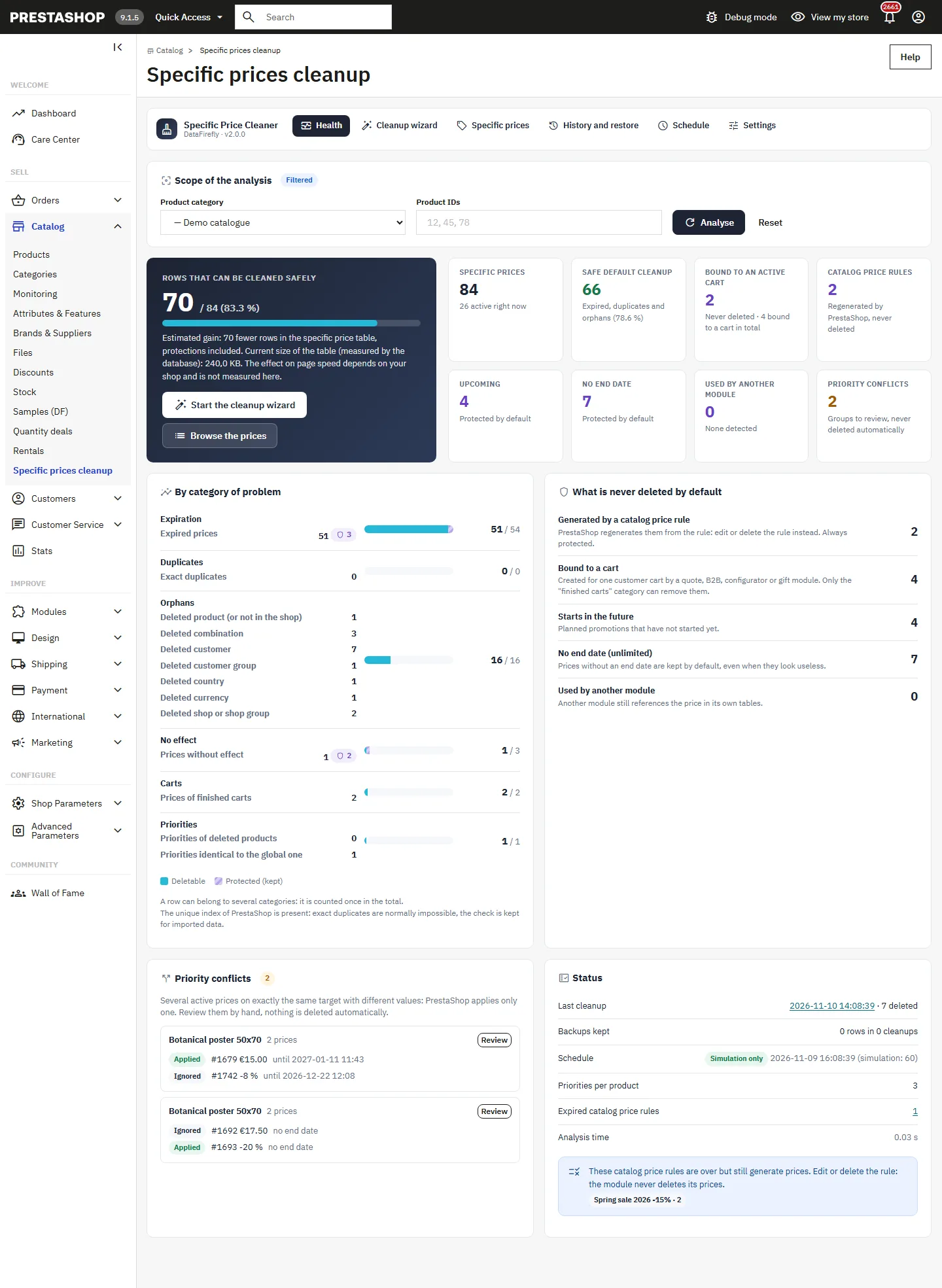
The dashboard shows how many rows fewer the table will have after the cleanup. The effect on page speed depends on your store: the module does not measure it.
## The 6-step cleanup wizard
Click **Start the cleanup wizard**. The steps are: Choose, Simulate, Review, Back up, Clean, Report. Nothing is deleted before the Clean step.
### 1. Choose
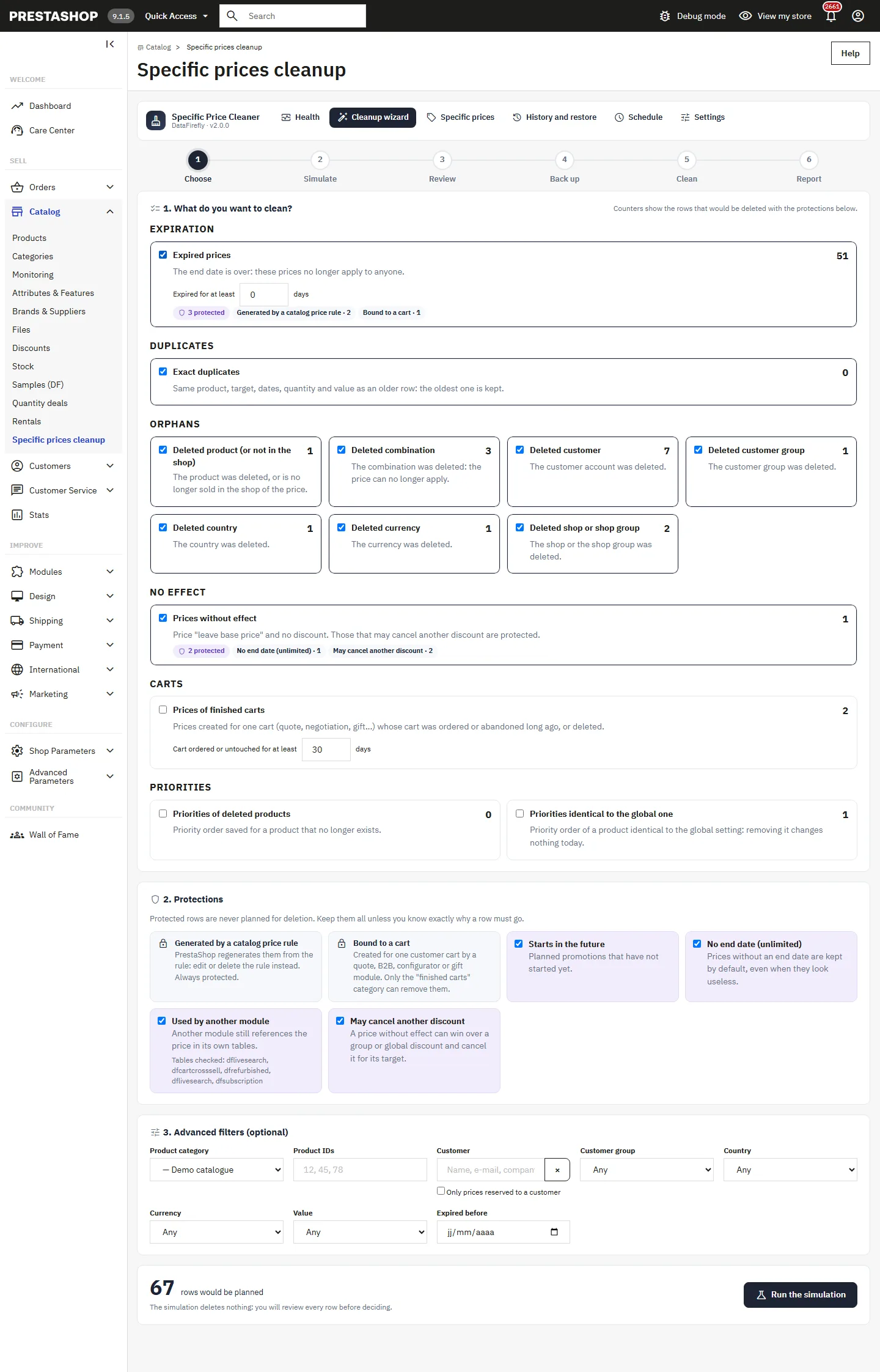
Tick the categories to clean. Each counter shows the rows that would be deleted with the active protections. Set the delay for expired prices (for example, expired for at least 7 days) and for finished carts. The **Protections** stay ticked by default; untick one only if you know exactly why a row must go. The **Advanced filters** limit the cleanup to a shop, a category, product IDs, a customer, a group, a country, a currency, a value type or an expiry date.
### 2. Simulate
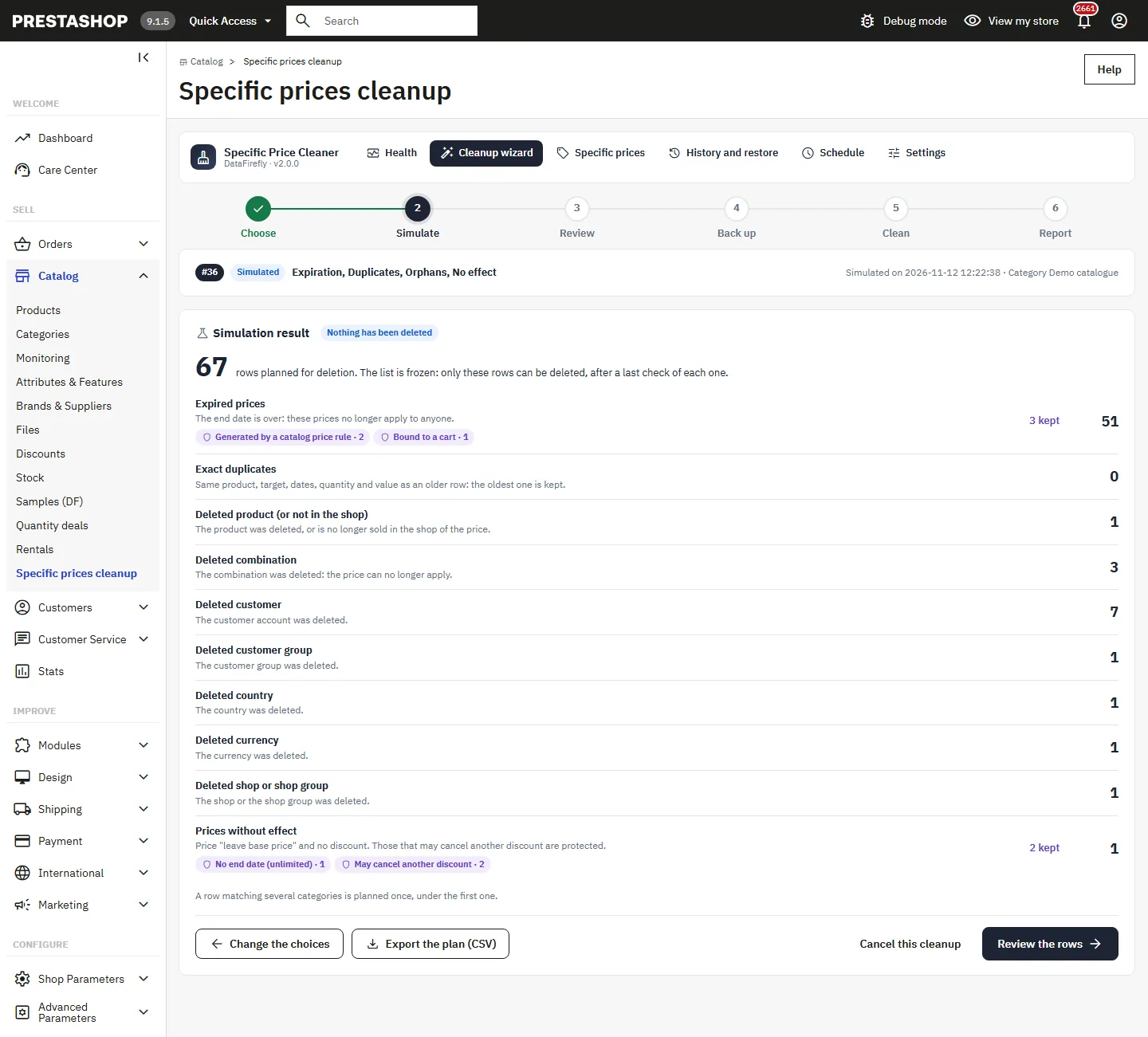
**Run the simulation** computes the plan without deleting anything: planned and protected rows per category. The plan is frozen: only these rows can be deleted. A row matching several categories is planned once, under the first one. You can export the plan as CSV.
### 3. Review
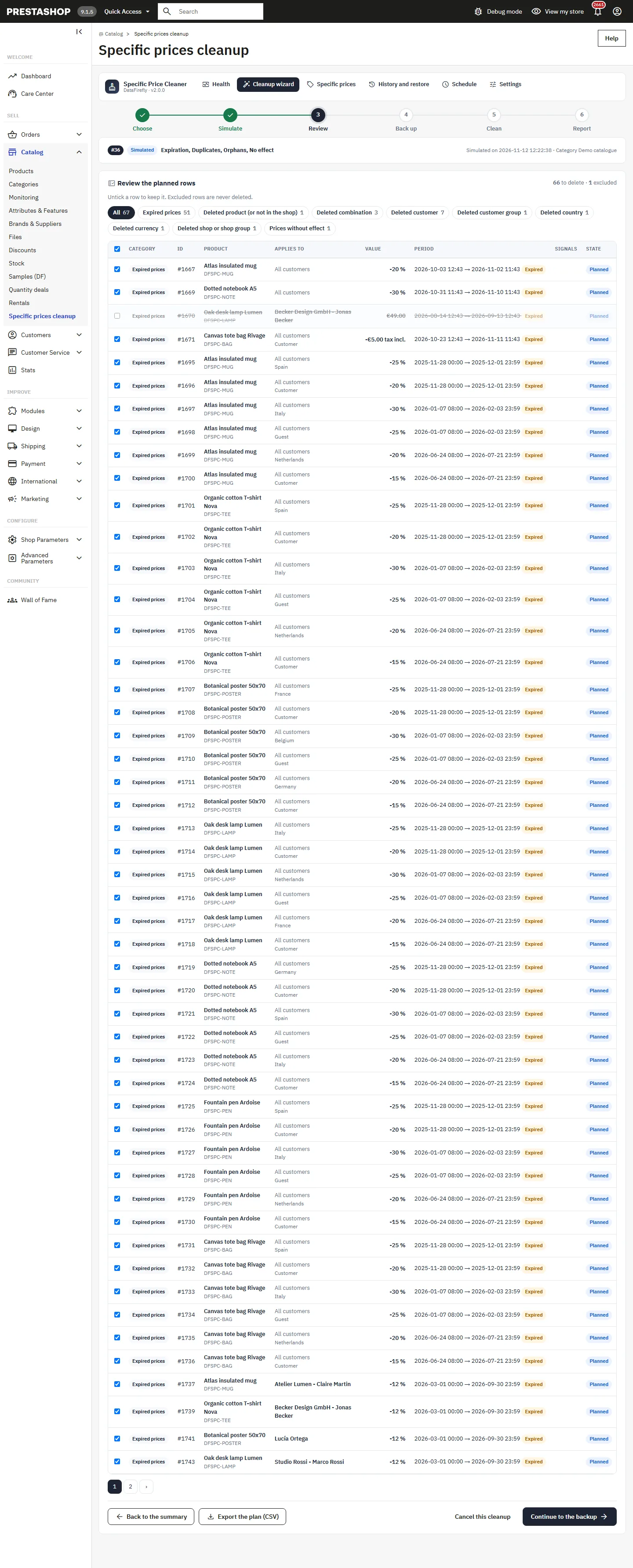
The list of planned rows shows the product, the target, the value, the period and the useful signals of each row. Untick a row to keep it: excluded rows are never deleted.
### 4. Back up
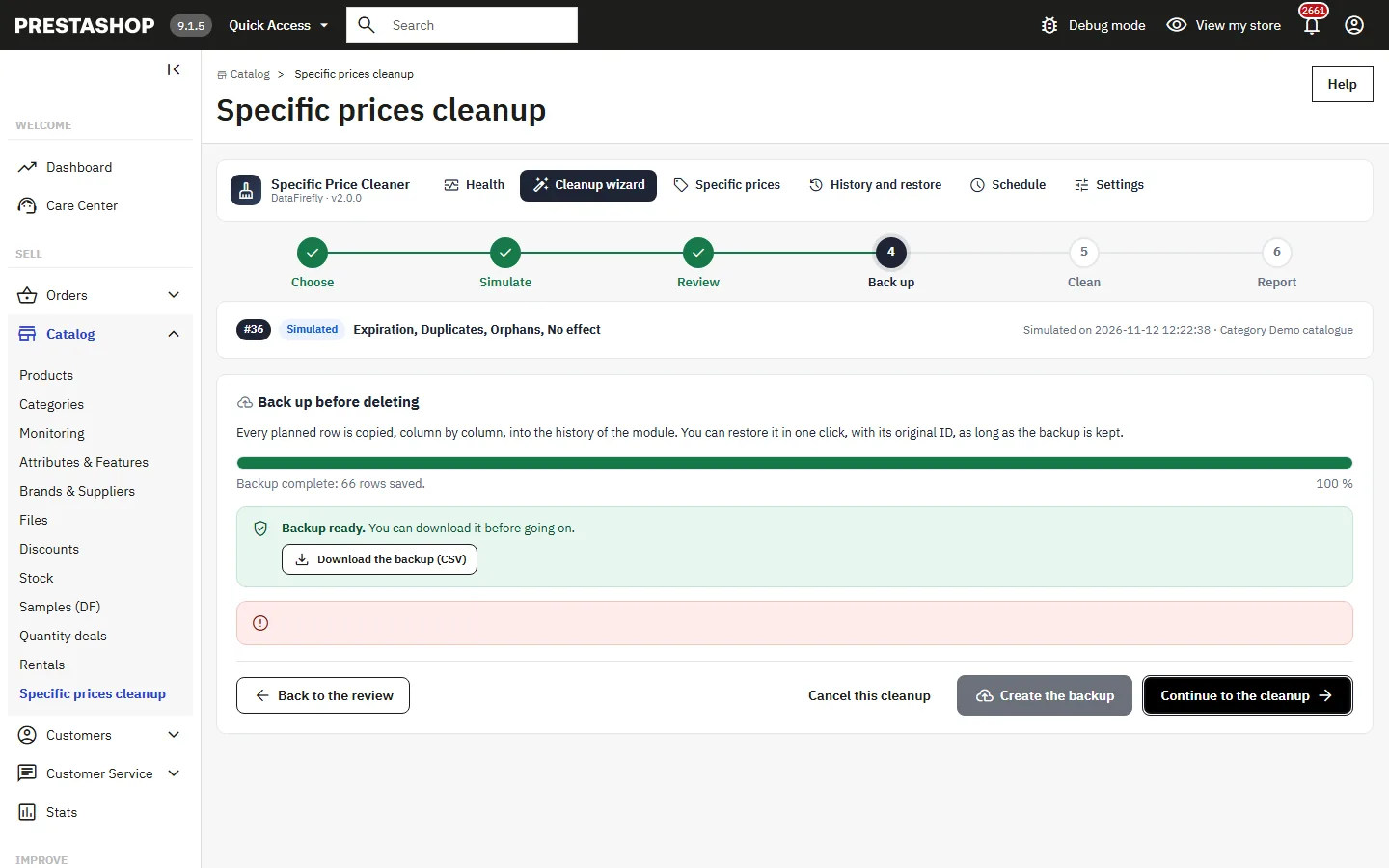
**Create the backup** copies every planned row, column by column, into the history of the module. You can download this backup as CSV before going on. If the backup is turned off in the settings, the module says so clearly: the deletion will be final.
### 5. Clean
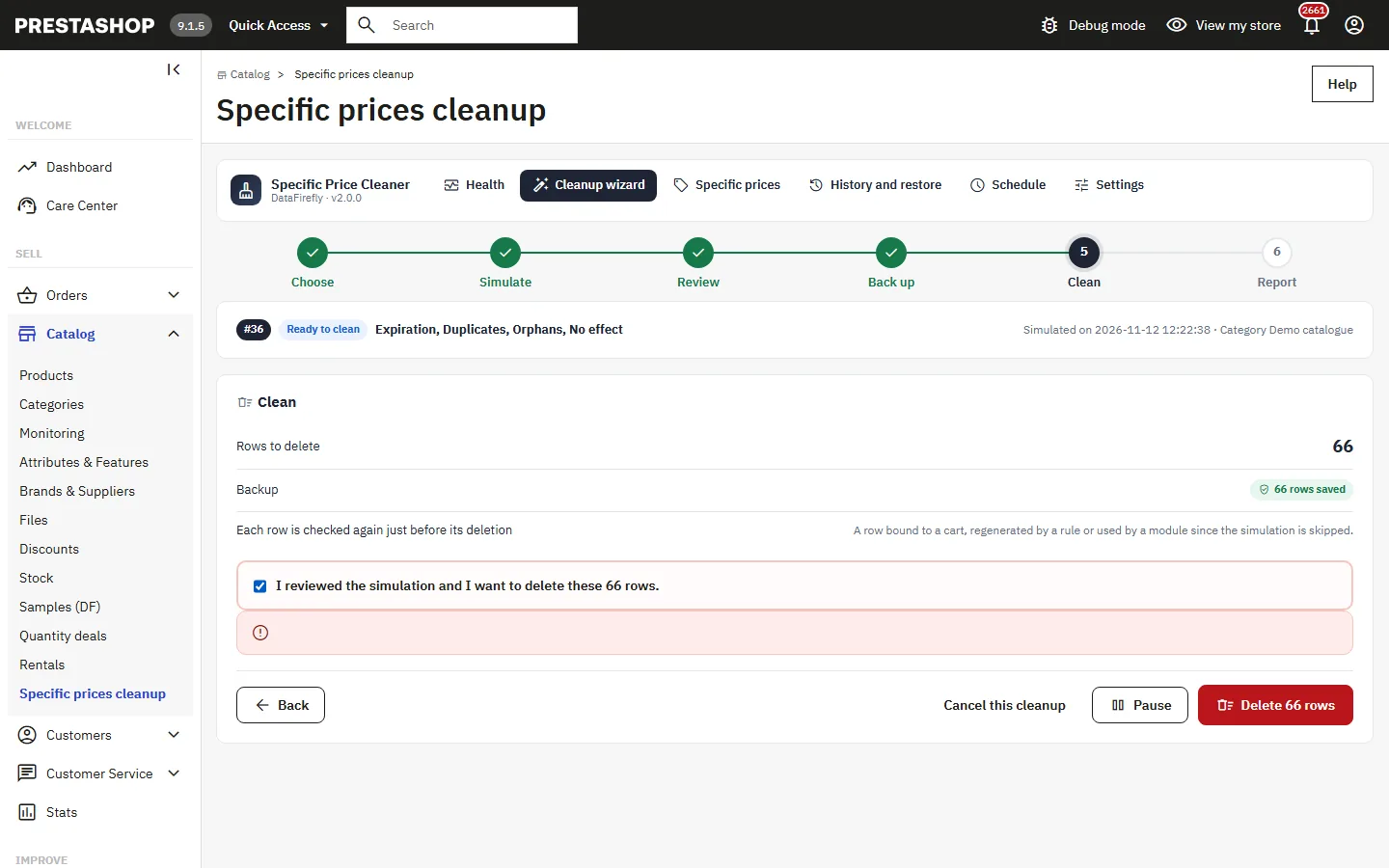
Tick **I reviewed the simulation and I want to delete these N rows**, then click **Delete N rows**. Without a backup, you also have to type the number of rows. The deletion runs in chunks, each in its own transaction, and each row is checked again just before its deletion: a row bound to a cart, regenerated by a rule or used by a module since the simulation is skipped. You can pause and resume.
### 6. Report
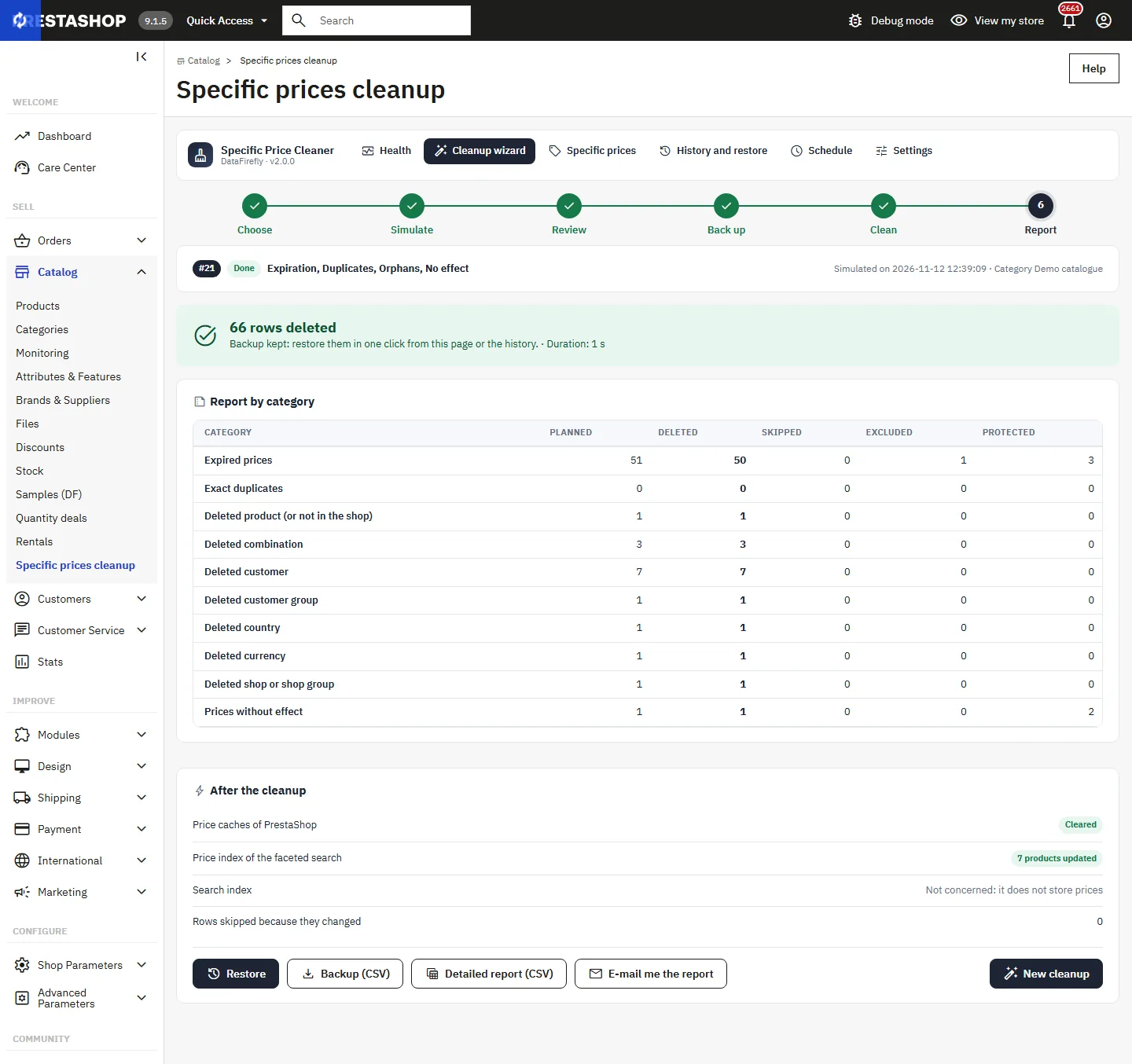
The report gives, per category, the planned, deleted, skipped, excluded and protected rows, and the duration. It also shows what was done after the cleanup: PrestaShop price caches cleared and faceted search price index updated for the products concerned. From the report you can restore, download the backup or the detailed report as CSV, or e-mail yourself the report.
If the tab is closed or the server stops during the cleanup, nothing is half done. The dashboard shows the unfinished cleanup with **Open and resume**, or you can abandon the rest.
## Cleanup categories
- **Expired prices**: the end date is over, these prices no longer apply to anyone.
- **Exact duplicates**: same product, target, dates, quantity and value as an older row; the oldest one is kept. The unique index of PrestaShop normally prevents them: the check stays useful for imported data.
- **Orphans**: deleted product (or no longer sold in the shop of the price), combination, customer, customer group, country, currency, shop or shop group.
- **Prices without effect**: "leave base price" and no discount. Those that may cancel another discount are protected.
- **Prices of finished carts**: prices created for one cart (quote, negotiation, gift...) whose cart was ordered or untouched for the chosen delay, or deleted.
- **Priorities of deleted products** and **priorities identical to the global one**.
- **Manual selection**: rows chosen in the price list.
## Protections
- **Generated by a catalog price rule**: PrestaShop regenerates it from the rule. Always protected: edit or delete the rule instead.
- **Bound to a cart**: created for one customer cart by a quote, B2B, configurator or gift module. Only the Finished carts category can remove it.
- **Starts in the future**: planned promotions.
- **No end date (unlimited)**: kept by default, even when they look useless.
- **Used by another module**: a module still references the price in its own tables. The dashboard lists the detected modules.
- **May cancel another discount**: a price without effect can win over a group or global discount and cancel it for its target.
## The price list
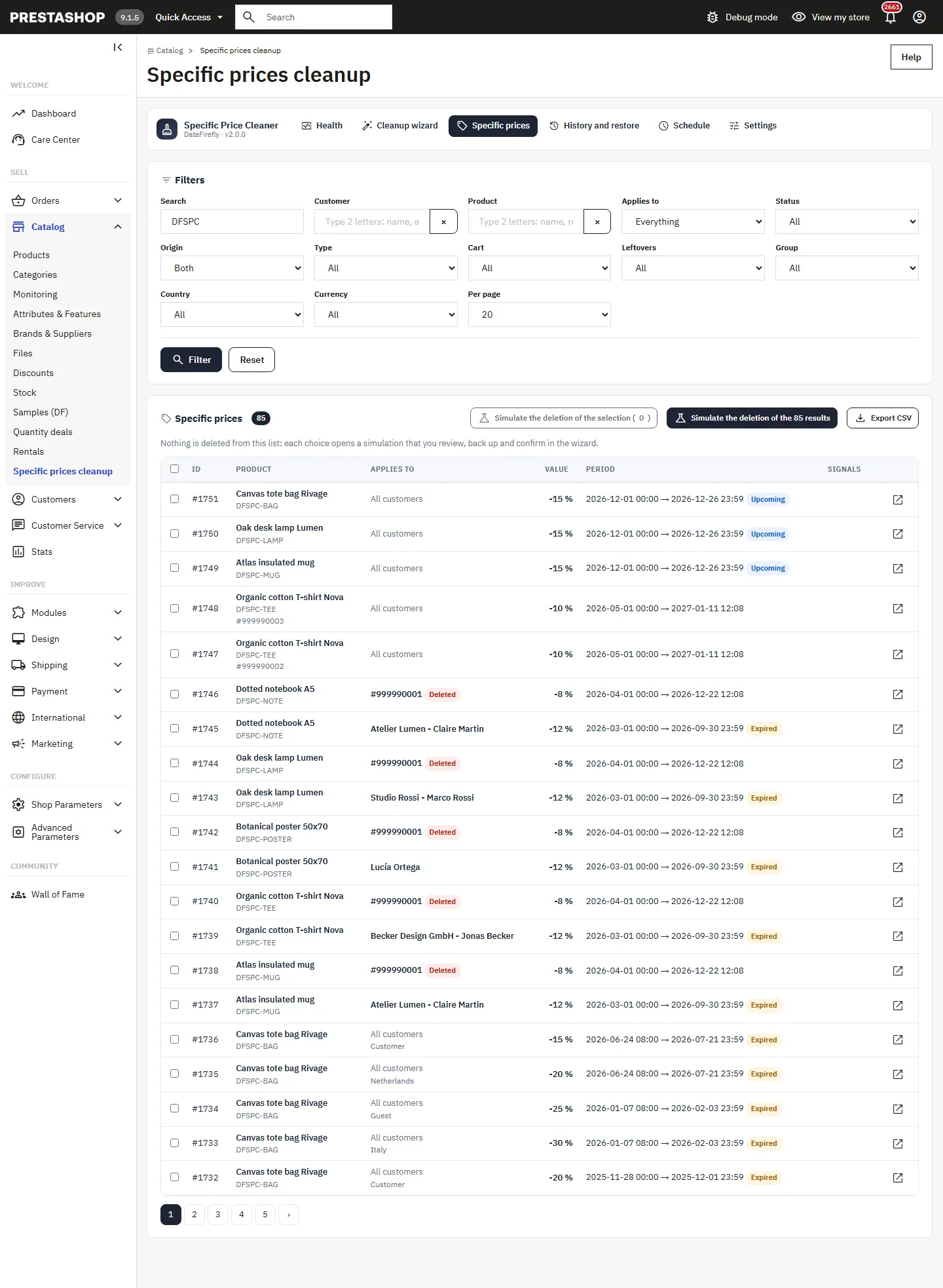
The **Specific prices** tab lists all specific prices with the same filters as the wizard, and signals for prices bound to a cart, generated by a rule or used by a third-party module. Tick rows to run a simulation on this selection only.
## History and restore
The **History and restore** tab lists every cleanup and every scheduled simulation, with its author, report and backup. Cleanups are kept with their backup for the retention chosen in the settings (90 days by default), then purged automatically.
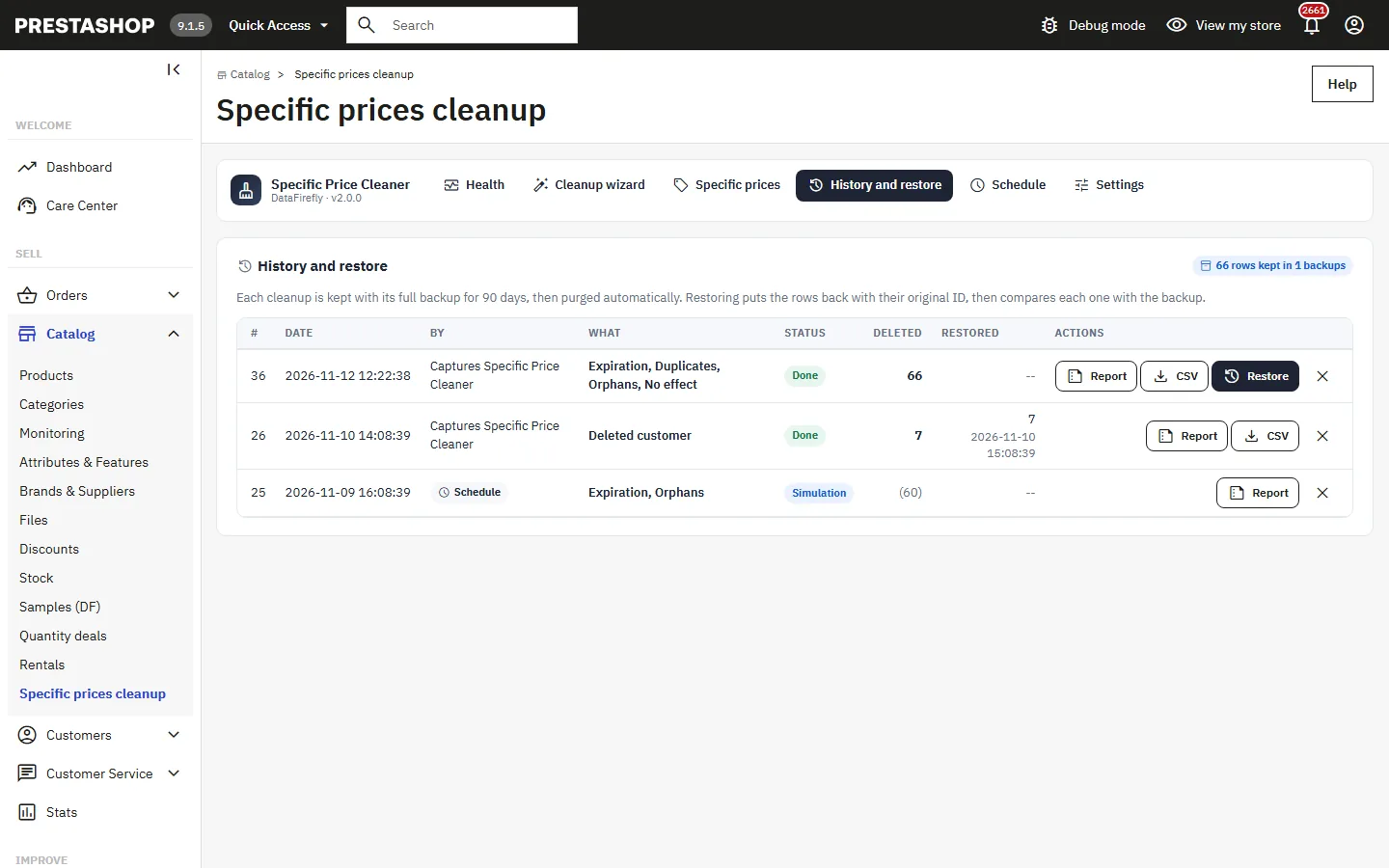
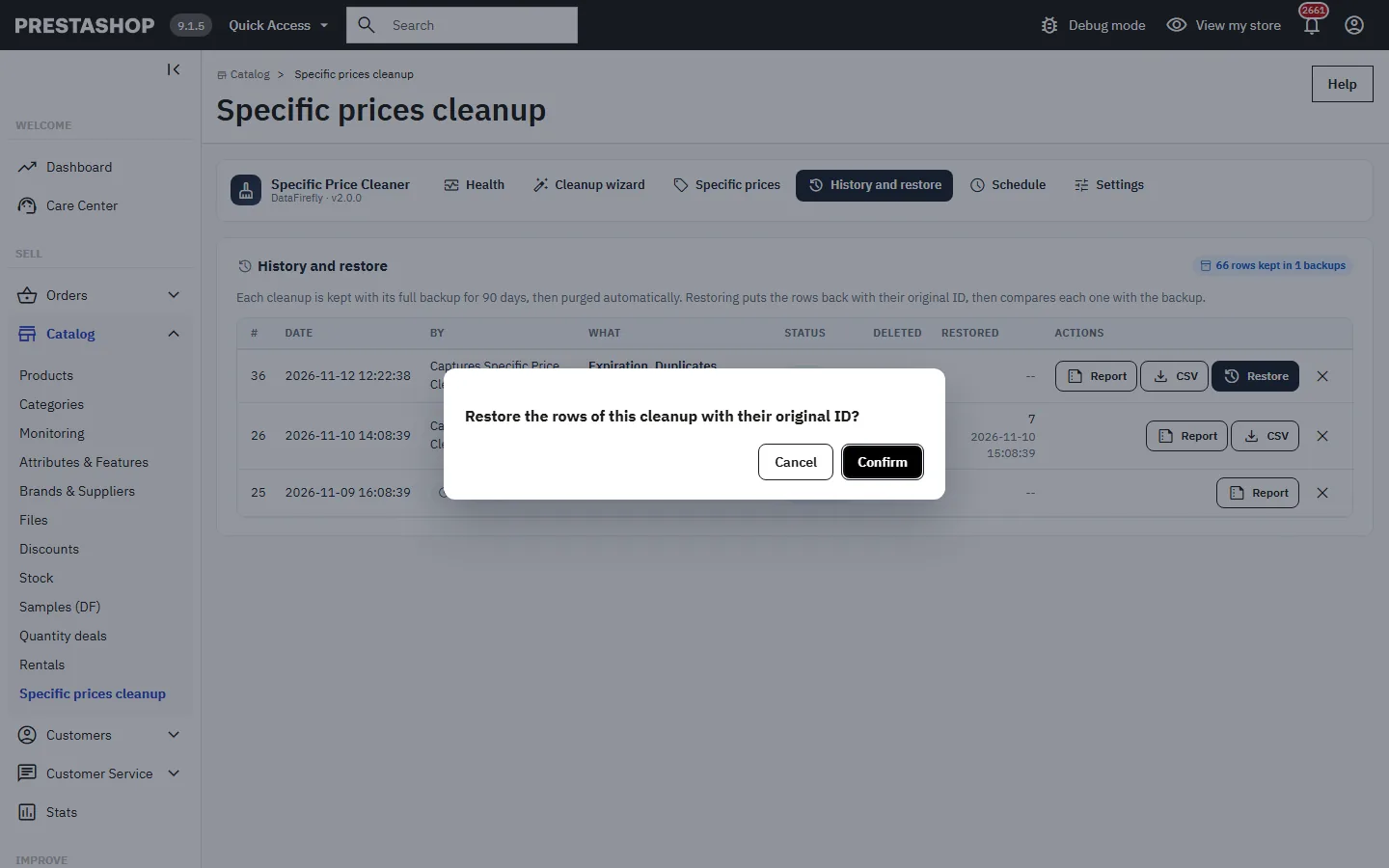
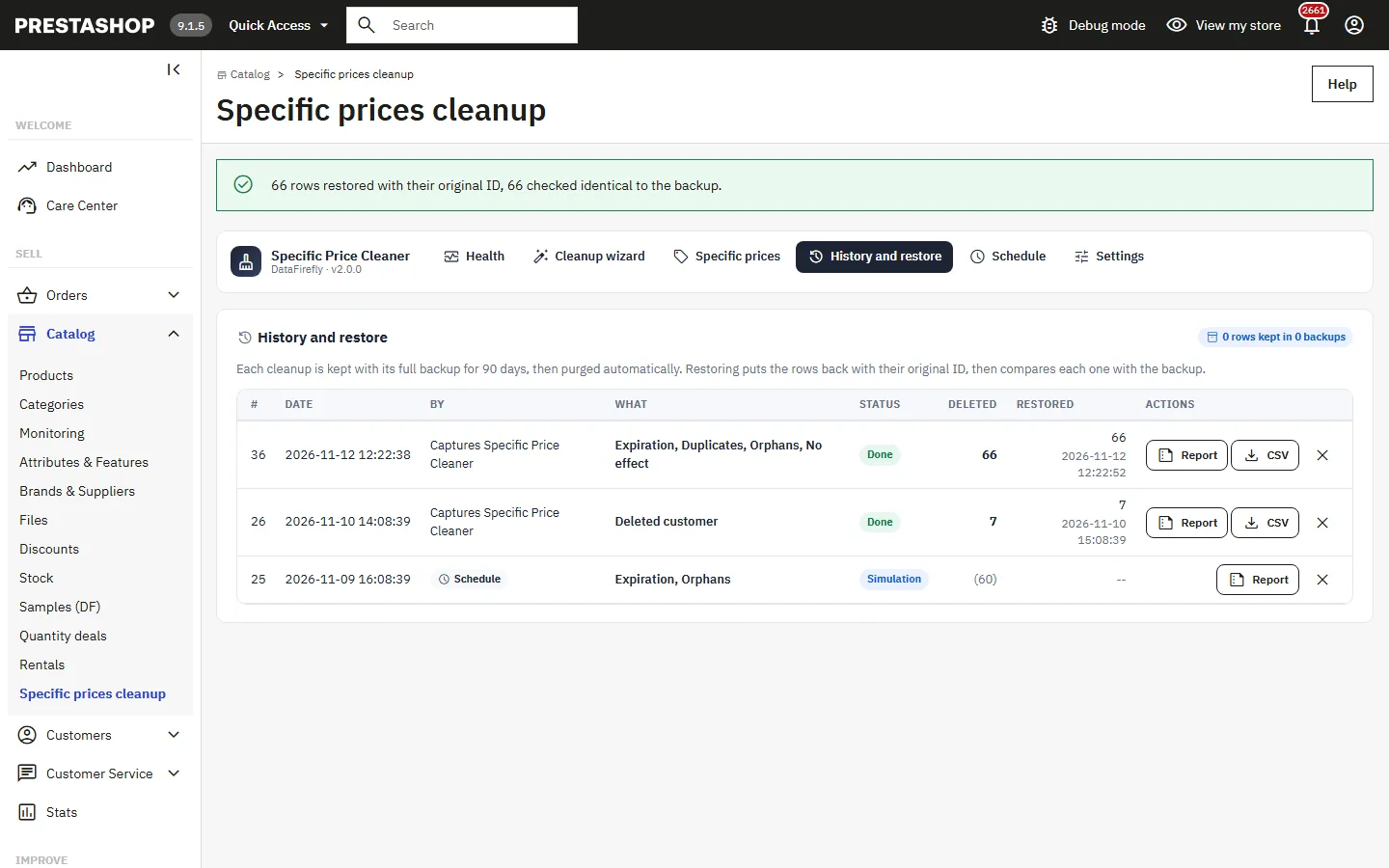
**Restore** puts the rows back with their original ID, then compares each one with the backup. The report then shows the number of rows restored and the date.
## Schedule
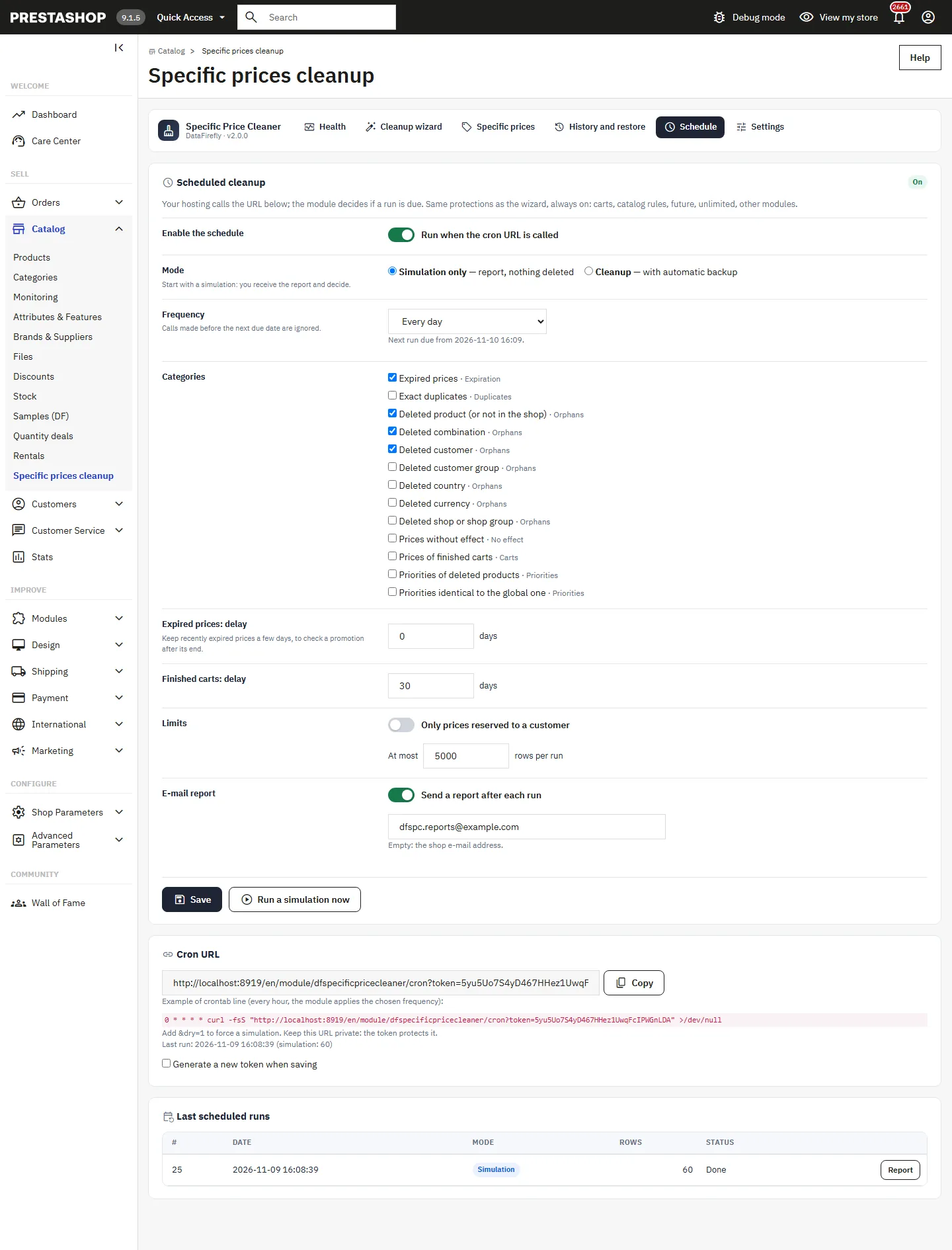
The **Schedule** tab sets up an automatic cleanup called by the cron task of your hosting. The protections of the wizard are always on.
- **Mode**: _Simulation only_ (report, nothing deleted), recommended to start with, or _Cleanup_ with automatic backup.
- **Frequency**: every hour, day, week or month. Calls made before the next due date are ignored.
- **Categories**, delay for expired prices and finished carts, limit to prices reserved to a customer or to one shop.
- **At most N rows per run**: the rest is processed by the next run.
- **E-mail report** after each run, to the chosen address or the shop address.
Copy the **Cron URL** shown and call it from your hosting, for example every hour: the module applies the chosen frequency. Add `&dry=1` to force a simulation. Keep this URL private: the token protects it, and you can generate a new one. A call with a wrong token gets a 403 error; if a run is already in progress, the call gets a 423 error.
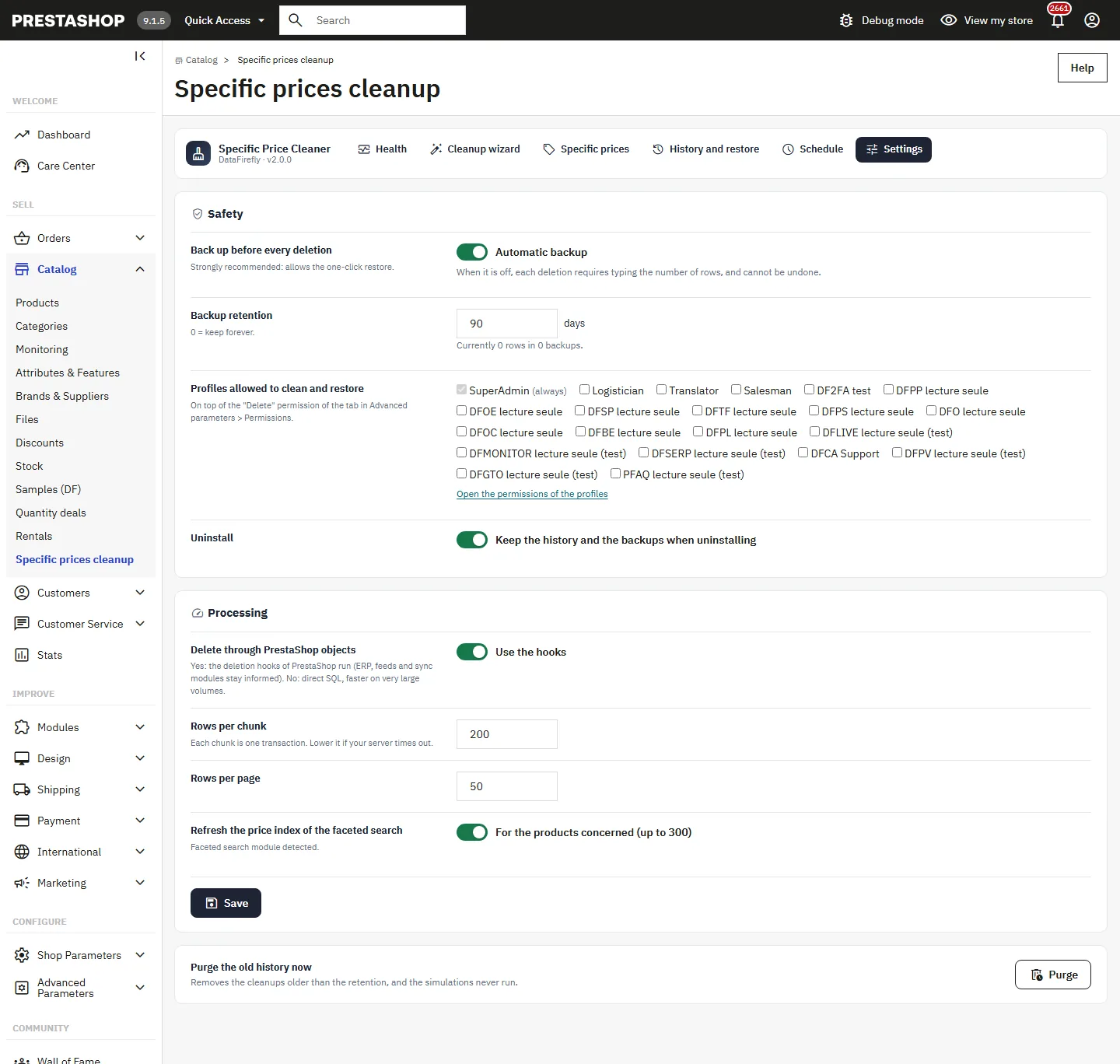
## Settings
- **Back up before every deletion**: strongly recommended, it allows the one-click restore.
- **Backup retention** in days (0 = keep forever).
- **Profiles allowed to clean and restore**, on top of the "Delete" permission of the tab.
- **Keep the history and the backups when uninstalling**.
- **Delete through PrestaShop objects**: yes by default, so that the deletion hooks run (ERP, feeds and sync modules stay informed). No: direct SQL, faster on very large volumes.
- **Rows per chunk** (500 by default): each chunk is one transaction. Lower it if your server times out.
- **Refresh the price index of the faceted search** for the products concerned (up to 300).
- **Purge the old history now**: removes the cleanups older than the retention, and the simulations never run.
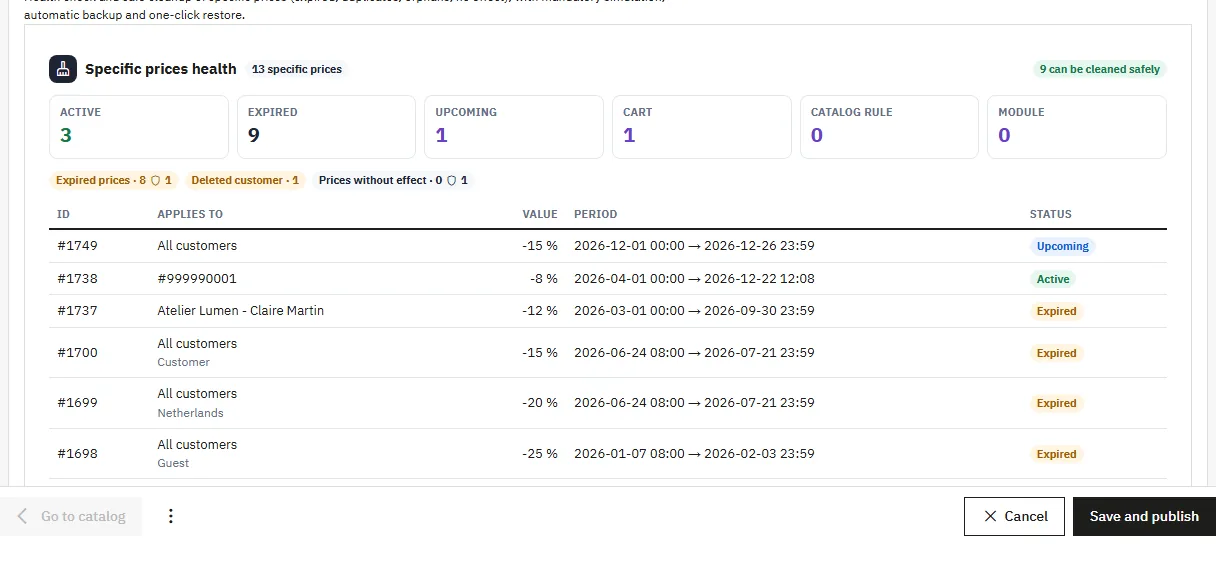
## Blocks on the product and customer pages
On the product page, the **Specific prices health** block shows the number of prices of the product, those that can be cleaned safely, and the state of each one (active, expired, upcoming, cart, catalog rule, module). The **Simulate a cleanup of this product** button opens the wizard already filtered.
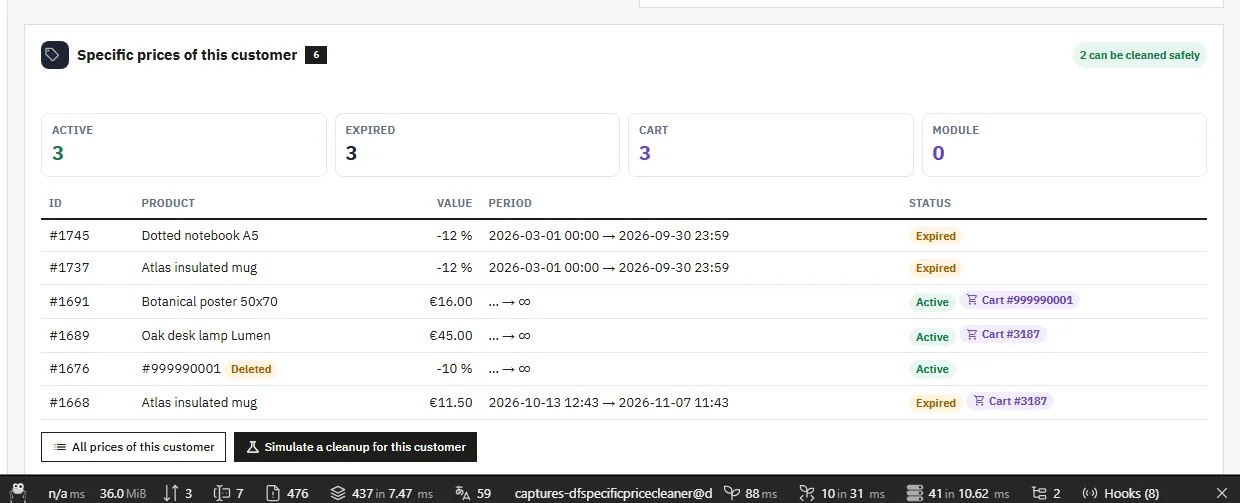
On the customer page, the block lists the prices reserved to the customer and the bound carts, with a cleanup targeted on this customer.
## Employee permissions
Viewing the module requires the "View" permission of the tab. Cleaning and restoring require the "Delete" permission of the tab in **Advanced Parameters > Team > Permissions**, and the profile ticked in the module settings. The SuperAdmin profile is always allowed. A profile without these rights sees the pages read-only.
## For module developers
Just before deleting a chunk, the module runs the `actionDfSpecificPriceCleanerBeforeDelete` hook with the cleanup ID and the list of price IDs. A module can add to the `veto` array the IDs of the prices it wants to keep: these rows are then skipped and stay in place.
## Troubleshooting
### Rows are "skipped" during the cleanup
They changed since the simulation: bound to a cart, regenerated by a rule or used by a module. This is intended. Run a new simulation to review them again.
### The simulation plans no row
Every matching row is protected, or no row matches the filters. The "protected" counter of each category shows what is kept and why.
### The cleanup stops on a large volume
Lower **Rows per chunk** in the settings, then resume the cleanup from the dashboard. Chunks already processed are not done again.
### The cron URL answers 403, 423 or SKIPPED
403: wrong token, copy the URL again from the Schedule tab. 423: a run is still in progress. SKIPPED: schedule disabled, next due date not reached or no category selected.
### The report recommends a rebuild of the index
Above 300 products concerned, the module does not update the faceted search price index itself. Rebuild the index from the configuration of the Faceted search module.
## Limitations
- Priority conflicts and expired catalog rules are reported, never deleted automatically.
- The e-mail report is sent in the language of the employee (report button) or in the default language of the shop (cron).
- Without a backup, a deletion cannot be undone.
## Compatibility
- PrestaShop 1.7.8 to 9.x with the same ZIP. Tested on 1.7.8.11, 8.2.1 and 9.1.5, with PHP 7.4, 8.1 and 8.5.
- Multistore: analysis and cleanup can be limited to one shop.
- ModuleAdminController architecture, no Composer dependency.
- Interface translated into French, English, Spanish, German, Italian, Dutch, Polish and Portuguese.