
Our best WooCommerce plugins to bring your store into compliance
Four plugins — and one question to answer before spending a cent.
Accessibility isn't audited inside WooCommerce: it's audited in the HTML your theme outputs. And before you buy anything — check whether you're exempt. Many shops are, and nobody says so.
Sound familiar?
An audit of the rendering
Nobody inspects WooCommerce. They inspect your page — so your theme, and your plugins.
A deadline already behind you
Accessibility has applied since June 2025. It isn't a deadline any more, it's a delay.
Rules that target products
The product passport targets categories — textiles, batteries — not every store.
Fear, sold to you
Many small shops are exempt. Nobody mentions it, because exemptions can't be invoiced.
Our selection, ranked
Every module below is built, maintained and supported by our team. The ranking reflects what we would install first on a client store.
-
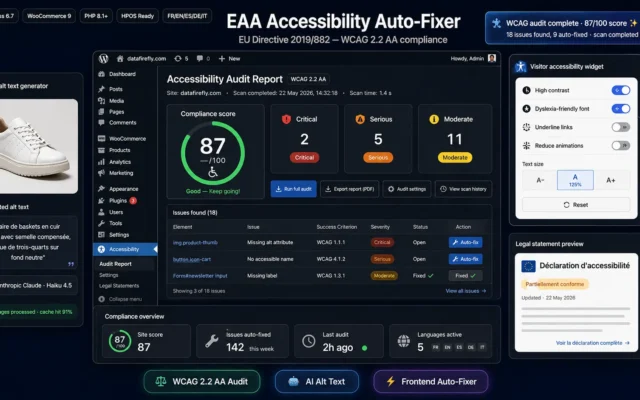
EAA Accessibility Auto-Fixer
The urgent oneAccessibility has applied since June 2025. Fixes land on the final HTML — that is, on the theme, where the problem actually lives.
The European Accessibility Act has been applicable since 28 June 2025. This plugin audits your WordPress and WooCommerce site against WCAG 2.2 level AA,…
€29.00 View the module -
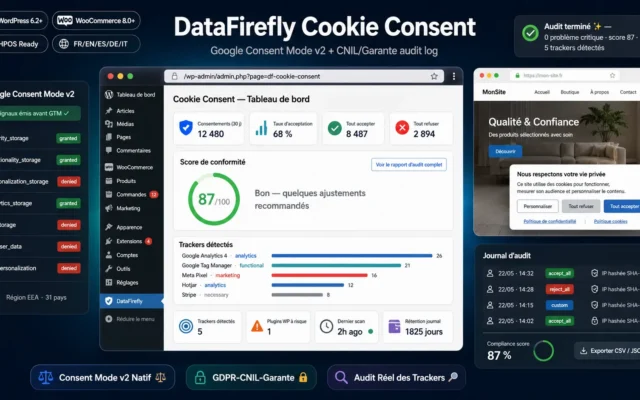
DataFirefly Cookie Consent — GDPR/CNIL & Google Consent Mode v2 for WordPress
The one you think is doneHaving a banner isn't being compliant. Refusing must be as easy as accepting — and Consent Mode v2 must follow.
GDPR cookie consent banner with native Google Consent Mode v2 fired before GTM, audit that detects actual trackers loaded, and CNIL/Garante log exportable as…
€39.00 View the module -
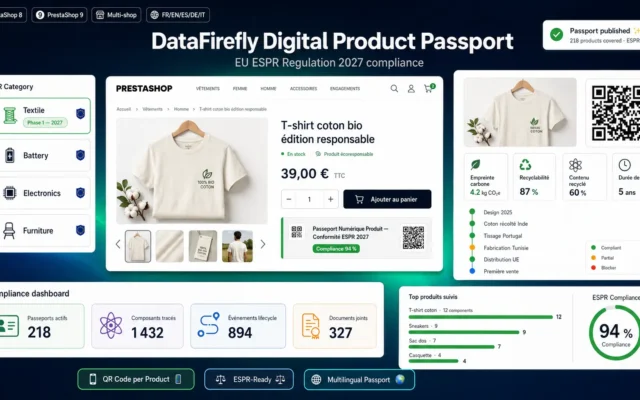
Digital Product Passport (DPP) — ESPR Compliance for WooCommerce
If your category is in scopeThe digital passport targets product categories, not company sizes. Textiles and batteries first.
Generate a Digital Product Passport compliant with the ESPR for every WooCommerce product: unique QR code, component registry, material composition, traceability, repairability index and…
€59.00 View the module -
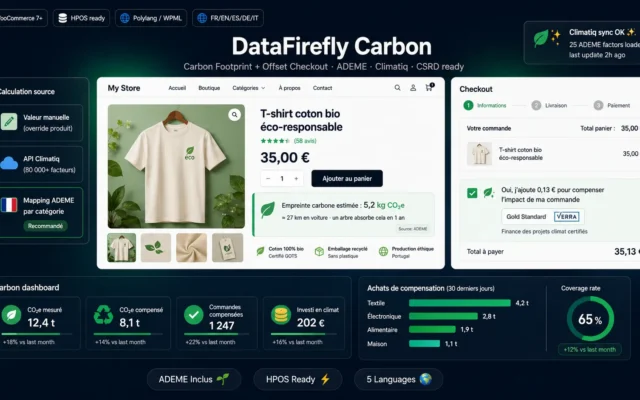
Carbon Footprint & Offset at Checkout for WooCommerce
Voluntary — for nowA per-order calculation and a traceable offset. What separates it from greenwashing is the traceability.
Per-product carbon footprint, customizable badge, optional offset at checkout via Gold Standard or Verra partners, complete admin reporting. HPOS and WooCommerce Blocks compatible. 5…
€49.00 View the module
Side-by-side comparison
| Module | Best for | Price | Rating | Link |
|---|---|---|---|---|
| EAA Accessibility Auto-Fixer | The urgent one | €29.00 | — | |
| DataFirefly Cookie Consent — GDPR/CNIL & Google Consent Mode v2 for WordPress | The one you think is done | €39.00 | — | |
| Digital Product Passport (DPP) — ESPR Compliance for WooCommerce | If your category is in scope | €59.00 | — | |
| Carbon Footprint & Offset at Checkout for WooCommerce | Voluntary — for now | €49.00 | — |
WooCommerce compliance isn’t decided inside WooCommerce
That’s the founding misunderstanding. Accessibility, GDPR, mandatory disclosures: none of it depends on WooCommerce core. It depends on the HTML your theme and your forty plugins produce — and that HTML is exactly what an inspector looks at.
So you can be perfectly up to date on the WooCommerce side, and perfectly non-compliant on the rendering side. The two have nothing to do with each other.
And first: are you even in scope?
Nobody will tell you, because fear sells better than nuance. The accessibility directive includes an exemption for micro-enterprises providing services — broadly, fewer than 10 staff and a modest turnover — and every member state transposed it its own way.
Before buying anything, read your national transposition. It costs nothing, and it changes everything.
Compliance isn’t a cost — it’s market access
The digital product passport (ESPR) doesn’t target shops: it targets product categories. If you sell textiles or batteries, the deadline isn’t an opinion. If you sell mugs, you have time.
How to choose
First, check whether you're in scope
This is the step nobody sells, because it's free. The accessibility directive includes an exemption for micro-enterprises providing services — fewer than 10 staff and a modest turnover — and each member state transposed it differently. Read your national transposition before opening your wallet.
Then understand where the audit happens
Not in WooCommerce. In the HTML your theme outputs. Contrast ratios, field labels, tab order, image alternatives: all of it comes from your theme and your extensions. That's why a render-level fix is more honest than a redesign — it treats the problem where the problem is.
The passport targets products, not shops
ESPR arrives through delegated acts, category by category. Textiles and batteries first. If you sell mugs, you have time; if you sell t-shirts, start gathering material data now — collecting it takes months.
And consent, which everyone thinks is handled
A banner isn't enough. Refusing must be as easy as accepting, consent must be provable, and Consent Mode v2 must be wired correctly — otherwise your advertising data is wrong and so is your compliance.
What you gain
Fixed at render, not in code
Fixes apply to the final HTML: contrast, labels, focus order, alt text. Without touching the theme.
An audit before the invoice
You see what breaks, and where. A targeted fix costs far less than a redesign sold as a package.
The product passport, when it targets you
QR code, public data sheet, material data. Ready the day your category lands — not six months later.
Consent that holds up legally
A banner isn't enough. Consent Mode v2, refusing as easy as accepting, proof retained.
Carbon without the greenwashing
A per-order calculation and a traceable offset. Not a green badge dropped at checkout.
Thresholds checked, not endured
You spend on what genuinely applies. The rest waits — as a decision, not an oversight.
From install to results
-
Check your exemption
Micro-enterprise providing a service? Read the national transposition. It's free and it may change everything.
-
Audit the render, not the code
The audit looks at the page. Contrast, labels, focus — your theme produces all of them.
-
Fix at render level
A targeted fix on the final HTML costs less than a redesign — and treats the real problem.
-
Check whether your category is in scope
The passport arrives by delegated act. Textiles, batteries. Not every store.
-
Rebuild consent properly
Refusing as easy as accepting, proof retained, Consent Mode v2 wired correctly.
“We were quoted 12,000 € for an accessibility redesign. We read the transposition first: our company was exempt. We fixed the contrast and the labels anyway — because our older customers weren't exempt.”
Frequently asked questions
Does accessibility really apply to my store?
It has applied across the EU since June 2025, but the directive exempts micro-enterprises providing services — fewer than 10 staff and a modest turnover. Every country transposed it differently, so read your national transposition before buying anything.
Why a plugin rather than a theme redesign?
Because the audit looks at the final HTML, not your source code. A fix applied at render level treats exactly what is inspected — contrast, labels, focus, alternatives — without paying for a new theme. A redesign can be justified; it shouldn't be the first reflex.
Does the digital product passport apply to me?
It targets product categories, not company sizes. The first delegated acts cover textiles and batteries in particular. If your category isn't listed you have time — but gathering material data takes months, so look at the list now.
I already have a cookie banner — am I compliant?
No, and that's the most common mistake. Refusing must be as easy as accepting, consent must be provable, and Consent Mode v2 must be transmitted properly. A badly wired banner gives you non-compliance and false analytics at the same time.
Isn't carbon offsetting just greenwashing?
It becomes greenwashing the moment it isn't traceable. The difference lies in the per-order calculation, an identifiable offset project and proof handed to the customer. A green badge at checkout with nothing behind it is exactly what green-claims rules target.
Where do I start on a limited budget?
With the exemption check — it's free. Then accessibility, because it already applies and it also improves conversion. Consent next. The product passport only if your category is in scope.
Does accessibility bring commercial value, or only legal safety?
Both, and the second is underrated. A form with proper labels, readable contrast and working keyboard navigation converts better — for everyone, not only for disabled users. It's one of the rare obligations that pays for itself.
This need on other platforms
Not sure which one fits your store?
Tell us your context — we answer with a straight recommendation, not a sales pitch.