
Everything you'd want to know before you install.
A detailed look at how Digital Product Passport (DPP) — ESPR Compliance for WooCommerce works, why we built it the way we did, and the thinking behind the features above.
§ 01
Why a Digital Product Passport?
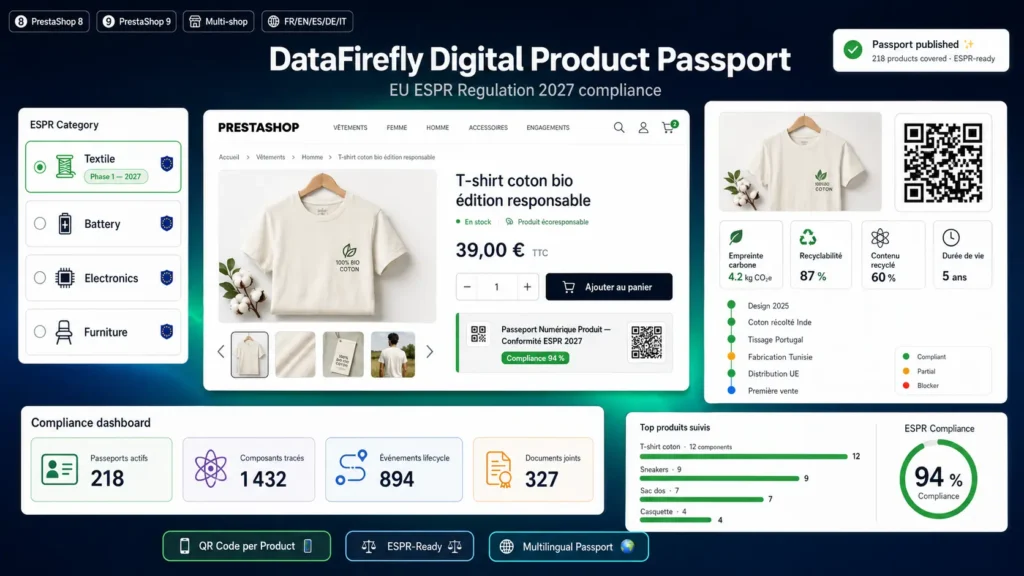
The European Ecodesign for Sustainable Products Regulation (ESPR), which entered into force in 2024, plans the gradual rollout of a mandatory Digital Product Passport. The first delegated acts target textiles, batteries and consumer electronics in 2027, before generalising to virtually every product placed on the European market. This passport must expose, via a unique scannable identifier, the origin, composition, traceability, repairability and environmental footprint of the product. It's a heavy obligation if you tackle it late, and a huge marketing asset if you tackle it early.
§ 02
What you get by activating the plugin
Upon installation, the plugin adds a new Passport DPP tab to the WooCommerce product editor with eight sections covering all the data required by the ESPR. Each product automatically gains a stable unique identifier, a server-side generated QR code and a clean public URL. A polished public page displays the passport with a responsive design, embeds schema.org JSON-LD structured data natively, and offers PNG or SVG QR downloads. Data is stored in five dedicated tables for high performance even with tens of thousands of passports.
§ 03
Which sectors are concerned?
Textile and fashion brands subject to the textile delegated act planned for 2027. Manufacturers of Li-ion, LFP, NMC, NCA, NiMH and lead batteries affected by the Battery Passport. Brands in consumer electronics, furniture, construction materials, cosmetics, toys, detergents and lubricants targeted by later acts. More broadly, any brand wishing to get ahead on product transparency to differentiate itself today.
§ 04
How it works in practice
You install the plugin via the provided ZIP, activate WooCommerce if not already done. You go to WooCommerce then Passport DPP to configure the default manufacturer identity, public URL prefix, QR code options and branding. On each product, you fill in the Passport DPP tab — at minimum the Identification, Components and Materials sections. You switch the status to Published and the public URL becomes active. The QR code automatically appears on the public product page and can be printed on the label.
§ 05
Technical data and interoperability
The plugin exposes a REST API under the dfdpp/v1 namespace with full JSON retrieval, on-the-fly QR SVG generation, search by identifier or by WooCommerce product identifier, and authenticated endpoints for creation and update. The JSON payload includes a schema.org Product JSON-LD block usable for interoperability with other systems. Material codes follow ISO 11469 and ISO 1043 for plastics, ISO 1833 for textiles, and battery chemistries Li-ion, LFP, NMC, NCA, NiMH and lead with CAS numbers for chemical substances.
§ 06
Privacy and data
No data is sent to any external service. QR code generation is 100 percent server-side inside your WordPress installation. Public display of each data category is configurable independently: you choose what you expose (carbon footprint, materials, traceability, repairability, suppliers). Supplier names are hidden publicly by default to respect commercial confidentiality.
§ 07
Why DataFirefly
DataFirefly has been developing premium e-commerce modules for PrestaShop, WooCommerce and Shopware 6 for several years. All modules respect the standards of the target platform, are tested in production environments, delivered with their documentation and a compatibility update included. Support is provided in French and English.



There are no reviews yet.