
Everything you'd want to know before you install.
A detailed look at how Passwordless Login (Magic Link) for PrestaShop 8 & 9 works, why we built it the way we did, and the thinking behind the features above.
§ 01
Why replace the password?
E-commerce studies show that 30 to 40 percent of carts abandoned at the login step are abandoned because the customer forgot their password. And every reset request generates an email, a delay, sometimes a support ticket. Magic links remove that friction: the customer enters their email, receives a link, clicks, and they are signed in. Simpler for them, less support for you, and a faster checkout journey.
§ 02
How the module works
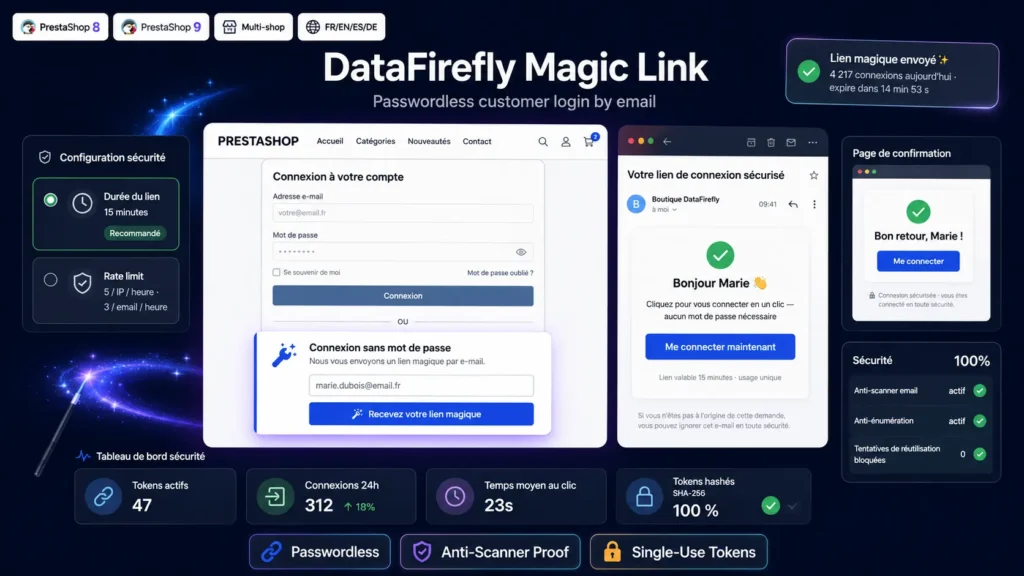
Below the standard login form, a second form offers email-based sign-in. The customer enters their address, an AJAX request generates a 256-bit random token, stores only its SHA-256 hash in the database, and emails the raw token. The customer clicks the link in the email, lands on a confirmation page, clicks once to validate, and is authenticated in the PrestaShop session exactly like with a standard sign-in. Native authentication hooks are fired, so every other module of yours keeps working normally.
§ 03
Production-ready security
The raw token only ever exists in the email sent. Only the SHA-256 hash is stored in the database. A database leak therefore gives no usable link. Every token is single-use and marked consumed as soon as it is used. The validity window is configurable (15 minutes default, 24 hours maximum). A dual rate limiter watches the number of requests per IP address and per customer account over a rolling hour, with adjustable thresholds. And the AJAX response is intentionally generic, to prevent an attacker from telling apart an existing account from a non-existing one.
§ 04
The email scanner problem, and the fix
Outlook with Safe Links, Gmail with its preview feature, corporate antivirus and security proxies automatically visit every link in incoming emails to scan them. If the module consumed the token on the first GET, those scanners would burn the link before the customer could even click. The module therefore uses a two-step flow: GET shows a standalone confirmation page with a button, and only the POST triggered by the real user click consumes the token. Scanners do not submit arbitrary forms, so they cannot burn the link. Same pattern used by Slack, Notion, Vercel and Auth0 for their magic links.
§ 05
Universal confirmation page
The page the customer lands on after clicking the link is rendered as a self-contained HTML5 document, independent of the PrestaShop theme. This guarantees perfect rendering on any theme — Classic, Hummingbird, Warehouse, MySmartBook or custom. The page stays clean and centred, with the shop name as a header, a personalised welcome title, a blue confirmation button and a security note. No external CSS dependency, no JavaScript framework loaded, instant rendering.
§ 06
Automatic multilingual
The module ships HTML and plain-text email templates translated into the four official PrestaShop France languages: French, English, Spanish and German. The language of the email sent automatically matches the customer account language. Interface strings (request form, confirmation page, error messages) are also translated through PrestaShop's standard translation system, so you can customise them from the back-office if needed.
§ 07
Back-office configuration and statistics
A configuration page accessible from the Module Manager exposes every setting: activation, login form display, validity window, rate limiting thresholds, post-sign-in redirect. Three live counters display active tokens, sign-ins in the last 24 hours and links issued in the same window. A button lets you purge expired tokens manually. The save action uses a POST then redirect then GET pattern to avoid false positives from phishing classifiers like Google Safe Browsing.



There are no reviews yet.