
Everything you'd want to know before you install.
A detailed look at how Customer Email Verification — Block fake signups & clean your database (PrestaShop 8 & 9) works, why we built it the way we did, and the thinking behind the features above.
§ 01
What is this module for?
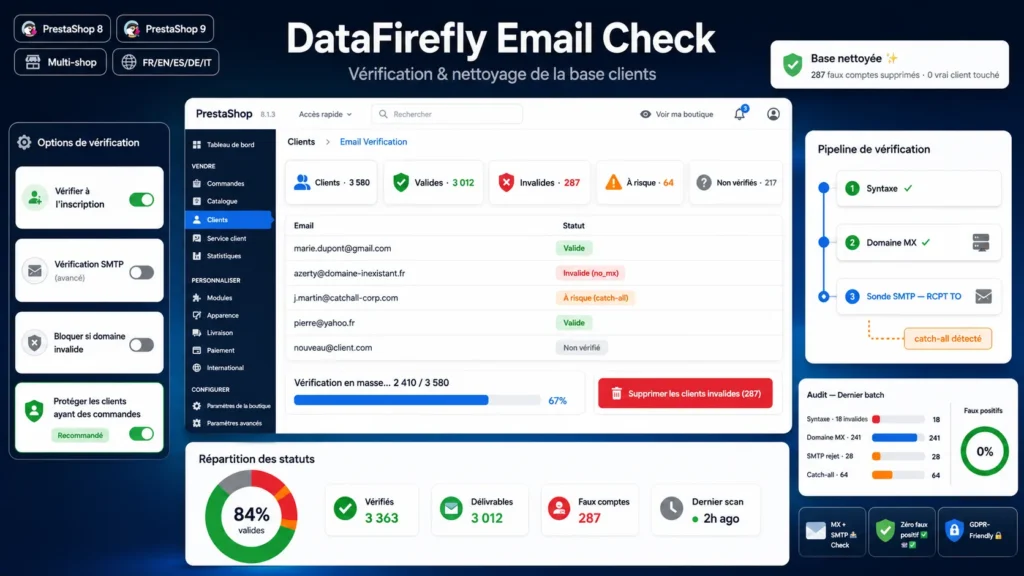
Fake email addresses pollute your customer base: accounts created with non-existent addresses, typos, ghost domains, fraudulent signups. This module checks the real deliverability of every address and helps you keep a clean, reliable base you can actually use for your campaigns.
§ 02
A three-level verification
The module first checks the address syntax, then the existence of the domain through its MX records, falling back to A records. Optionally, an SMTP probe queries the recipient server to confirm the mailbox really exists, with detection of catch-all servers flagged as risky.
§ 03
Everything from the back office
A dedicated tab under the Customers menu shows a dashboard with the number of valid, invalid, risky and unchecked customers. The full list can be filtered by status. You verify new customers or your whole base in one click, processed in batches with a progress bar.
§ 04
A safe database cleanup
One button removes every customer whose email does not exist in a single pass. Safety is at the core of the module: an address is never marked invalid on mere doubt. A timeout, greylisting or a closed SMTP port leave the status as unchecked, never deleted. Customers who placed at least one order are protected by default to avoid orphan orders.
§ 05
Built for performance and hosting
At signup, only the fast check (syntax and domain) runs so the checkout funnel is not slowed down. The slower SMTP probe only runs during bulk verifications. Note: the SMTP check requires outbound port 25, often closed on shared hosting; without it, verification stops at the domain, which already catches the vast majority of fake addresses.




There are no reviews yet.