
Everything you'd want to know before you install.
A detailed look at how DataFirefly Product Return Manager — Product returns with QR scan, analytics and ChatGPT translation for PrestaShop 8 works, why we built it the way we did, and the thinking behind the features above.
Why native isn't enough
PrestaShop 8 natively offers manual creation of credit notes and vouchers from the back-office — that's all. No customer self-service request, no PDF label, no validation at the receipt point, no analytics on return reasons, no automatic translation, and above all no flow for customers who checked out as guests. Result: your customer service spends its time on the phone manually recording returns, your warehouse operators check return numbers scribbled on slips by hand, and you have no visibility on what your customer is returning or why. On a store with 5% return rate and 1,000 orders per month, that's several man-days per month lost in pure data entry.
The complete journey, from customer to analytics
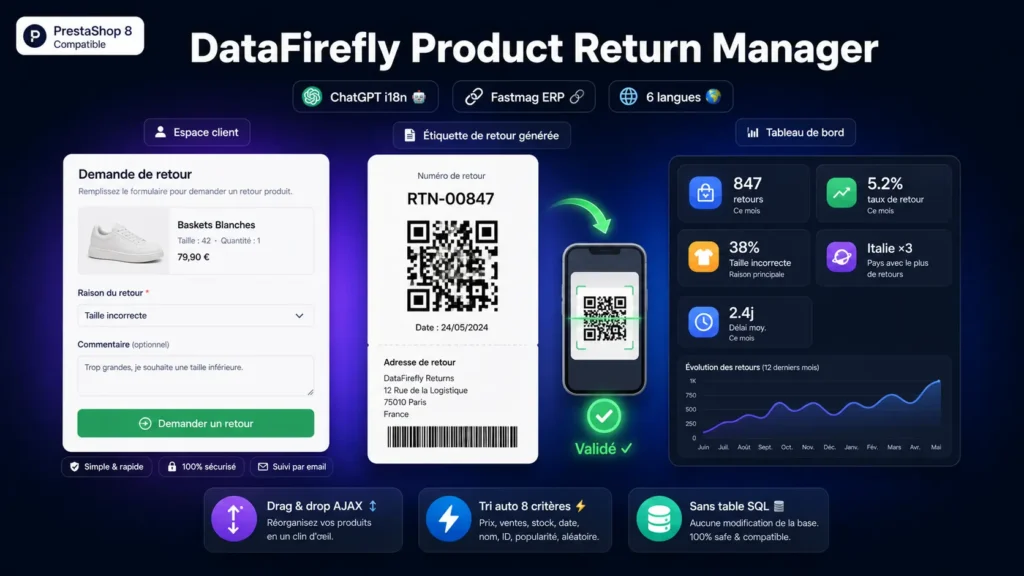
The customer goes to their customer area, selects their order, clicks «Request a return». They choose the products to return and their quantity, select a reason category («Product issue» / «Logistics issue» / «Change of mind») then a precise reason («Wrong size», «Quality defect», «Delivery too long», etc.), add an optional comment, and validate. They immediately receive by email a return label PDF with your address, the return number, the products concerned, and a unique QR code. On package receipt, your operator scans the QR with their phone — a secure admin page opens with all return details. They validate or refuse in one click, which triggers: order status change (configurable partial / full refund states), voucher or refund generation, customer email, dispatch of the actionOrderSlipAdd hook to third-party modules (Fastmag ERP, others). All without manual re-entry.
The QR code: what changes at the warehouse
Without QR, your warehouse operator receives a package, reads the scribbled return number, goes to PrestaShop admin, searches for the return in a long list, opens the file, checks the contents vs the package contents. With QR: they scan, the file opens directly, they validate. The gain isn't only time (from 2 minutes to 10 seconds per return), it's the elimination of data entry errors on the return number — and therefore the elimination of cases where the wrong return is validated. The validation page is protected (authenticated admin required), the QR token is unique to each return: no risk of illegitimate validation.
Analytics, the real differentiator
The dashboard exposes 13 axes of analysis. Global KPIs: number of returns over period, return rate, returned value in €, voucher transformation rate. By reason category: 60% of returns are «product issue» — you know where to look. By reason: on product issues, 80% are «wrong size» — you may have a sizing guide problem. By product: 3 references concentrate 40% of returns — you identify the flops. By country: return rate 3x higher in Italy — country-specific carrier, or product not adapted. Top returners: 5% of customers make 30% of returns — candidates to eliminate or watch. 12-month monthly trends: post-Christmas peak, summer trough. Average processing time: your customer service takes 4 days — too long, your customers complain. Everything is exportable in CSV for external analysis or data warehouse.
ChatGPT integration for translation
You define your reasons in your main language, and multilingual translation is typically the point that blocks the content team for 1 to 2 days. The module automates it via OpenAI: you provide your ChatGPT key, you click «Translate», in a few seconds your reasons are translated into FR, ES, IT, PT, DE (and all other activated languages) with contextualized e-commerce vocabulary. You can review and edit each translation if needed. When you add a new reason, the same click is enough. On a store with 6 languages and 30 reasons, that's 180 translations saved — about 1 to 2 man-days.
Fastmag ERP integration
If you use Fastmag (or any other ERP), return synchronization is typically a friction point — the return is entered in PrestaShop, then re-entered manually in the ERP. The module dispatches the actionOrderSlipAdd hook on each validated return, which is captured by the DataFirefly Fastmag module (or any third-party module listening to this hook). You get real-time sync. The «Re-sync past returns to Fastmag» button also allows re-triggering the hook on past returns — useful if Fastmag was installed after this module or after a synchronization loss.
Typical use cases
Fashion and textile: return rate often at 15%+, dominant «wrong size» reasons — the module reveals which products have a sizing guide to correct. Consumer electronics: moderate return rate but high value — the QR eliminates costly validation errors, supplier analytics identifies questionable quality brands. Cosmetics: low return rate but legally mandatory processing — the module ensures compliance without overloading customer service. B2B: rare returns but large amounts — the voucher builds loyalty, the official PDF label facilitates customer accounting.
New in 1.6: admin manual return
The module is now usable by customer service as a goodwill gesture tool. A «Create manual return» button appears in the header of the returns list in the back-office. The workflow runs in two screens: enter the order reference or ID, then tick the products to return, their quantities, their reason, the refund type (voucher or credit slip) and a per-line refund amount that the admin can override freely. The configured return delay (DF_RETURN_DAYS) and the order status filter are completely ignored — the admin can therefore create a return on an order from 2022, cancelled or in draft. On validation, the return is processed immediately: the voucher or credit slip is generated on the spot, stock is restored, the order state is updated, the Fastmag hook is dispatched. A «Notify customer» checkbox (unchecked by default) allows sending the standard confirmation email to the customer if needed.
Per-line refund amount override (1.7)
On the admin manual return, each product line now has an editable «Refund amount» field. The default value is computed as unit price times quantity, and a script automatically recalculates this default when the quantity is changed — until the admin manually enters an amount, after which their value is preserved. The proportional discount ratio of the order, which automatically applies to regular customer returns to reflect the actual price paid, is disabled for manual returns: the amount entered by the admin is exactly the refunded amount, no more, no less. This is what makes the feature useful for partial refunds (damaged product refunded at 50%, for example), goodwill gestures or retroactive regularization. The generated credit slip preserves the excl/incl tax breakdown proportional to the original line's tax rate.
New in 1.7: the guest flow
Customers who placed their order in guest mode (without account creation) can now access returns at the same URL as logged-in customers. When an unauthenticated visitor lands on the returns page, the module displays an «Order reference + email» form instead of the «My orders» page. Validation is done server-side: the reference and email pair must match an existing order exactly (case-insensitive email comparison). On failure, the error message is intentionally generic («No order found matching this reference and email») to avoid revealing which references exist in the database — anti-enumeration protection. Once validated, the order ID and customer ID are stored in the PrestaShop session cookie, and the visitor accesses the standard return flow for that order only. The label PDF is generated normally and remains accessible via the email link without login, protected by a 64-character random token unique to the return. A «Use a different order» banner lets the visitor reset their session and switch to a different order.
There are no reviews yet.