
Everything you'd want to know before you install.
A detailed look at how Database Manager Back Office — Adminer for PrestaShop 8 & 9 works, why we built it the way we did, and the thinking behind the features above.
Why integrate Adminer into the back office
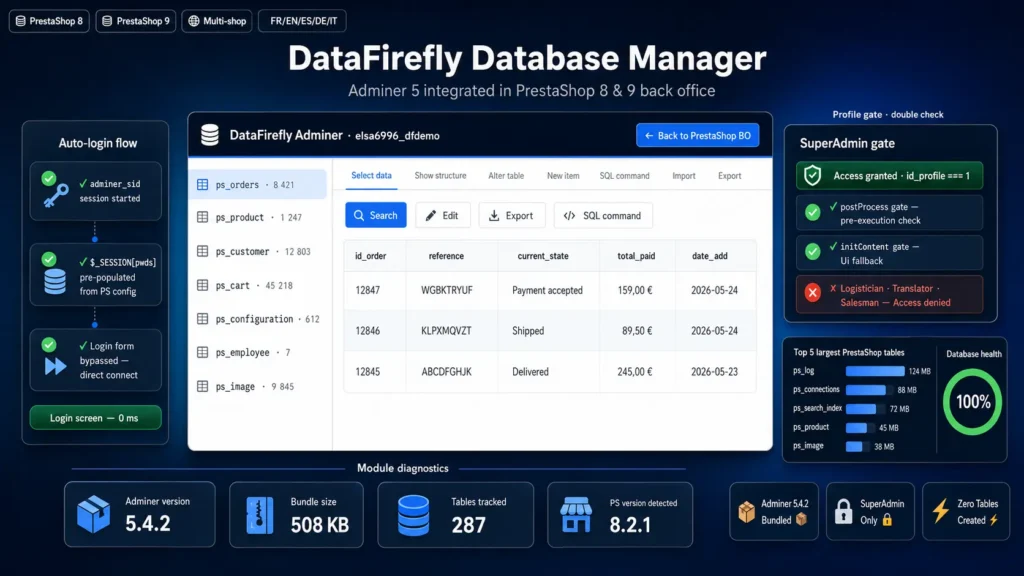
When you need to debug a PrestaShop order, check a value in a cms_lang table, run an ad-hoc SQL query, or browse ps_configuration content, the usual procedure is: open cPanel or your hosting panel, launch phpMyAdmin, re-enter your credentials, navigate to the right database. This flow breaks your concentration and multiplies errors (wrong database selected, wrong tab, forgotten credentials). dfdbmanager replaces these six steps with one: a click in the PrestaShop Advanced Parameters > Adminer menu. You land directly on your shop's table list, already authenticated.
Adminer rather than phpMyAdmin
Adminer is the modern and lightweight alternative to phpMyAdmin, created by Jakub Vrana and used by thousands of developers and agencies. A single 508 KB PHP file (vs ~50 MB for phpMyAdmin), cleaner faster interface, native support for MySQL/PostgreSQL/SQLite/MS-SQL/Oracle. For PrestaShop specifically: inline row editing, chunked SQL export, full-text search in tables, multi-line SQL query execution with history, schema modification directly from the UI. The shipped adminer.php file is the latest stable version (5.4.2), Apache 2.0 / GPL 2.0, source code included.
Auto-login: no password to re-enter
The module loader starts the Adminer session (adminer_sid) server-side and pre-populates it with credentials read from PrestaShop configuration. When Adminer starts, it sees an already valid session and goes straight to the database interface. No Authentication screen, no field to fill, no token to copy. If you have multiple SuperAdmin employees, each has their own Adminer session (PHP sessions are per browser cookie), but all connect to the same PrestaShop database with the same system credentials.
Security: SuperAdmin only, double-check gate
Adminer is a powerful tool — whoever has access to your database has access to everything: orders, customers, payments, hashed employee passwords. The module restricts access to the SuperAdmin profile only (id_profile = 1 in PrestaShop), with verification in postProcess (before execution) and in initContent (UI rendering). A Logistician, a Translator, a Salesman — none will have access, even if they know the Adminer URL. The adminer.php file itself is blocked from direct HTTP access via a .htaccess Require all denied, so it's impossible to reach it bypassing PrestaShop. The MySQL connection uses PrestaShop's existing credentials: no new password created, no privilege escalation on the database side.
Compatible with PrestaShop 8 and 9, same architecture
The module uses a legacy ModuleAdminController, supported by both major PrestaShop versions. The configuration page uses Smarty, the menu tab is installed via Tab class (with Material storage icon), the hooks used are 100% standard. On PrestaShop 9, the module works without modification, without recompilation, without adding Symfony classes. Compatible with PHP 7.4 through 8.3, MySQL 5.7+ and MariaDB 10.3+. Tested on o2switch, OVH, and Infomaniak shared hosting.
Return banner, dark mode, continuous navigation
A fixed top bar (dark navy #0f172a, blue border #3b82f6, max int z-index) stays visible throughout Adminer navigation. On the left: DataFirefly Adminer and the current database name. On the right: a blue Back to PrestaShop BO button that brings you back to Advanced Parameters in one click. The banner automatically adapts to the system dark mode via @media (prefers-color-scheme: dark) with a deeper color (#020617) and a bright blue border (#60a5fa) to stay readable. Adminer's internal URLs (table links, forms, CSS and JS files) are all rewritten in post-processing to pass through our controller — no accidental disconnection if you click an Adminer link.
Who it's for
For PrestaShop developers who debug daily and want a shortcut to the database. For agencies maintaining multiple client shops who prefer an integrated tool over a cPanel per site. For technical merchants who want to see their raw data without depending on their host. For freelancers on missions who don't have access to the client's hosting panel but have a PrestaShop SuperAdmin account. For everyone tired of re-entering their phpMyAdmin credentials three times a day.
Technical architecture
The AdminDfAdminerController controller overrides checkToken() to bypass PrestaShop CSRF on Adminer internal actions (Adminer's POST forms don't carry the PS token — the upstream SuperAdmin gate is strictly stronger as protection). In renderAdminer(), ob_start is called with a callback that post-processes Adminer's output: injecting the BO return banner and rewriting all href/action/src URLs that point to index.php?... to inject controller=AdminDfAdminer. The callback survives the 19 exit; calls Adminer makes at various points (page_footer, file= serving, etc.) — unlike a plain ob_get_clean which would be skipped. The loader pre-populates $_SESSION[pwds] with the real password and $_SESSION[db] with true, which is enough for Adminer to skip its form and go straight to connect.
There are no reviews yet.