
Everything you'd want to know before you install.
A detailed look at how DataFirefly Cleanup — PrestaShop 8 & 9 Database Cleaner works, why we built it the way we did, and the thinking behind the features above.
§ 01
Why clean your PrestaShop database
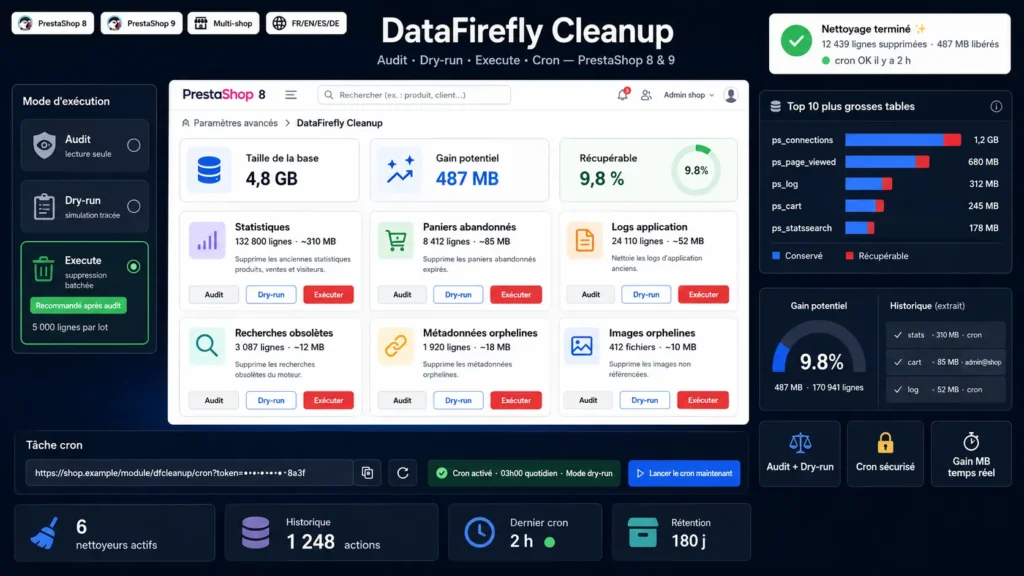
Over time, your PrestaShop database piles up data you no longer need: visit statistics from two years ago, never-ending abandoned carts, logs of long-fixed errors, searches for deleted products, metadata of products you removed from the catalogue, orphan images on disk. All of this slows down your queries, inflates your backups and costs server space.
§ 02
A three-step approach
DataFirefly Cleanup offers three modes per cleaner, ordered by caution. Audit reads the database and counts what would be deleted, touching nothing. Dry-run simulates execution and traces the result in history. Execute actually deletes, in 5,000-row batches by default, to avoid saturating the server. You stay in control at every step.
§ 03
Six specialised cleaners
Stats cleans connections, page_viewed, referrer_cache, pagenotfound and orphan guests while respecting schema joins. Cart removes abandoned carts and never touches a cart that became an order. Log prunes the log table with severity-weighted retention — critical errors are kept twice as long. Search cleans the search history and the index of deleted products. Metadata targets orphan rows in product_lang, product_shop, category_product, stock_available, specific_price and many more. Image handles DB orphans and, optionally, scans the product image directory for JPGs whose product no longer exists.
§ 04
MB gain report
Before every action, the module queries information_schema.TABLES to estimate how much space you will reclaim. For each cleaner you see the affected row count and matching disk equivalent. The dashboard snapshot shows your total database size, potential gain, reclaimable percentage and the top 10 biggest tables.
§ 05
Token-secured cron task
The /module/dfcleanup/cron endpoint is protected by a 32-character hex random token. Constant-time comparison via hash_equals to resist timing attacks. If the official PrestaShop cronjobs module is installed, dfcleanup self-registers there via the actionRetrieveCronJobs hook — nothing to configure. Otherwise, a ready-to-paste system crontab line is shown in the admin. The default mode is dry-run, so even an accidental run deletes nothing.
§ 06
Full auditable history
Every operation is recorded in a dedicated table with the cleaner used, the mode (audit / dry_run / execute), the affected row count, freed bytes, per-table details as JSON, the operator identity (admin email or cron for scheduled runs), and the date. History retention is configurable (180 days by default).
§ 07
Who is it for
For PrestaShop merchants whose database exceeds 500 MB and who experience back-office slowness. For agencies that want to automate maintenance for their clients. For developers who want a robust, auditable orphan-cleanup tool instead of writing ad-hoc SQL scripts. For hosting providers who want to reduce the disk space consumed by their clients' databases safely.





There are no reviews yet.