
Our best WooCommerce plugins for GDPR and cookies
Four plugins — and a question worth asking before you buy any of them.
On WordPress, one plugin displays consent — and twenty others load the scripts. A banner that doesn't hold the others back documents your breach instead of preventing it.
Sound familiar?
A banner that blocks nothing
It displays while analytics is already running. It prevents nothing — it records.
Twenty plugins that ask no one
The banner is a plugin, your pixel is another. Neither asks the other.
Refusing harder than accepting
Bright Accept button, grey link beside it. Both exist — and it's still a breach.
No trace of anything
Without a stored record, your answer in an audit is a claim.
Our selection, ranked
Every module below is built, maintained and supported by our team. The ranking reflects what we would install first on a client store.
-
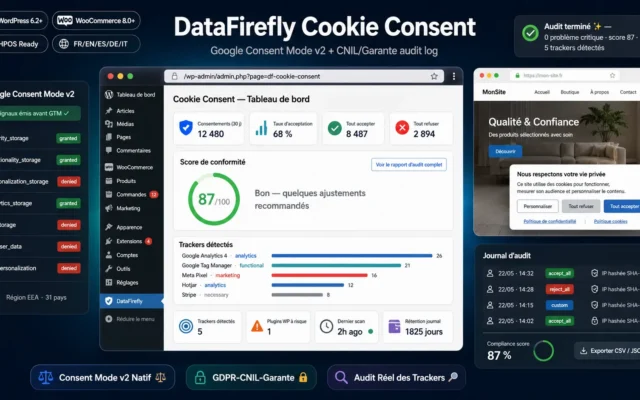
DataFirefly Cookie Consent — GDPR/CNIL & Google Consent Mode v2 for WordPress
The foundation — it has to blockNo script before the click, refusing as easy as accepting, Consent Mode v2 correctly wired, proof retained.
GDPR cookie consent banner with native Google Consent Mode v2 fired before GTM, audit that detects actual trackers loaded, and CNIL/Garante log exportable as…
€39.00 View the module -
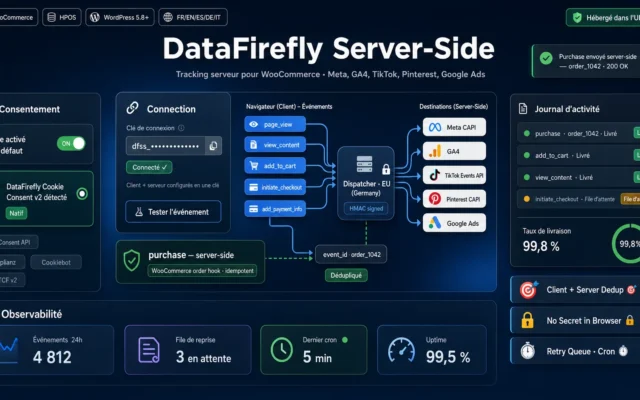
DataFirefly Server-Side — WooCommerce client + server tracking (free)
Server-side that respects consentThe visitor's decision is stored on the order — even when the event fires later from a webhook.
The free WooCommerce connector for the DataFirefly Server-Side Tracking service: your whole funnel sent client and server, deduplicated, consent-aware, and natively compatible with our…
€0.00 View the module -
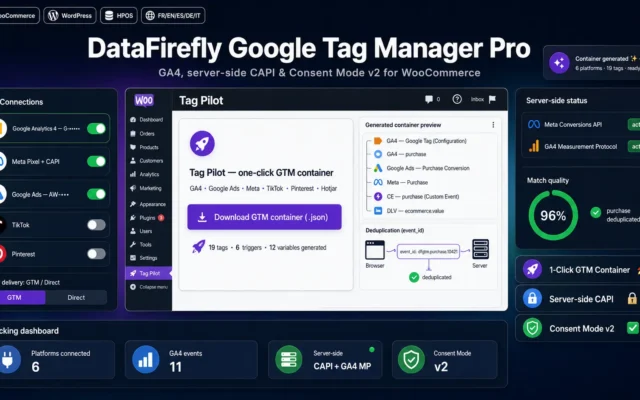
DataFirefly Google Tag Manager Pro — GTM & Server-side for WooCommerce
If you run several channelsGTM and Consent Mode v2 together. A container that fires without consent is a container that incriminates you.
The premium Google Tag Manager plugin for WooCommerce. Connect GA4, Google Ads, Meta, TikTok, Pinterest, Snapchat, LinkedIn, Microsoft, X, Hotjar and Clarity, then generate…
€49.00 View the module -
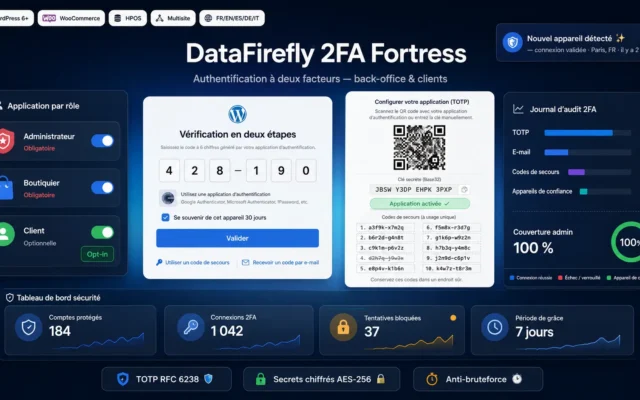
Two-Factor Authentication (2FA) for WordPress & WooCommerce
The forgotten obligationThe accounts that access customer data are part of the technical measures. A weak admin password is a privacy problem.
Professional two-factor authentication for WordPress and WooCommerce: back office and customer accounts, TOTP, email, backup codes, per-role enforcement with grace period.
€29.00 View the module
Side-by-side comparison
| Module | Best for | Price | Rating | Link |
|---|---|---|---|---|
| DataFirefly Cookie Consent — GDPR/CNIL & Google Consent Mode v2 for WordPress | The foundation — it has to block | €39.00 | — | |
| DataFirefly Server-Side — WooCommerce client + server tracking (free) | Server-side that respects consent | €0.00 | — | |
| DataFirefly Google Tag Manager Pro — GTM & Server-side for WooCommerce | If you run several channels | €49.00 | — | |
| Two-Factor Authentication (2FA) for WordPress & WooCommerce | The forgotten obligation | €29.00 | — |
On WordPress, one plugin displays consent — and twenty others load the scripts
That’s the structural problem nobody says out loud. Your cookie banner is a plugin. Your analytics is another one. Your pixel is a third. Your theme loads a font from somewhere else. None of them asks the banner for permission.
A banner that blocks nothing is an exhibit for the prosecution
If your analytics is already running while the banner is on screen, the banner documents your breach rather than preventing it. And it documents it well: you knew the rule.
So on WordPress only one thing matters: does the banner reach into the other plugins?
There is a standard for exactly that — and most plugins don’t implement it. A banner that doesn’t know how to hold back your GA4 plugin doesn’t hold it back.
How to choose
The only question that matters on WordPress
Does your banner reach into your other plugins? A banner is a plugin. Your analytics is another. If one can't tell the other anything, your tracking runs while the question is still on screen. There's a standard for this — check whether your plugins support it before buying anything.
Then the three rules that actually get sanctioned
- No tracker before consent. A block, not a display.
- Refusing as easy as accepting. Same level, same visibility, same clicks.
- The proof. Who chose what, and when — stored, not asserted.
And what server-side is NOT
It isn't a way around consent. It solves a technical problem — blockers — not a legal one. A server that sends without consent sends unlawfully, just more reliably.
What these plugins don't cover
Your privacy policy, your records of processing, your contracts, your procedures. That's exactly what a regulator opens first — and no plugin replaces it. Saying otherwise would be dishonest.
What you gain
Consent that actually blocks
No script loads before the click. The banner is a block, not a display.
Refusing as easy as accepting
Refusing as visible and as fast as accepting. One of the most sanctioned rules in Europe.
Consent Mode v2, correctly wired
Consent Mode v2 is required by Google. Without it you lose attribution and reach.
Server-side that respects consent
The server only sends what the visitor allowed. The decision is stored on the order itself.
Provable, not asserted
In an audit you must show who chose what, and when. Without proof, your answer is a claim.
Access protection on admin accounts
Protecting the accounts that access the data is part of the technical measures. It's the forgotten one.
From install to results
-
Check whether your banner reaches in
A banner that doesn't hold the other plugins back blocks nothing.
-
Block before the click
If analytics runs while the banner shows, the banner is the evidence.
-
Make refusing just as easy
Same level, same visibility, same clicks. One of the most sanctioned rules.
-
Wire server-side to consent
It solves no legal problem — it may only send what was allowed.
-
Store the record
Without proof, your answer in an audit is a claim.
“We had a banner and felt safe. In the audit, our GA4 plugin was already running while the banner was still on screen. The banner wasn't protection — it was the evidence.”
Frequently asked questions
Does my cookie banner block my other plugins?
Usually not. A banner is a plugin; your analytics is another one, and it asks no one. For the banner to actually block, it has to reach into the other plugins — there's a standard for that, and many plugins simply don't implement it.
What's wrong with a banner that only displays?
A banner that blocks nothing documents your breach instead of preventing it. It proves you knew the rule. Without a technical block, it's an exhibit with your logo on it.
Does refusing really have to be as easy as accepting?
Yes, and it's one of the most sanctioned rules in Europe. Same level, same visibility, same number of clicks. A bright Accept button next to a grey Settings link is a breach, even if both technically exist.
Is server-side tracking a way around consent?
No — and this needs saying plainly. Server-side solves a technical problem (blockers), not a legal one. Consent is still required, Consent Mode v2 is still required. Confusing the two builds you a problem with a fine attached.
What does access protection have to do with GDPR?
Because technical and organisational measures are part of the obligation — not just the banner. An admin account with a weak password that can read every customer record is a data protection problem, not an IT detail.
Why store proof of consent?
It shows the moment someone asks what happened on 14 March. Without a stored record of consent, your answer is a claim. With one, it's an answer.
Do these plugins make me GDPR-compliant?
No, and claiming otherwise would be dishonest. These plugins cover the technical side: consent, blocking, transmission, proof. Your privacy policy, your records of processing, your processor contracts and your internal procedures aren't included — and those are exactly what a regulator looks at first.
This need on other platforms
Not sure which one fits your store?
Tell us your context — we answer with a straight recommendation, not a sales pitch.