
Everything you'd want to know before you install.
A detailed look at how DataFirefly Google Tag Manager Pro — GTM & Server-side for WooCommerce works, why we built it the way we did, and the thinking behind the features above.
§ 01
Professional ecommerce tracking, without the complexity
Setting up Google Tag Manager for WooCommerce usually takes hours: building the dataLayer, declaring every variable, wiring every GA4 tag, connecting Google Ads, adding the Meta and TikTok pixels, handling consent. DataFirefly Google Tag Manager Pro does all of it for you. You enter your IDs, you click, you import. Tracking is in place — clean and compliant.
§ 02
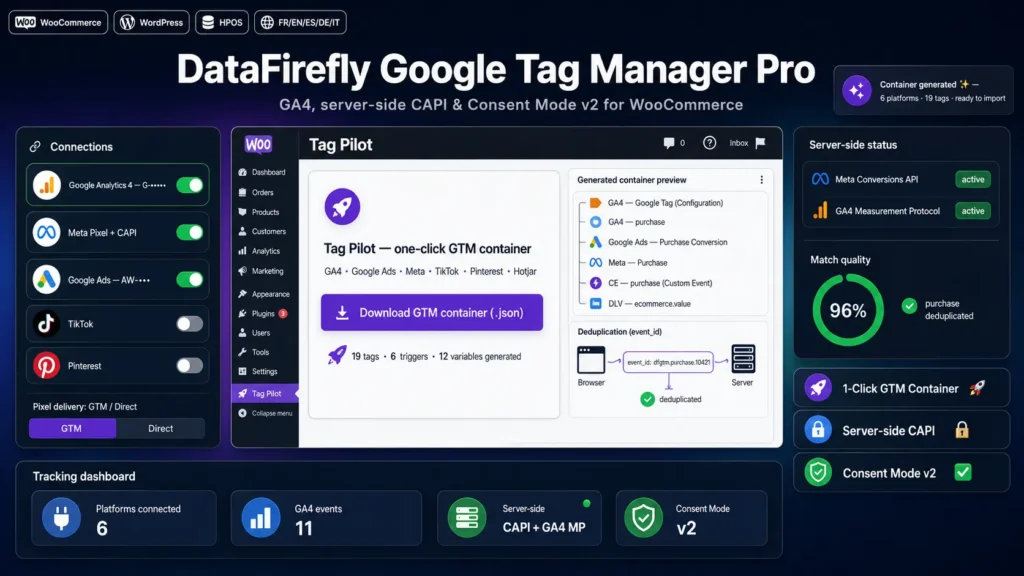
Tag Pilot: your GTM container generated in one click
The Tag Pilot builds a complete Google Tag Manager container from your connections: GA4 Google configuration tag and one event tag per enabled event, Google Ads Conversion Linker, purchase conversion and dynamic remarketing, the Meta Pixel with its standard events, and base tags for every other configured platform. Data Layer Variables and Custom Event triggers are created automatically. You download a JSON file and import it into GTM (Admin → Import Container, Merge).
§ 03
Every platform, one screen
GA4, Google Ads, Meta, TikTok, Pinterest, Snapchat, LinkedIn, Microsoft Advertising (UET), X, Hotjar and Microsoft Clarity. Paste the IDs of the platforms you use, leave the others empty. Everything else — the GTM container, the direct pixels, the server-side events — is built from that foundation.
§ 04
Server-side: maximum match quality
Turn on Meta's Conversions API and the GA4 Measurement Protocol: the purchase is sent directly from your server and keeps being counted even when the browser blocks the pixel. Browser and server share the same deterministic per-order event_id, so Meta and GA4 deduplicate conversions automatically. Customer data is SHA-256 hashed, and fbp/fbc cookies, IP address and user-agent are passed through for optimal matching.
§ 05
A GA4 ecommerce dataLayer worthy of the name
The plugin pushes the full set of GA4 ecommerce events with complete item objects: item_id from SKU or ID, brand detected across multiple taxonomies, categories up to five levels, variant, price and discount. The purchase is deduplicated: it fires once per order, even if the confirmation page is reloaded. Add your own dimensions from a product meta, a taxonomy or stock status.
§ 06
Compliance at the core
Consent Mode v2 sets default consent states before the container even loads, with EEA/UK scoping, wait_for_update, URL passthrough and ads data redaction. A dfgtmConsent JavaScript API lets you connect any consent banner in a few lines. Google Ads Enhanced Conversions pass SHA-256 hashed customer data on the purchase event.
§ 07
With or without Google Tag Manager
Using GTM? Import the generated container and everything works. Prefer not to depend on GTM? Switch delivery to Direct mode: the plugin injects the base pixels itself and replays the dataLayer ecommerce events to Meta, TikTok, Pinterest, Snapchat and GA4. The same dataLayer powers both approaches.
§ 08
Built for serious stores
HPOS, Cart Blocks and Checkout Blocks compatible. No tracking in admin, feeds or the customizer. Role-based traffic exclusion. Autoloader architecture with clean uninstall, full source under the GPL-2.0-or-later license, and developer hooks at every key point: dfgtm_export_container, dfgtm_meta_capi_payload, dfgtm_ga4_mp_payload, dfgtm_connections_registry, dfgtm_purchase_push, dfgtm_build_item.


There are no reviews yet.