
Our best Shopware plugins to measure your conversions
Three plugins — and a check that takes two minutes.
On Shopware, tracking breaks where nobody looks: in the multi-step checkout and in decoupled front ends. And native cookie management is not a consent signal sent to Google.
Sound familiar?
A pixel that no longer sees anything
A browser pixel needs page views. A decoupled front end doesn't produce them.
Cookie management that isn't Consent Mode
Shopware manages groups — it signals nothing to Google. Not the same thing.
Events nobody reconciles
Three scripts, one order. Your ROAS looks great and it's false.
A budget flowing the wrong way
Steer on false numbers and you'll eventually cut the campaign that sells.
Our selection, ranked
Every module below is built, maintained and supported by our team. The ranking reflects what we would install first on a client store.
-
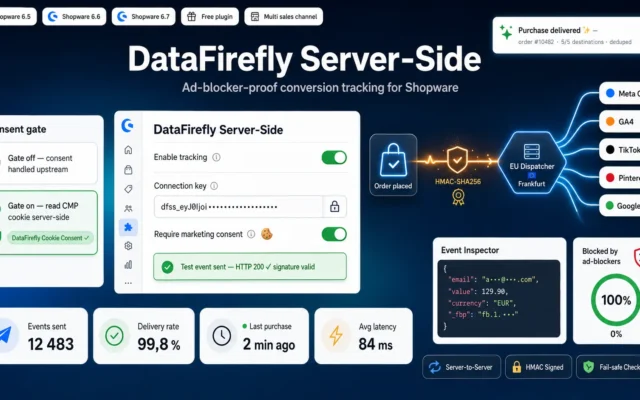
DataFirefly Server-Side — Shopware conversion tracking (free)
First — and freeThe event leaves from the order, not the browser. No blocker, no headless front end can suppress it.
The free Shopware plugin for the DataFirefly Server-Side Tracking service: your purchase conversion sent server-to-server, HMAC-signed, consent-aware, and compatible with our DataFirefly Cookie Consent…
€0.00 View the module -
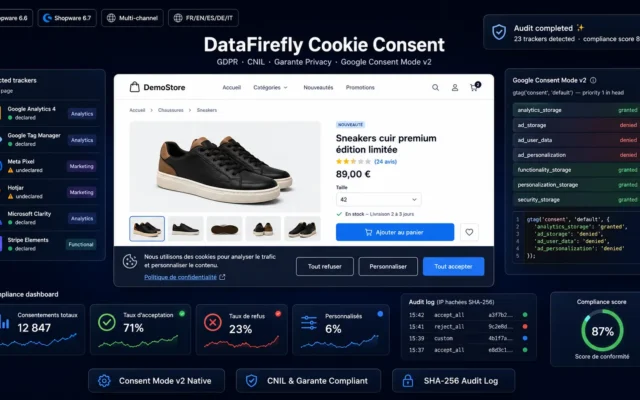
DataFirefly Cookie Consent — GDPR/CNIL & Google Consent Mode v2 for Shopware 6
The part Shopware doesn't doManaging cookie groups isn't Consent Mode v2. The decision has to reach Google.
GDPR cookie consent banner for Shopware 6.6 and 6.7 with native Google Consent Mode v2 (7 signals injected with priority 1 in the head),…
€69.00 View the module -
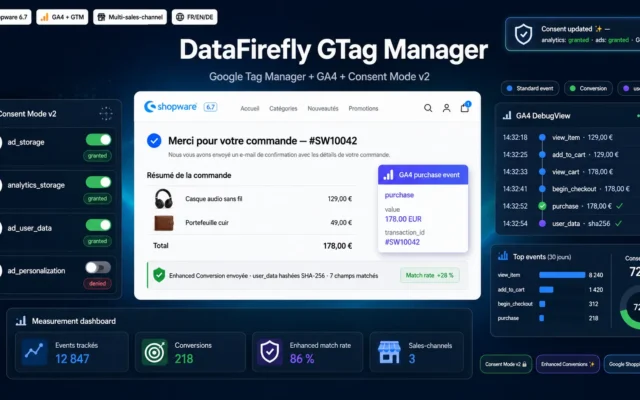
Google Tag Manager for Shopware — GTM, GA4 e-commerce, Consent Mode v2 & Enhanced Conversions
If you run several channelsGA4 ecommerce, Consent Mode v2, Enhanced Conversions — wired once, properly.
Complete Shopware 6.7 plugin for modern e-commerce measurement: Google Tag Manager container, GA4 Enhanced Ecommerce, Consent Mode v2 integrated with the native cookie banner,…
€69.00 View the module
Side-by-side comparison
| Module | Best for | Price | Rating | Link |
|---|---|---|---|---|
| DataFirefly Server-Side — Shopware conversion tracking (free) | First — and free | €0.00 | — | |
| DataFirefly Cookie Consent — GDPR/CNIL & Google Consent Mode v2 for Shopware 6 | The part Shopware doesn't do | €69.00 | — | |
| Google Tag Manager for Shopware — GTM, GA4 e-commerce, Consent Mode v2 & Enhanced Conversions | If you run several channels | €69.00 | — |
On Shopware, tracking breaks where nobody looks
Not on the home page. In the multi-step checkout — and in decoupled front ends. A browser pixel waiting for page views sees almost nothing in a headless storefront. The purchase happened; your pixel never saw it.
And native cookie management is not Consent Mode
Shopware manages cookie groups — cleanly, but locally. It signals nothing to Google. Consent Mode v2 is a transmission, not a display: what the visitor chose has to reach the tag. Otherwise you have a correct interface and wrong data.
The order is the only source that doesn’t lie
It sits in your database, with amount, line items and timestamp. An event sent from there cannot be suppressed by a blocker — it doesn’t happen in the browser.
How to choose
First, check whether you're even counting correctly
Compare the orders in your Shopware admin with the conversions in GA4, same period. The gap is your truth. Steer your budget on the wrong number and you'll eventually cut the campaign that actually sells.
Then server-side — it's free and closes the biggest gap
The event leaves from the order, not the browser. No blocker, no ITP, no decoupled front end can suppress it. It's the only source that doesn't lie.
And native cookie management is NOT Consent Mode v2
Shopware manages groups — locally. Consent Mode v2 is a transmission to Google. Confusing the two means: correct interface, incomplete advertising data, and legal exposure anyway.
GTM last
A container organises tracking; it doesn't guarantee it arrives. In the wrong order, you pay for a beautiful architecture that fires blocked events.
What you gain
Conversions you stop losing
The event leaves from your server, from the order. No blocker can remove it.
Measurable even headless
A decoupled front end fires no classic page views. The server does.
Consent that's actually transmitted
Managing cookie groups isn't Consent Mode v2. The decision has to reach the tag.
GTM without the tinkering
Enhanced Conversions and GA4 ecommerce wired properly — once, not at every deployment.
One source instead of five
One order, one event. The database counts better than three scripts that don't know each other.
Budget that goes where it works
You optimise on numbers that are true — and stop cutting the budget of the campaign that sells.
From install to results
-
Compare the numbers first
Orders in the admin against conversions in GA4. The gap is your truth.
-
Server-side first
Free, immediate — and the only option when you're headless.
-
Actually transmit Consent Mode v2
Shopware manages groups. Google expects a signal. Not the same thing.
-
GTM after that
A container organises — it doesn't guarantee the event arrives.
-
Read campaigns on margin
A ROAS without margin is a number with no meaning.
“GA4 showed a third fewer orders than our Shopware admin. We assumed GA4 was broken. In fact our checkout was multi-step and our front end decoupled — the pixel simply never had a chance.”
Frequently asked questions
Why does my pixel measure less than expected on Shopware?
Because a browser pixel needs visible page views. A decoupled front end doesn't produce them — and a multi-step checkout loses context along the way. The purchase happened; your pixel never saw it.
Isn't Shopware's native cookie management enough?
No, and that's the most common mistake. Shopware manages cookie groups — locally, and correctly. Consent Mode v2 is something else: a transmission to Google. Without it you have a clean interface and still incomplete advertising data.
Does server-side replace consent?
No — and this needs saying plainly. Server-side solves a technical problem (blockers, headless), not a legal one. Consent is still required. Confusing the two builds you a problem with a fine attached.
Why send from the order rather than the browser?
Because the order sits in your database — with amount, line items and timestamp. An event from there isn't an estimate, it's a fact. And it's sent once, not three times by scripts that know nothing about each other.
What do Enhanced Conversions add?
They improve conversion matching by sending hashed customer data. They help exactly where cookies are weak — but they replace neither proper consent nor a server-side event.
In what order?
With the free server-side plugin, because it closes the biggest gap and costs nothing. Then consent, because it's legally unavoidable. GTM after that — it organises, it doesn't rescue.
How do I check whether my tracking is right?
Compare the orders in your Shopware admin with the conversions in GA4 over the same period. If they diverge significantly, you're measuring wrong — and steering your budget on a number that doesn't exist.
This need on other platforms
Not sure which one fits your store?
Tell us your context — we answer with a straight recommendation, not a sales pitch.