
Our best WooCommerce plugins to measure your conversions
Four plugins to stop counting the same order three times.
Your pixel is being blocked — and your plugins are counting the same order three times. You are not seeing more sales: you are seeing the same sales several times — and optimising against a number that does not exist.
Sound familiar?
A pixel that gets blocked
Blockers, Safari ITP, iOS. The purchase happened, the money is there — your campaign never knew.
Sales counted three times
Three marketing plugins, three purchase events, one order. Your ROAS is excellent — and false.
Budget spent into the void
You cut the budget of a campaign that sells, because it is badly measured. And you never see it.
Five plugins, five truths
Each plugin has its own truth. None knows the others are firing the same event.
Our selection, ranked
Every module below is built, maintained and supported by our team. The ranking reflects what we would install first on a client store.
-
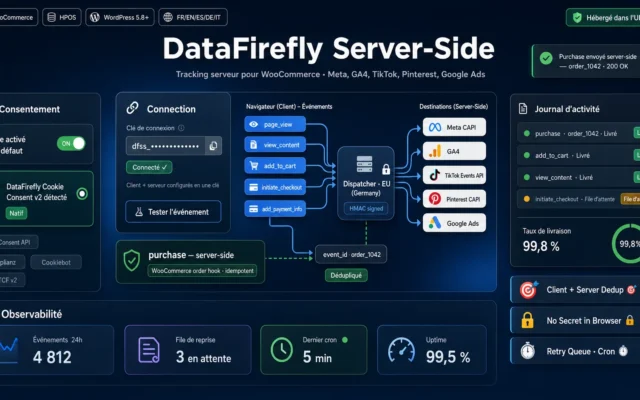
The event fires from the server, and the order is reported once — because it comes from the database, not from three scripts.
The free WooCommerce connector for the DataFirefly Server-Side Tracking service: your whole funnel sent client and server, deduplicated, consent-aware, and natively compatible with our…
€0.00 View the module -
DataFirefly Google Tag Manager Pro — GTM & Server-side for WooCommerce
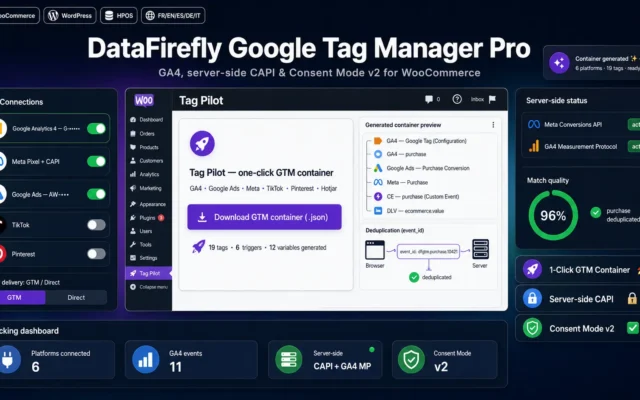
If you steer several channelsGTM and server-side combined. GTM organises the tracking — server-side makes sure it arrives.
The premium Google Tag Manager plugin for WooCommerce. Connect GA4, Google Ads, Meta, TikTok, Pinterest, Snapchat, LinkedIn, Microsoft, X, Hotjar and Clarity, then generate…
€49.00 View the module -
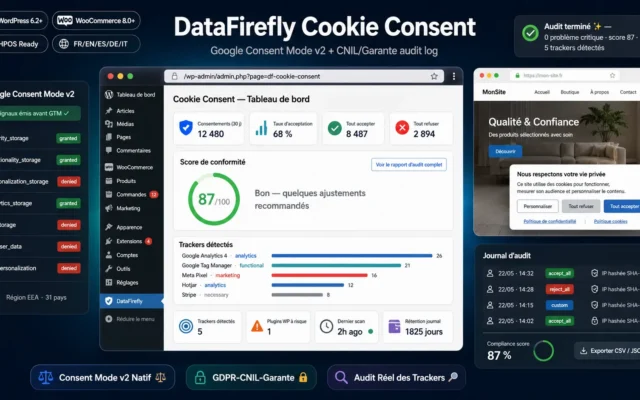
Consent Mode v2. Server-side does not exempt you from consent — confusing the two builds a problem.
GDPR cookie consent banner with native Google Consent Mode v2 fired before GTM, audit that detects actual trackers loaded, and CNIL/Garante log exportable as…
€39.00 View the module -
Real Profit & Margin Dashboard for WooCommerce
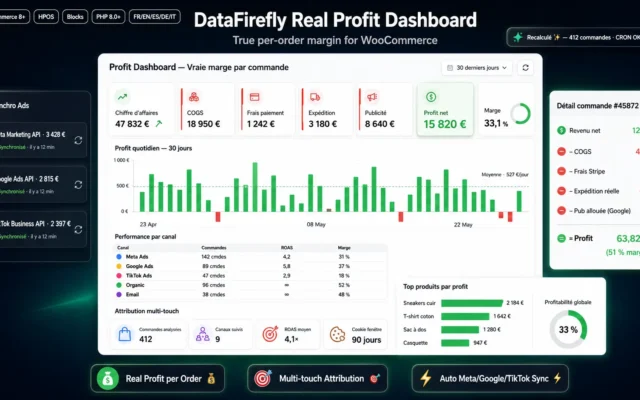
The number that really countsNot revenue — margin. A channel with an excellent ROAS can still be costing you money.
The only WooCommerce dashboard that computes your real profit order by order: product COGS, Stripe/PayPal/Mollie fees read natively, real shipping, and ad spend from…
€89.00 View the module
Side-by-side comparison
| Module | Best for | Price | Rating | Link |
|---|---|---|---|---|
| DataFirefly Server-Side — WooCommerce client + server tracking (free) | First, and free | €0.00 | — | |
| DataFirefly Google Tag Manager Pro — GTM & Server-side for WooCommerce | If you steer several channels | €49.00 | — | |
| DataFirefly Cookie Consent — GDPR/CNIL & Google Consent Mode v2 for WordPress | The legal part | €39.00 | — | |
| Real Profit & Margin Dashboard for WooCommerce | The number that really counts | €89.00 | — |
WooCommerce tracking is broken twice over
The first break is the same as everywhere: the pixel gets blocked. Ad blockers, Safari ITP, iOS. The purchase happened — your campaign simply never heard about it.
The second is specific to WordPress and never gets mentioned: your plugins all track the same event. Three plugins, three purchase events, one order. You are not seeing more sales — you are seeing the same sales three times. And you are optimising against a number that does not exist.
Server-side is not an improvement — it is a repair
The event fires from your server, not from the browser. No blocker can suppress it. And the order is reported once, because it comes from the database — not from three scripts that do not know about each other.
And no, it does not exempt you from consent
Consent Mode v2 is still required. Server-side solves a technical problem. Confusing the two builds you a legal one.
How to choose
First check whether you are double counting
It takes two minutes and almost nobody does it: compare the number of purchase events in GA4 with the number of orders in WooCommerce over the same period. If GA4 shows more sales than your store actually made, several plugins are reporting the same order. Your ROAS looks excellent — and it is false.
Then the free plugin, in that order
Server-side repairs both breaks at once: the event fires from the server (no blocker can suppress it) and the order is reported once, because it comes from the database — not from three scripts that do not know about each other. It costs nothing. It comes first.
GTM comes afterwards — and does not replace it
Without server-side, a GTM container is a beautiful architecture firing blocked events. GTM organises the tracking; server-side makes sure it arrives. One does not replace the other — and in the wrong order you are paying for a structure that delivers nothing.
What server-side is NOT
It is not a way around consent. Consent Mode v2 is still needed, a legal basis is still needed. Server-side solves a technical problem — turning it into a legal tool builds you a problem.
What you gain
Conversions you stop losing
The event fires from your server. No blocker can suppress it — it does not happen in the browser.
The WordPress problem: double counting
Three plugins, three purchase events, one order. You are seeing the same sales three times.
One order, one event
The order is reported once, because it comes from the database — not from three scripts.
One source, not five
GA4, Ads, Meta: a single source of truth instead of five plugins contradicting each other.
Consent handled properly
Consent Mode v2 is still needed. Server-side solves a technical problem, not a legal one.
Budget that goes where it works
Optimising against wrong numbers means cutting the budget of the campaign that actually sells.
From install to results
-
Check whether you are double counting
GA4 purchase events against WooCommerce orders, same period. Two minutes — and almost nobody does it.
-
The free plugin first
It repairs both breaks at once — the blocked events and the double counting. And it costs nothing.
-
GTM afterwards — not before
Without server-side, GTM is a beautiful architecture firing blocked events.
-
Do NOT confuse server-side with consent
Consent Mode v2 is still needed. Server-side solves a technical problem, not a legal one.
-
Optimise on margin, not revenue
A channel with an excellent ROAS can still be costing you money. Only margin tells you.
“Our GA4 showed 40% more sales than our accounts. We assumed it was an attribution error. In fact three plugins were firing the same purchase event on every order.”
Frequently asked questions
Does server-side invent conversions?
They are your real conversions, the ones the browser pixel could not report — because of blockers, Safari ITP or iOS. The purchase happened, the money is there, only your campaign never knew. You do not invent a conversion: you recover it.
Why does WordPress count my sales twice?
Because each plugin fires its own purchase event — and none of them knows the others are doing the same. Three marketing plugins, one order, three reports. Your ROAS looks excellent, and it is false. It is the commonest WooCommerce problem and the least diagnosed.
How do I check whether I am double counting?
Compare the number of purchase events in GA4 with the number of orders in WooCommerce, over the same period. If GA4 shows more sales than your store actually made, you are double counting. It takes two minutes — and almost nobody does it.
Is server-side a way around consent?
No, and it must be said: server-side does not exempt you from consent. Consent Mode v2 is still needed, a legal basis is still needed. Server-side solves a technical problem (blockers), not a legal one. Confusing the two builds you a problem.
How many conversions am I really losing?
It depends heavily on your audience and their devices — which is precisely why the only serious number is your own. Install both in parallel and compare for a week. Anyone quoting you a percentage without having seen your traffic is guessing.
What do I gain concretely on day one?
Nothing — and that is the point. Your conversions are more complete, so your ROAS looks better, but you did not sell more. The gain comes afterwards: you make budget decisions on correct numbers. And that is what actually makes money.
Where do I start?
The free plugin first. It repairs the essentials — the blocked events and the double counting — and costs you nothing. The GTM Pro container comes afterwards, when you are steering several channels and need a real data layer. In that order, not the reverse.
Does Google Tag Manager replace server-side?
No, quite the opposite: without server-side, GTM is a container firing blocked events. You have a beautiful architecture that delivers nothing. GTM organises the tracking — server-side makes sure it arrives. One does not replace the other.
This need on other platforms
Not sure which one fits your store?
Tell us your context — we answer with a straight recommendation, not a sales pitch.