
Everything you'd want to know before you install.
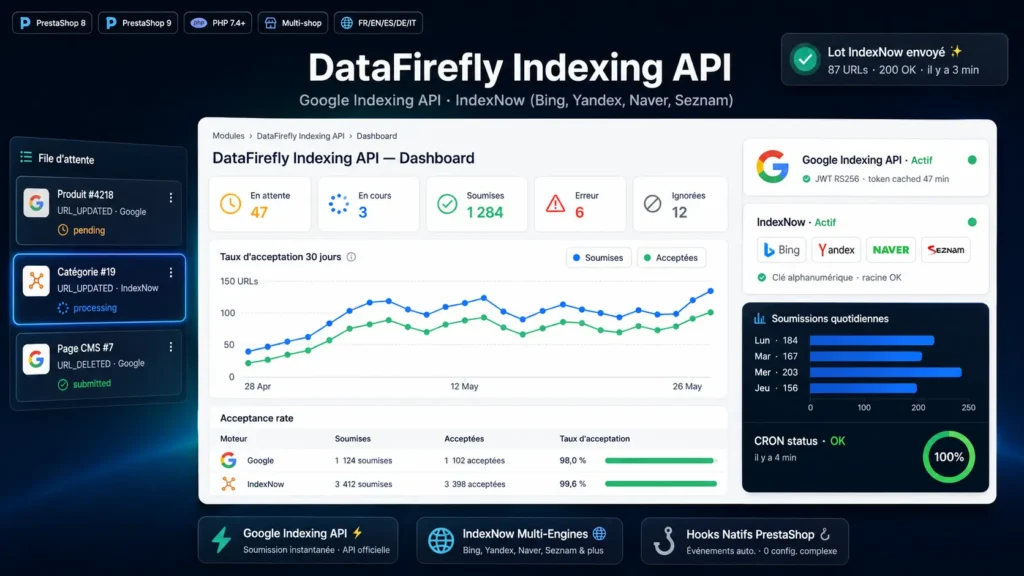
A detailed look at how DataFirefly Indexing API — Automatic Google Indexing API and IndexNow submission (Bing, Yandex, Naver) for PrestaShop 8 and 9 works, why we built it the way we did, and the thinking behind the features above.
§ 01
The problem: Googlebot and Bingbot take time to crawl
It is the SEO blind spot of any growing store. You publish a new product on Monday morning and Google does not index it until Thursday evening. You fix a typo in a listing and Bing still shows the old version two weeks later. During that delay, you lose organic traffic, you lose conversions, and your users see outdated information in search results. For a store that publishes or modifies 20 products per week, that is hundreds of URLs perpetually behind on indexing. The XML sitemap remains essential: it is the official discovery channel and it needs to stay clean and current. But it grants no priority, and the classic sitemap ping has been useless since Google removed its ping endpoint in June 2023. To signal a change in minutes rather than days, you need direct submission.
§ 02
Google Indexing API: what it does, and what it does not
Google exposes a REST endpoint at indexing.googleapis.com that accepts URL update or deletion notifications. Authentication is via a Google Cloud Service Account: you create a Service Account, you download its JSON key, you add it as owner of your Search Console property. The module signs a JWT RS256 with the private key, exchanges that JWT for an OAuth2 access token at oauth2.googleapis.com, caches that token for 55 minutes, and uses it to authenticate every submission. The thing to know before buying: Google documentation officially restricts this API to pages carrying JobPosting structured data, or BroadcastEvent embedded in a VideoObject. A product listing or a category page falls into neither case. The API still accepts the submission and responds 200, but that 200 only means the notification was received: Google alone decides on crawling and indexing. The default quota is 200 URLs per day per Service Account, and quota increases are reserved for sites that actually use JobPosting or BroadcastEvent, so a store should not count on one. The module submits, logs the return code, and the dashboard reflects the API response, not the indexing decision. If you are after a measurable indexing gain on a product catalog, IndexNow is what delivers it.
§ 03
IndexNow: Bing, Yandex, Naver, Seznam in a single call
IndexNow is an open protocol pushed by Microsoft Bing and Yandex in 2021, since joined by Naver (the dominant engine in South Korea) and Seznam (the historical engine in the Czech Republic). Unlike the Google API, IndexNow imposes no restriction on page type: product listings, categories and CMS pages are within its normal scope. The principle: you generate an alphanumeric key, you publish it at the root of your domain (key.txt file), and you call the api.indexnow.org endpoint with a list of URLs. The call is free, unlimited, and automatically propagated to all participating engines. No quota, no Service Account, no OAuth: just a key and an HTTP call. The module generates the key automatically on install, offers two methods to serve it at root (.htaccess rewrite with generated snippet, or physical file), and batches URLs up to 100 per call to save requests.
§ 04
The PrestaShop hooks listened to
The module hooks into PrestaShop official object lifecycle hooks. For products: actionProductSave is called on creation and on every modification, and if the product is active the URL is enqueued as URL_UPDATED, otherwise as URL_DELETED. actionProductDelete is called on final deletion, with URL_DELETED enqueued. For CMS pages: actionObjectCmsAddAfter (creation), actionObjectCmsUpdateAfter (update), actionObjectCmsDeleteAfter (deletion). For categories: actionCategoryAdd, actionCategoryUpdate, actionCategoryDelete, with the category root (ID 1 and 2) ignored for safety. Each hook builds the canonical URL via the official PrestaShop Link object, which guarantees respect of SEO friendly URL preferences, language prefixes, and multilingual rules.
§ 05
The queue: why and how
Submitting synchronously on every hook would be doubly bad: latency would slow the admin (a call to Google can take 2 to 5 seconds), and an API failure would make product saves impossible. The module therefore queues each submission in a persistent queue table (df_indexapi_queue) and a CRON processes the batch every few minutes. Deduplication is key: if you modify a product three times in one hour, the module recognizes that a job already exists for that tuple (shop, type, ID, provider, action) and simply updates its URL and date, it does not create three. The pending to processing logical lock avoids double processing if two parallel CRONs claim from the queue at the same time. And each failure increments a retry counter, triggering automatic retry on the next CRON up to a configurable maximum (default 5). Beyond that, the job switches to error and remains visible in the Queue screen with the exact API message.
§ 06
The log and the dashboard
Each submission produces an entry in the df_indexapi_log table: provider Google or IndexNow, object type and ID, exact URL submitted, action URL_UPDATED or URL_DELETED, HTTP code returned, accepted or rejected flag, full response message, and date. The Log screen exposes this data in a standard PrestaShop HelperList with native filters (provider, HTTP code, accepted), sorting, and CSV export. The Dashboard aggregates everything: five cards for queue status counters, two provider diagnostic cards (Google Service Account configured or not, IndexNow key and host configured or not), a 30-day acceptance rate table per provider with semantic coloring (green above 90, orange between 60 and 90, red below), and a Chart.js daily submissions chart overlaying total submitted and total accepted. Read it as an indicator of the technical health of your API calls, not as proof of indexing.
§ 07
CRON and key file security
The CRON controller is exposed on a standard PrestaShop frontend URL but protected by a 32-character random token generated on install and regenerable with one click from configuration. Without the right token, the controller returns 403. Three actions are supported: process processes a queue batch (to be called every 5 to 15 minutes by your host CRON), purge deletes jobs and logs processed beyond the configured retention (to be called once a day), and key serves the IndexNow key file content as text/plain for the .htaccess rewrite (protected by prior knowledge of the key in the k parameter). The exact .htaccess snippet to paste at the PrestaShop root is generated automatically in the Configuration page with the current key.
§ 08
Typical use cases
Growing store with 50 new products per week: the module enqueues each creation, the CRON submits within 10 minutes, and Bing, Yandex, Naver and Seznam typically pick up the new URLs within hours. On the Google side, submission speeds up discovery with no guaranteed outcome. Multilingual store with a catalog of 5000 products: on every listing change, the canonical URLs of all languages are queued and submitted, across all your markets at once. B2B store with a technical catalog frequently updated (prices, stocks, spec sheets): deduplication avoids spamming the APIs on bursts of changes, one single job per product even if you modify it twenty times in a day. SEO recovery after migration: a Retry all jobs button in the Queue screen lets you re-submit in bulk after solving a configuration or quota issue.
§ 09
Known limits and best practices
Google officially restricts the Indexing API to JobPosting and BroadcastEvent pages, which makes IndexNow the module's primary channel for a product catalog. Enable IndexNow first, and treat Google as a logged bonus. IndexNow does not handle URL_DELETED: the protocol considers a 404 or 410 on the URL to be the proper way to signal deletion, so the module ignores those jobs (Google does support that action type). The Google quota is capped at 200 URLs per day per Service Account, and since quota increases are conditioned on JobPosting or BroadcastEvent markup being present, a store should treat that cap as permanent: narrow the Google filter to new items, or create a second Service Account with its own quota. The module does not submit product variants or combinations, since the main product canonical URL is enough and Google consolidates variants naturally. And the category root (ID 1 and 2) is ignored to avoid submitting non-relevant URLs.





There are no reviews yet.