
Everything you'd want to know before you install.
A detailed look at how AI Virtual Try-On Module for PrestaShop works, why we built it the way we did, and the thinking behind the features above.
§ 01
The real barrier to buying clothes online: uncertainty
In fashion, the number-one cause of hesitation and returns is not knowing how a garment will look once worn. Photos on a model don't answer the question the customer is really asking: will it suit me? dfgoogletryon closes that gap directly on the product page.
§ 02
A generative virtual try-on, on the product page
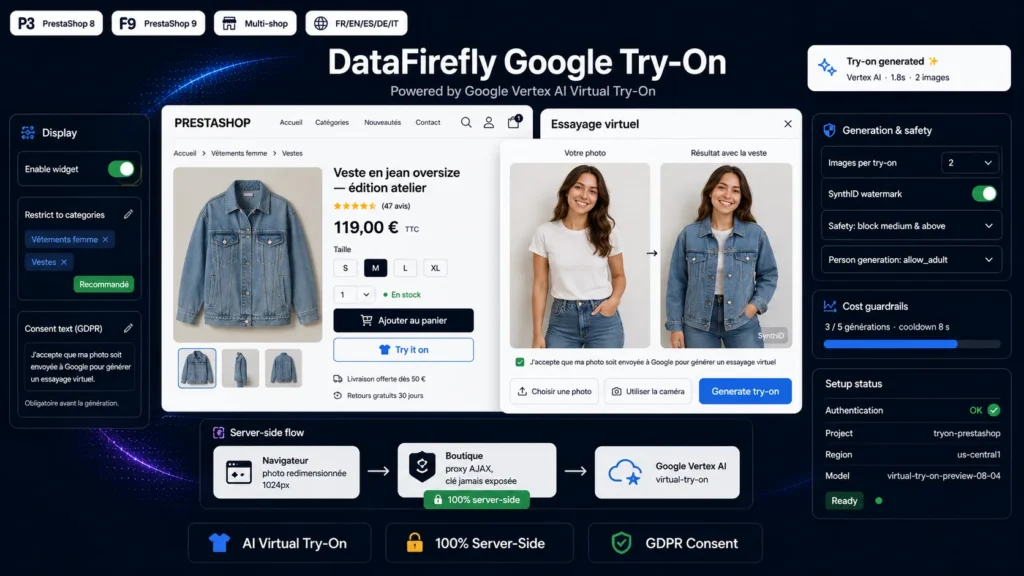
The module adds a Try it on button that opens a modal. The customer uploads a photo or uses their camera, and the garment from the page is rendered onto them via the Google Vertex AI Virtual Try-On model. The result is photorealistic: the garment follows the pose and body shape. You can generate 1 to 4 proposals per try-on.
§ 03
Privacy-respecting by design
The customer photo is downscaled in the browser, sent to your server then to Google, and is never saved on the shop: processing happens in memory. A mandatory, customizable consent checkbox appears before any upload, for clean GDPR compliance. The SynthID watermark invisibly marks generated images.
§ 04
Security: nothing leaks on the client
Unlike a naive front-end integration, dfgoogletryon proxies every call server-side. The service-account key stays on your server; the module signs an RS256 JWT, obtains an OAuth token cached for about 55 minutes, and calls the Vertex AI API from the back end. The browser never sees your Google credentials.
§ 05
Controlled costs, blocked abuse
Each generated image is billed by Google. The module includes a per-session generation cap and a cooldown between attempts, both configurable, to keep costs predictable. A per-product token and same-origin checks discourage use of the proxy outside your pages.
§ 06
PrestaShop 8 and 9 compatible, guided setup
The module runs on PS 8.0 to 9.x, PHP 8.1 to 8.4, with no composer dependency. On the Google side: create a Google Cloud project with billing, enable the Vertex AI API, create a service account with the Vertex AI User role, download its JSON key and paste it into the configuration. The Save and test authentication button validates your credentials in one click.


There are no reviews yet.