
Our best PrestaShop modules to cut cart abandonment
Six modules to turn an abandoned cart into an order, without giving away your margin.
Seven carts out of ten never reach checkout. But an abandoned cart is not a lost sale — it is a sale on hold. These are the PrestaShop modules that bring it back, in the order we install them.
Sound familiar?
Carts that evaporate
The visitor fills the cart, then vanishes. With no recovery, that cart dies in the database and nobody ever knows.
A cart lost on return
The customer returns three days later… to an empty shop. Everything has to be rebuilt — so they don't rebuild it.
Giving up before the cart
“Too expensive” or “out of stock”: the visitor gives up before the add to cart. No recovery email will ever catch them.
Discounts that cost more than they earn
You offer 10% in the first email. Your regulars have worked that out and now abandon their cart on purpose.
Our selection, ranked
Every module below is built, maintained and supported by our team. The ranking reflects what we would install first on a client store.
-
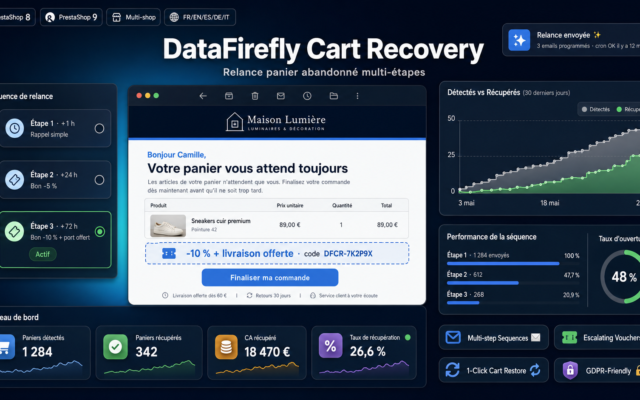
Multi-Step Abandoned Cart Recovery
Highest ROIMulti-step sequence with attributed conversion tracking. The most directly and quickly measurable module in the selection.
Automatically recover your abandoned carts with scheduled email sequences, escalating vouchers and one-click cart restoration. Compatible with PrestaShop 8 & 9.
€129.00 View the module -
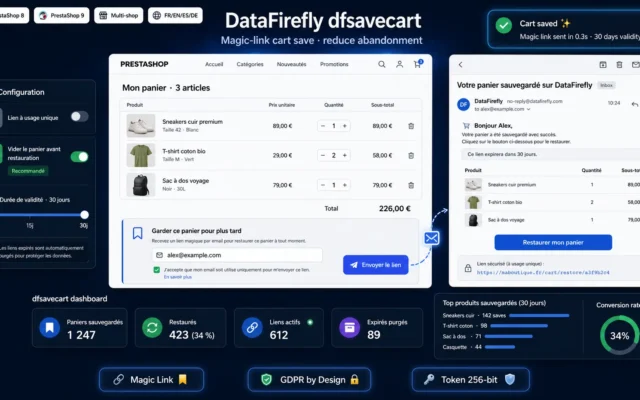
Save Cart via Magic Link — PrestaShop 8 & 9
Essential alongside recoveryRestores the exact cart through a signed link, on any device, with no re-login. Without it, your recovery email lands on an empty shop.
A "Keep for later" button on the cart page. Visitors enter their email, receive a secure link, and restore their exact cart (products +…
€49.00 View the module -
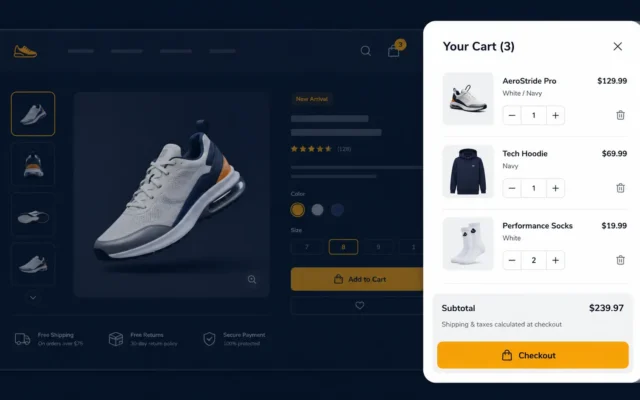
DataFirefly SideCart — Side cart panel for PrestaShop 8
Best for preventionThe side cart removes the page reload to the cart page on every add. Less friction, fewer drop-offs.
The cart that no longer leaves the product page. SideCart slides a cart panel in from the side as soon as a product is…
€59.00 View the module -
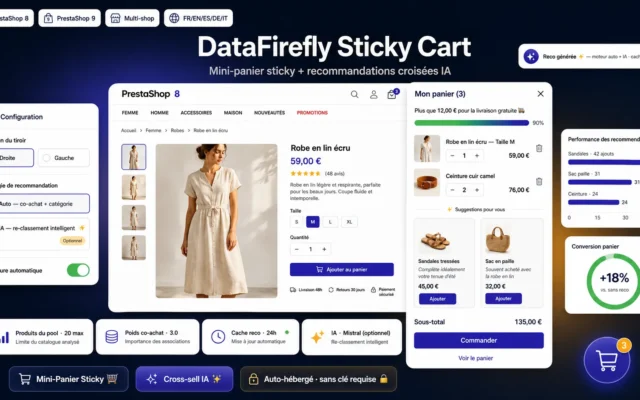
Sticky Cart & AI Cross-sell Module for PrestaShop 8/9
Permanent reminderKeeps the cart visible throughout browsing, with AI cross-sell. Purchase intent does not fade.
Ajax sticky cart drawer with cross-sell recommendations built from your real orders and optional AI re-ranking. More add-on sales, zero dependency.
€89.00 View the module -
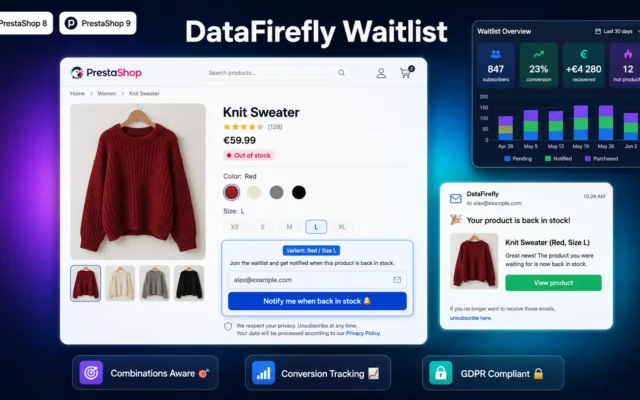
DataFirefly Waitlist — Back-in-stock alert with conversion tracking for PrestaShop 8 & 9
Otherwise lost revenueCaptures intent on out-of-stock products and calls the customer back the moment stock returns. Conversion tracking included.
"Notify me when back in stock" button on out-of-stock product pages. Automatic email at restock with conversion dashboard. Combinations support, GDPR double opt-in, merchant…
€49.00 View the module -
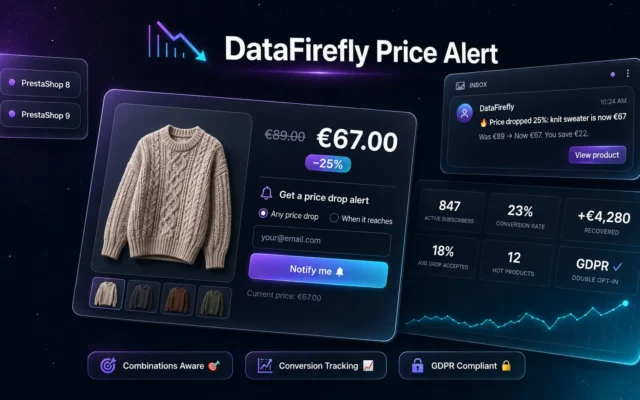
DataFirefly Price Alert — Price drop alert with conversion tracking for PrestaShop
Against the price objectionThe visitor who finds it too expensive leaves an email instead of leaving. They return when the price drops — with strong intent.
Automatic price-drop alert for PrestaShop 8 and 9: customers subscribe from the product page in 'any drop' or 'target price' mode, receive an email…
€49.00 View the module
Side-by-side comparison
| Module | Best for | Price | Rating | Link |
|---|---|---|---|---|
| Multi-Step Abandoned Cart Recovery | Highest ROI | €129.00 | — | |
| Save Cart via Magic Link — PrestaShop 8 & 9 | Essential alongside recovery | €49.00 | — | |
| DataFirefly SideCart — Side cart panel for PrestaShop 8 | Best for prevention | €59.00 | — | |
| Sticky Cart & AI Cross-sell Module for PrestaShop 8/9 | Permanent reminder | €89.00 | — | |
| DataFirefly Waitlist — Back-in-stock alert with conversion tracking for PrestaShop 8 & 9 | Otherwise lost revenue | €49.00 | — | |
| DataFirefly Price Alert — Price drop alert with conversion tracking for PrestaShop | Against the price objection | €49.00 | — |
Abandonment is not an accident, it is a signal
Seven carts out of ten never reach checkout. That number is usually treated as a fact of life, when in reality it covers very different causes that call for very different answers. The visitor who balks at the price, the one who is comparing, the one who gets interrupted, the one who trips on a form: those are four distinct problems, and no single module covers them all.
The right way in is not “how do I send a reminder”, but “when exactly does the cart die”. Every module in this selection steps in at a precise moment of that death.
Three windows, three mechanics
Before the add to cart, the visitor stalls on price or on a stock-out. There is no cart to save yet, but there is intent to capture: price alerts, back-in-stock alerts. These are the only tools that recover revenue otherwise lost for good.
During the session, the cart exists but stays invisible. A side cart and a sticky reminder keep the purchase present in the visitor’s mind without forcing a trip to a dedicated page.
After they leave, everything hinges on the ability to come back to the same cart. A magic link that restores the exact cart, plus a multi-step reminder sequence, beats a single email with a discount code.
The reflex discount trap
A reminder that offers 10% in the very first email teaches your regulars to abandon their cart on purpose. That is a cost you inflict on yourself. A well-built sequence opens with a plain reminder, adds reassurance on the second beat, and only reaches for the commercial incentive as a last resort — while it is still profitable.
How to choose
Start by diagnosing, not by installing
Before picking a module, answer one question: where do your visitors drop off? If carts are created but never completed, recovery is what you need. If carts are not even created, the problem sits upstream — price, stock, reassurance — and recovery will do nothing for you.
The install order that works
- Multi-step recovery first — it is the module with the most direct and fastest-measured ROI. Three weeks are enough to get real numbers.
- The magic-link cart save right after — it multiplies the recovery's effect. An email that brings the visitor back to an empty shop is worthless.
- The side cart next — it acts preventively, on the live session.
- Price and stock alerts last — they open a different revenue channel, not an optimisation of the existing one.
The setting that changes everything
The delay before the first reminder. Too early (under 30 minutes) and you are emailing someone still browsing, which reads as intrusive. Too late (over 24 hours) and the intent has faded. One hour is the compromise we keep on most stores — late enough for the session to have died, early enough for the need to still be there.
What no module will fix
Shipping costs revealed at the last step. It is the number one cause of abandonment across every sector, and no recovery email compensates for the feeling of having been trapped. Show the shipping cost as early as you can — a free-shipping progress bar does more for your conversion rate than three recovery emails.
What you gain
The cart found exactly as it was
The magic link restores the exact cart, products and quantities included. No friction, no manual rebuild.
A multi-step sequence
Reminder, reassurance, then incentive. The discount code only lands as a last resort, while it is still profitable.
Deferred revenue recovered
Price and back-in-stock alerts capture intent where there is no cart to save yet.
The cart always visible
Side cart and sticky reminder keep the purchase top of mind without ever interrupting browsing.
A measurable ROI
Every module tracks its conversions. You know what the reminder earns, not just what it sends.
No subscription
Transactional emails sent from your own store — no third-party SaaS, no monthly fee indexed on your volume.
From install to results
-
Diagnose the breaking point
Look at where visitors drop off before installing anything. If carts are not even being created, recovery will do nothing.
-
Install the three-beat recovery
First reminder at 1 hour, second at 24 hours with reassurance, third at 72 hours with the incentive. Never a discount on the first send.
-
Wire up the magic-link save
Without it, your email brings the visitor back to an empty shop and the whole benefit of recovery evaporates.
-
Move to prevention
Side cart, then sticky cart: act on the live session rather than waiting for the abandonment.
-
Open the deferred-revenue channel
Price and back-in-stock alerts: a separate revenue channel, on visitors who would never have created a cart.
“We used to send one recovery email with 10% off. We discovered our best customers were abandoning their carts on purpose to get it. We rebuilt the whole thing in three beats, with no discount before the third.”
Frequently asked questions
How many reminders, and at what pace?
Our default sequence: 1 hour (plain reminder — the visitor may simply have been interrupted), 24 hours (reassurance: shipping, returns, warranty), then 72 hours (commercial incentive if the cart value justifies it). Past five days, recovery rates become marginal and the message reads as nagging.
Should the reminder carry a discount code?
That is the classic trap. Your regulars quickly learn that abandoning a cart triggers a discount — and start doing it deliberately. Save the discount for the third reminder, cap it, and exclude customers who ordered recently. The first email must be a reminder, not a promotion.
Can you email a visitor who is not logged in?
Yes, if you have their email: an existing account, a newsletter opt-in, or an email captured at checkout before the drop-off. That is a strong argument for asking for the email early in the funnel — but only with a valid legal basis (consent or documented legitimate interest).
What does the magic link save actually do?
The magic link encodes a signed cart identifier in the URL. One click and the visitor finds their exact cart — same products, same quantities, same variants — on any device, without logging back in. That is the difference between “come back to the shop” and “pick up where you left off”, and it weighs heavily on the resumption rate.
Do price and stock alerts really belong in cart abandonment?
No — and that is precisely their value. These two modules act where cart recovery is powerless: the visitor never added anything, they simply gave up (too expensive, out of stock). Without capture, that revenue is gone for good. With it, they come back once the blocker lifts — and they come back with strong intent.
Are recovery emails GDPR-compliant?
Recovery emails are transactional messages triggered by a user action. In B2C, GDPR and the ePrivacy directive require a legal basis in practice: consent, or legitimate interest where the customer already has a commercial relationship with you. An unsubscribe link remains mandatory either way. The modules log consent.
Side cart or sticky cart — what is the difference?
The side cart opens on add and removes the page reload to /cart — it smooths the add. The sticky cart stays visible while browsing and constantly reminds the visitor what is committed. They are complementary: the first cuts friction, the second sustains intent.
How do you measure what it actually earns?
Each module tracks attributed conversion: how many carts were emailed, how many clicks, how many orders completed and for what value. So you measure recovered revenue, not just emails sent — the only metric that lets you decide whether the discount is worth its cost.
Not sure which one fits your store?
Tell us your context — we answer with a straight recommendation, not a sales pitch.