
Our best PrestaShop modules to raise your average order value
Eight modules to lift the cart without ever putting the order at risk.
One point of average order value is often worth more than one point of conversion: the visitor is already here, already decided, and the extra pound falls into margin. These are the PrestaShop modules that lift the cart without breaking the order.
Sound familiar?
One product, and nothing else
The customer buys the laptop but not the case, the drill but not the bits. Nobody offered them anything at the right moment.
Orders too small to be profitable
Shipping costs a fortune on small orders, and nothing nudges the customer to add one more item.
A cross-sell that recommends nothing
The accessories block shows unrelated products, typed in by hand two years ago. Nobody clicks on it.
Options never offered
Gift wrapping, insurance: pure margin you leave on the table simply because nobody offers it.
Our selection, ranked
Every module below is built, maintained and supported by our team. The ranking reflects what we would install first on a client store.
-
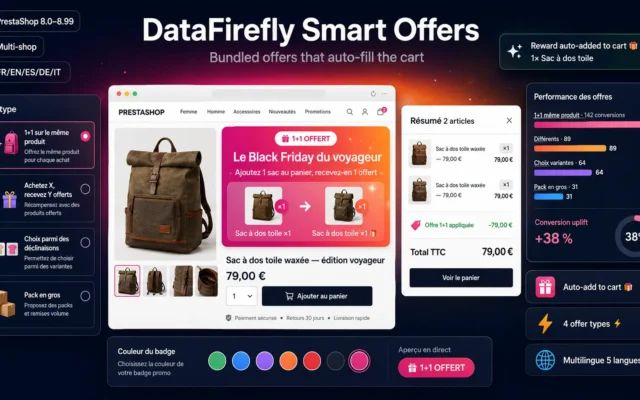
Bundles detected automatically from your real orders. Nothing to configure: the module learns what your customers already buy together.
Create 1+1 deals, bulk packs, multi-product bundles, and variant-choice offers on PrestaShop 8 and 9: auto-added reward products, customizable product page banner, and on-the-fly…
€89.00 View the module -
DataFirefly Cross-Sell — Related Products Carousel with Upsell & Analytics for PrestaShop 8
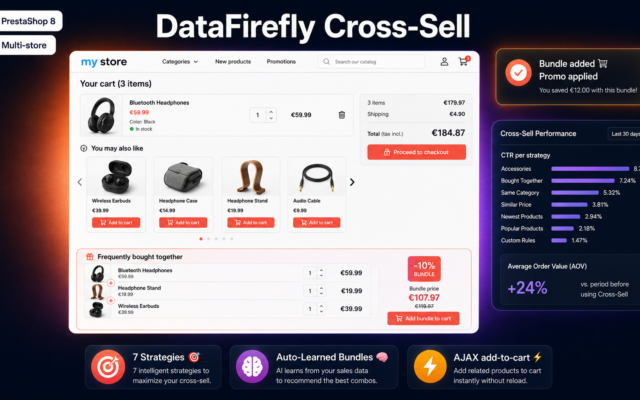
Best recommendation engineSeven weighted strategies, learning from validated orders, per-strategy CTR analytics. Nothing like PrestaShop's native block.
Intelligent cross-sell carousel for the PrestaShop 8 cart with 7 weighted recommendation strategies, auto-learned bundles, and CTR analytics per strategy.
€49.00 View the module -
Free Shipping Bar – Per-country and per-state thresholds PrestaShop 8 & 9
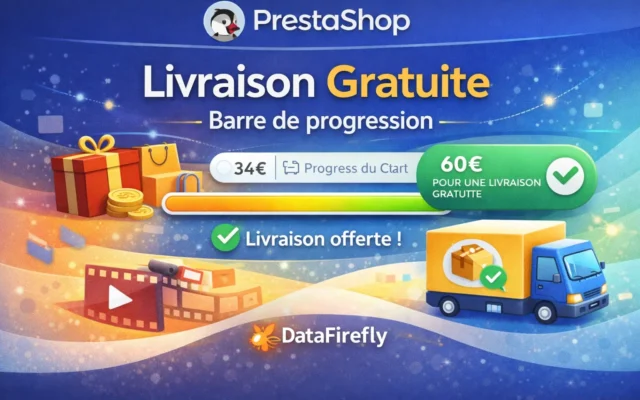
Best effect-to-effort ratioThe free-shipping bar with per-country thresholds. Simple, invisible to the hesitant buyer, devastatingly effective. Install this first.
Free shipping progress bar for PrestaShop 8 and 9. Per-country and per-state thresholds with exclusion of uncovered territories, display on the product page and…
€80.00 View the module -
Free Gift Above a Cart Threshold — PrestaShop 8 & 9
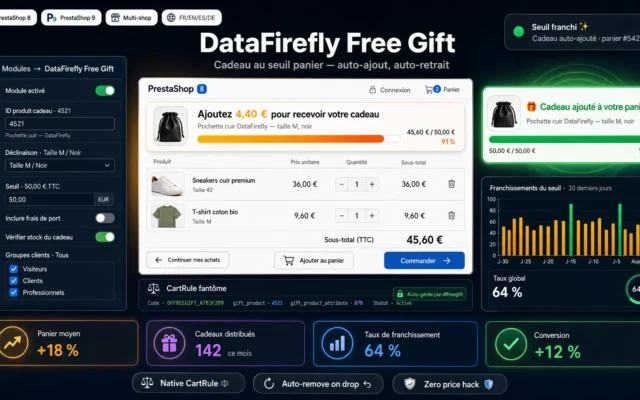
Best threshold leverA free gift above a set amount. The same psychological spring as free shipping, with a cost you control to the penny.
PrestaShop 8 and 9 module that automatically offers a gift product when the cart exceeds a threshold. Shows an "Add X to receive your…
-
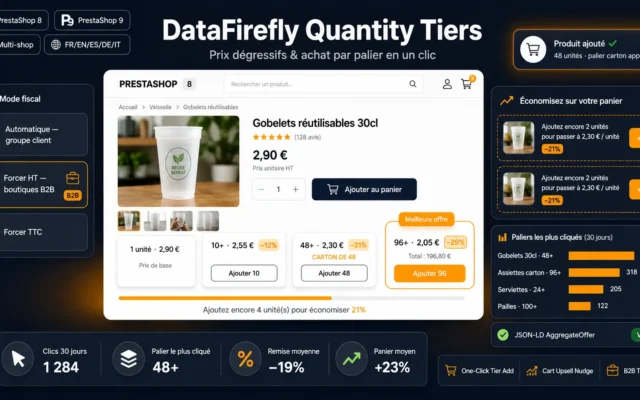
Volume-tier pricing. The customer raises their own quantities, without anyone pushing them.
Turn PrestaShop's native quantity discounts into a designer selling block: tier cards with a best deal badge, direct add to cart per quantity, automatic…
€69.00 View the module -
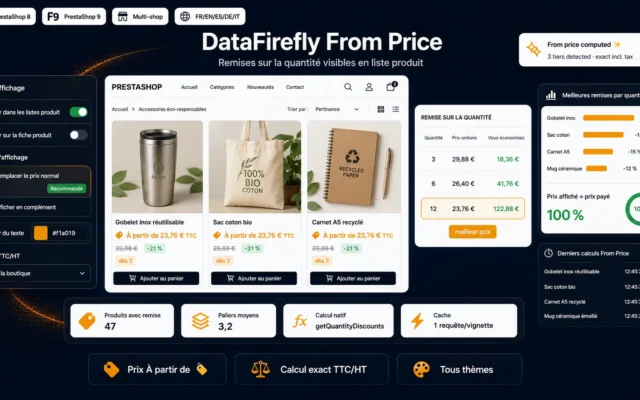
“From” Price Module — Quantity Discounts on Product Listings (PrestaShop 8 & 9)
The tiers' companionShows “from” pricing right in the listing. The customer sees the volume discount before entering the page — and arrives thinking in quantities.
Show "From {price}" and the cheapest per-quantity price on your product listings whenever a quantity discount exists. Your bulk-pricing lever, made visible before the…
€49.00 View the module -
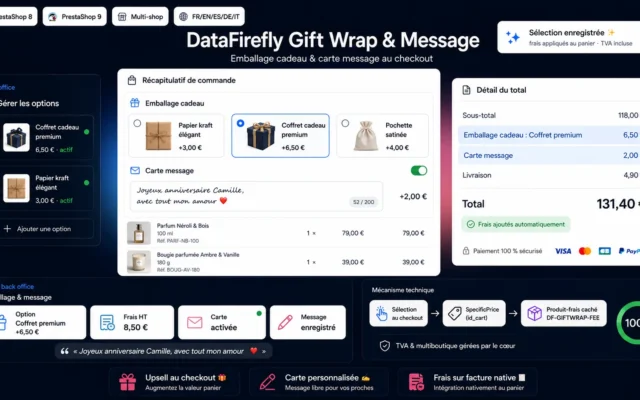
Gift wrapping with a personal message. No stock, no logistics, several points of margin over the holiday season.
Offer gift wrapping and a personalized message card right inside the PrestaShop checkout. Illustrated, paid wrapping options, a free-text message written to the order,…
€59.00 View the module -
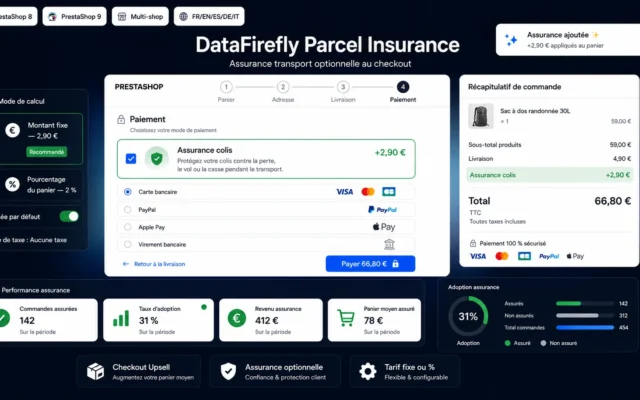
Parcel Insurance for PrestaShop 1.7, 8 & 9 — Optional Shipping Insurance Upsell at Checkout
Checkout upsellParcel insurance offered at payment. A service, not a product: high margin and zero friction for anyone who declines.
An optional shipping-insurance upsell shown at the payment step. The customer ticks the box and the amount is added to the cart — fixed…
€89.00 View the module
Side-by-side comparison
| Module | Best for | Price | Rating | Link |
|---|---|---|---|---|
| DataFirefly Smart Offers — Smart bundled offers for PrestaShop | The smartest | €89.00 | — | |
| DataFirefly Cross-Sell — Related Products Carousel with Upsell & Analytics for PrestaShop 8 | Best recommendation engine | €49.00 | — | |
| Free Shipping Bar – Per-country and per-state thresholds PrestaShop 8 & 9 | Best effect-to-effort ratio | €80.00 | — | |
| Free Gift Above a Cart Threshold — PrestaShop 8 & 9 | Best threshold lever | €59.00 | 5.0 | |
| Tiered Quantity Discounts (Bulk Pricing) for PrestaShop | Best for B2B | €69.00 | — | |
| “From” Price Module — Quantity Discounts on Product Listings (PrestaShop 8 & 9) | The tiers' companion | €49.00 | — | |
| Gift Wrapping & Personalized Message Module – PrestaShop 8/9 | Pure margin | €59.00 | — | |
| Parcel Insurance for PrestaShop 1.7, 8 & 9 — Optional Shipping Insurance Upsell at Checkout | Checkout upsell | €89.00 | — |
The cheapest lever of all
Raising average order value is the only optimisation that costs nothing in acquisition. You have already paid to bring this visitor in, they have already decided to buy: every extra pound they spend falls almost entirely into margin. That is why one point of AOV is often worth far more than one point of conversion rate.
But not all mechanics are equal, and above all, they do not apply at the same moment. Offering an accessory to someone who has not yet chosen their main product is noise. Offering it once that product is in the cart is a service.
Three families of levers
Recommendation levers add products: cross-sell, bundles, complementary items. They work in proportion to their relevance — an engine that learns from real orders always beats a frozen list of accessories.
Threshold levers push the customer to spend more to unlock something: free shipping, a free gift, a volume tier. They are formidably effective because they turn spending into perceived gain.
Option levers sell service rather than product: gift wrapping, parcel insurance. High margin, no stock, zero extra logistics.
The rule that decides everything
An AOV lever must never jeopardise the base order. An upsell popup standing between the customer and the pay button can cost you more in abandonment than it earns in add-ons. The right reflex: measure overall conversion, not just the cart value.
To sell bundles and gift boxes with correct VAT per component, see our bundles, packs and gift boxes selection.
How to choose
The one lever to install if you install only one
The free-shipping progress bar. It is simple, it bothers nobody, it is visible everywhere, and its effect is immediately measurable. Set the threshold 20–30% above your current AOV, and recalculate every quarter — otherwise it drifts out of tune as your cart grows.
Then, in this order
- Cross-sell — but only an engine that learns from real orders. An accessory list typed in by hand two years ago no longer recommends anything relevant.
- Bundles — they capitalise on what your customers already buy together. Nothing to configure: the module reads your history.
- Service options — gift wrapping, parcel insurance. Near-pure margin, no stock, immediate effect over the holidays.
- Volume tiers — only if your catalogue lends itself to it (consumables, B2B, parts).
The metric to watch (and it is not AOV)
It is revenue per visitor. Average order value alone is misleading: a module that scares off half your hesitant buyers mechanically lifts the AOV of the survivors while making you poorer. Revenue per visitor captures both effects. If a module lowers it, switch it off — even if it “raises average order value”.
The mistake we see everywhere
The upsell popup right before payment. The customer has decided, card in hand, and you hand them one more decision to make. It is the worst place in the funnel to add friction. If you want to upsell, do it on the product page or in the cart — never in the checkout.
What you gain
Zero acquisition cost
The visitor is already here, already decided. The extra pound they spend falls almost entirely into margin.
Recommendations that learn
The cross-sell engine learns from real orders, not from a frozen accessory list typed in once and forgotten.
The threshold that lifts the cart
The free-shipping progress bar turns spending into perceived gain. It is the highest-return lever in the set.
Selling service, not product
Gift wrapping, parcel insurance: pure margin, with no stock and no extra logistics.
Volume encouraged, not forced
Volume tiers and “from” pricing in listings: the customer raises quantities on their own, without being pushed.
Measured effect, not assumed
Every module tracks impressions, clicks and conversions. You know what lifts the cart — and what breaks the order.
From install to results
-
Install the free-shipping bar
Set the threshold 20–30% above your current average order value. Best effect-to-effort ratio in the whole selection.
-
Wire in a cross-sell that learns
An engine that learns from validated orders, not a frozen accessory list. Relevance is the whole difference in CTR.
-
Add the service options
No stock, no logistics: near-pure margin, especially over the holidays. The most under-used lever there is.
-
Let the bundles build themselves
The module reads your order history and proposes the packs your customers already assemble themselves.
-
Watch the right metric
Not average order value: revenue per visitor. A module that scares off the hesitant inflates the first while destroying the second.
“Our average order value jumped 11% after the checkout upsell. We were delighted — until we looked at revenue per visitor, which had fallen. We were scaring off the hesitant buyers and only counting the survivors.”
Frequently asked questions
Cross-sell or upsell — what is the difference, and which comes first?
Cross-sell offers a complementary product (the case with the laptop); upsell offers a step up on the same need (the higher model). Cross-sell is almost always safer: it adds to the cart without reopening a decision already made. A badly placed upsell can revive hesitation the customer had already settled.
Where should the free-shipping threshold sit?
Rule of thumb: roughly 20 to 30% above your current average order value. Too low and you give away shipping on orders you would have banked anyway. Too high and nobody believes it, so the lever never fires. Recalculate the threshold every quarter — it must follow your AOV, or it drifts out of tune on its own.
Can an upsell module actually reduce my sales?
Yes, and that is the main risk across this whole family of modules. An upsell popup standing between the customer and payment can cost more in abandonment than it earns in add-ons. Always measure overall conversion, not just cart value. If the cart rises 8% while conversion falls 10%, you are losing money.
Why does the free-shipping bar work so well?
It works because it turns spending into perceived gain: the customer does not “pay £12 more”, they “save £6 of shipping”. It is irrational, and thoroughly documented. That is also why it must stay visible at all times, not only on the cart page: the visitor needs to know where they stand while they browse.
Do gift wrapping and parcel insurance really pay?
Gift wrapping and parcel insurance are services: nothing to stock, nothing to buy, very high margin. Over the holiday season, gift wrapping alone can represent several points of additional margin without a penny of investment. It is the most under-used lever in European e-commerce.
Are volume discounts visible before the product page?
“From” pricing shows the best-tier rate right in the product listing. The customer discovers the volume discount before entering the product page, not after. In B2B and on consumables that changes buying behaviour entirely: they land on the page already thinking in quantities.
Should I install all of these at once?
No — it is actually counterproductive. Stack at most: one recommendation lever, one threshold lever, one option lever. Beyond that, the product page and cart turn into a billboard, readability collapses and conversion goes with it. Start with the free-shipping bar: best effect-to-effort ratio by far.
How are the bundles built?
Bundles are detected automatically from products actually bought together in your validated orders. There is nothing to configure: the module learns from your history, proposes the pack, and applies the discount you set. You keep control of the rate and can exclude products.
This need on other platforms
Not sure which one fits your store?
Tell us your context — we answer with a straight recommendation, not a sales pitch.