
Everything you'd want to know before you install.
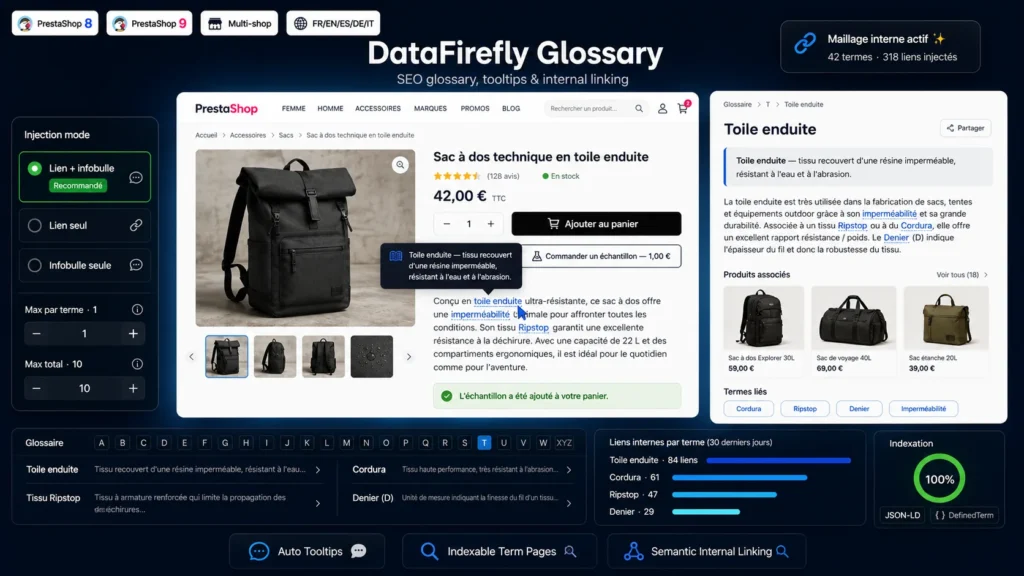
A detailed look at how DataFirefly SEO Glossary — Industry term lexicon, automatic tooltips in your descriptions and internal linking to your products for PrestaShop 8 & 9 works, why we built it the way we did, and the thinking behind the features above.
§ 01
Why a glossary is one of the best effort-to-result ratios in e-commerce SEO
An e-commerce catalog captures transactional queries: coated canvas backpack, men's ripstop jacket. That is the visible, contested part of the market. But upstream of it lies a considerable volume of informational queries your product pages structurally cannot capture: what is coated canvas, difference between ripstop and cordura, what does the denier of a fabric mean. Those queries are easier to rank for (commercial competition is thin), they bring in discovery-stage traffic, and above all they can be funnelled towards your catalog through a well-placed contextual link. The glossary is precisely the tool that captures them. Each industry term becomes a dedicated page, quick to produce, thematically coherent with your catalog, and naturally linked to your products. Unlike a blog, there is no continuous editorial output to maintain: you enter the term once, and it works for you indefinitely.
§ 02
The double benefit: conversion and rankings
Most merchants who install a glossary do it for SEO, and discover a conversion benefit they were not expecting. A visitor reading a product page who stumbles on a technical term has three options: guess (bad for trust), open a new Google tab (bad for you: they leave your site) or give up. The tooltip solves the problem without ever taking the visitor off the page: they hover, read a one-sentence definition, and carry on reading. Bounce rate falls, time on page rises, and both behavioural signals in turn feed the rankings of the product page itself. The module lets you arbitrate: in link plus tooltip mode (the default), you get both benefits; in tooltip-only mode, you favour pedagogy without adding outbound links to your product pages; in link-only mode, you favour pure internal linking.
§ 03
How the injection engine works — and why it never breaks your HTML
This is the most sensitive technical point of a module like this, and the one where most solutions on the market fail. A naive glossary module does a plain string replacement in the description's HTML. The result: it drops links inside existing tags, breaks attributes, turns a word sitting inside a URL into a nested link, or re-links the text of a link it just created itself. DataFirefly SEO Glossary works differently. The content is first split into tag segments and text segments. Only text segments are candidates for replacement, and the engine maintains a depth counter for every forbidden zone: as soon as it enters an a, script, style, code, pre, svg, textarea, select, option, button, iframe or noscript tag, or an h1, h2 or h3 heading, every text segment up to the matching closing tag is left untouched. On allowed segments, the search uses a Unicode regular expression with real word boundaries, excluding letters, digits, underscores and hyphens on either side of the term — so it is impossible to turn the word cordura inside the word corduras into a link, or to catch a fragment in the middle of an identifier. Finally, each injected link is temporarily replaced by a unique token during processing, then restored at the end: this guarantees that a term can never be re-linked inside a link the module itself has just placed.
§ 04
Synonyms: the detail that triples your coverage
A single concept is rarely expressed one single way in a catalog written over several years by several people. Coated canvas, PVC coated canvas, coated fabric and PVC coating all mean the same thing. A module that only matches the exact term name misses the majority of real occurrences. Each glossary term therefore accepts a comma-separated list of synonyms, entirely free-form and translatable language by language. All variants (main name and synonyms) are merged then sorted by decreasing length before the matching step: the longest, most discriminating expression always wins, which prevents a short variant from catching a fragment of a longer one. Concretely, if both PVC coated canvas and coated canvas are in the list, the former is the one that gets linked when it appears in full. Matching is case-insensitive and tolerant of multiple spaces and line breaks — expressions split by a newline in the HTML are recognised normally.
§ 05
Over-optimisation guardrails, on by default
Excessive internal linking is counterproductive: Google has long identified anchor over-optimisation patterns, and a product page stuffed with twenty internal links to definitions dilutes internal PageRank rather than concentrating it. The module therefore starts from deliberately conservative settings. The per-term occurrence limit is set to 1 by default: even if the word ripstop appears eight times in a description, only the first occurrence becomes a link, the other seven stay plain text. The global per-content limit is set to 10: beyond that, the engine stops, whatever terms remain. Both values are configurable if your strategy differs, but we recommend keeping the per-term limit at 1 — a single link per concept is more than enough to pass the semantic signal, and the second adds nothing for the engine. Each term also has an individual auto-linking switch: a term can exist in the glossary, have its definition page indexed, and never be injected automatically into content.
§ 06
Structured data: DefinedTerm and DefinedTermSet
The Schema.org vocabulary defines two types dedicated to glossaries, still very rarely used in e-commerce. Each term page emits a DefinedTerm JSON-LD block with its name, description, URL and membership of a set. The index page emits a DefinedTermSet referencing all active terms. Concretely, this gives Google and answer engines an explicit, unambiguous signal: this page defines a specific term, and it belongs to a structured glossary on this domain. It is one of the few markups that tells the engine not only what the page is about, but what function it fills in the site's architecture. In the era of generative answers (AI Overviews, ChatGPT, Perplexity), correctly marked-up definitional content is over-represented in citations — a clean glossary is today one of the content formats most frequently picked up by answer engines.
§ 07
Multilingual and multistore, designed in from day one
Every text field in the glossary is multilingual: the term name, the synonyms, both definitions, the slug, the meta title and the meta description can all differ in each language of your store. This is essential, because a term's synonyms have no reason to be the same in English and German, and the URL slug should be in the visitor's language. Matching always happens in the current context language: an English description will never be enriched with German terms, and vice versa. On the multistore side, terms are attached to shops through PrestaShop's standard association table: you can run a dense technical glossary on your B2B store and a reduced, simplified one on your B2C store, within the same installation.
§ 08
Zero AI, zero API, zero recurring cost
This module makes no network calls. There is no API key to provide, no external provider to pick, no usage to monitor. All processing happens in PHP, server-side, from your own data. This is a deliberate choice: glossary linking is a deterministic problem, not an inference problem. You know your industry vocabulary better than any model does, and replacing a string in HTML needs no artificial intelligence to be done correctly — it needs to be done rigorously. The practical consequence is that the module has no running cost, no latency, no dependency on a third-party service that could change its pricing or shut down, and no data from your catalog ever leaves your server.
§ 09
Typical use cases
Textile and leather goods — a dense materials vocabulary (GSM, tanning, denier, ripstop, coating) that the customer does not master, with high volumes of associated informational queries. Cosmetics and supplements — active ingredients are searched terms in their own right (hyaluronic acid, niacinamide, adaptogen), each able to funnel visitors towards the products containing them. Technical equipment, tools, professional gear — specifications and standards (IP67, UPF rating, torque, EN 388 standard) are exactly what the buyer researches before choosing. B2B and industrial selling — a glossary is the best way to establish brand authority in a technical field, and to pull prospects still in the understanding phase into your funnel. Jargon-heavy niche stores (wine, coffee, audio, cycling, aquariums) — the glossary is literally the content the community is searching for, and it positions you as the reference in your sector.
§ 10
Internal architecture
Native PSR-4 autoloading under the DataFirefly/Glossary/ namespace mapped to the src/ folder, without Composer or any external dependency. The GlossaryTerm entity is a standard PrestaShop multilingual ObjectModel, with automatic generation of missing slugs. The TermRepository centralises database access with a static dictionary cache, so that injecting into a category page showing thirty products triggers a single query. The ContentFilter service holds the entire replacement engine, stateless and independently testable. Admin controllers are legacy ModuleAdminController — a deliberate choice to guarantee stable compatibility between PrestaShop 8.0 and 9.x without maintaining two code variants. Four SQL tables prefixed dfglossary_ in utf8mb4_unicode_ci: term (id, active, auto-linking), term_lang (all translatable fields), term_shop (multistore association) and term_product (related products). Uninstalling removes the four tables, the back office tab and every configuration key.




Simple and functional.
Exceptional support.Automatically translated