PrestaShop Catalogue Management

PrestaShop 8 & 9 Product Documents & Downloads Module — Manuals, Datasheets, CE Certificates on the Product Page + Indexable Download Page

Your manuals are asleep on the server. Your customers are looking for them on Google.

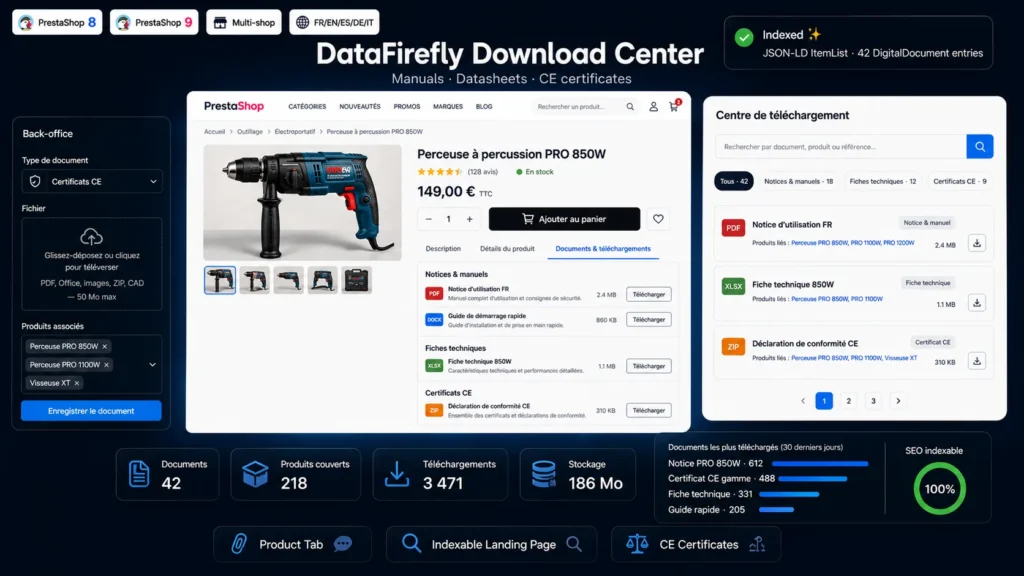
Download Center attaches your manuals, user guides, datasheets and CE certificates directly to your products. Every product page gains a Documents and downloads tab listing the files grouped by type, with a colored extension chip, file size and download button. Alongside it, an indexable central page gathers your whole document catalog, with search by document title, product name or reference, filters by type and JSON-LD structured data. One CE certificate can cover a whole range: associations are many-to-many. Download counter, files protected outside the web root, PrestaShop 8 and 9, multistore, five languages, no dependency.

At a glance
  • Documents and downloads tab on the product page, documents grouped by type
  • Indexable central page with search, type filters, pagination and JSON-LD ItemList
  • One document can cover several products: a single CE certificate for a whole range
  • Custom multilingual document types, four types shipped by default
  • Files stored outside the web root and served by a controller, with a download counter
PrestaShop 8 & 9 Product tab Indexable page CE certificates JSON-LD Multistore 5 languages No dependency
  • 30-day refund
  • 12 months updates
  • 24h support
www.datafirefly.com/en/
Module Documents & Téléchargements PrestaShop 8 & 9 — Notices, Fiches Techniques, Certificats CE en Fiche Produit + Page Centrale Indexable
v1.0.0 · updated 2026-07-12
What it does

The short version.

01

A clean tab on the product page

Documents appear in a Documents and downloads tab next to the description, through the native extra content hook. They are grouped by type — Manuals and user guides, Datasheets, CE certificates — each row showing a colored extension chip, the title, an optional description, the file size and a download button. No theme override.

02

A central page Google indexes

All your documentation is gathered on a page with a clean URL, such as slash downloads, with meta title and meta description configurable per language, a clean canonical, a breadcrumb and a JSON-LD ItemList of DigitalDocument. Each document links back to the products it covers: that many internal links gained.

03

One certificate, a whole range

The document-product association is many-to-many. A CE declaration of conformity covering three references is attached to all three in a single step, from an autocomplete search field with removable chips. Conversely, a product can carry as many documents as needed, with no limit.

04

Files that do not leak

Files are stored in a folder protected by htaccess, out of direct reach from the browser, and served by a front controller that checks the shop, checks the document is active and increments the download counter. The original file name is given back to the customer, PDFs open in the browser, everything else downloads.

The long version

Everything you'd want to know before you install.

A detailed look at how PrestaShop 8 & 9 Product Documents & Downloads Module — Manuals, Datasheets, CE Certificates on the Product Page + Indexable Download Page works, why we built it the way we did, and the thinking behind the features above.

§ 01

Product documentation, the content nobody puts to work

You have PDF manuals, datasheets, CE declarations of conformity. They arrive by email at customer service, they sit in a shared folder, or at best they are pasted into a product description. The result: customers write in to ask for the manual, and Google sees nothing. Download Center turns that documentation into a store asset — visible to the customer, indexable by the search engine.

§ 02

On the product page, where people look for it

The module adds a Documents and downloads tab next to the description, without touching your theme. Documents are grouped by type and presented as a list: colored extension chip, title, optional description, file size, download button. Customers find the manual without emailing support, and see at a glance that the product ships with a CE certificate — a reassurance argument that carries weight, in B2B as much as on technical products.

§ 03

A central page built for search

The module publishes a page gathering your whole document catalog, at a clean and configurable URL. It offers a search that queries both document titles and the names and references of the associated products, type filters with counters, and indexable pagination. Each document lists the products it covers as links: internal linking builds itself. Meta title and meta description are configurable per language, the canonical is clean, and a JSON-LD ItemList block describes each file as a DigitalDocument.

§ 04

One document, several products

A CE declaration of conformity rarely covers a single reference. The module handles many-to-many association natively: from a document form, an autocomplete search field lets you attach as many products as needed, as chips you can remove in one click. Documents with no attached product — a quality charter, a general catalog — remain visible on the central page, which also makes it a company documentation space.

§ 05

Files that are actually protected

Files are never directly reachable: they are written under a hashed name in a folder locked by htaccess, and only come out through a front controller that checks the document is active and attached to the current shop, increments the download counter, then returns the file under its original name. PDFs and images open in the browser, other formats download. There is no way to bypass the counter by guessing a URL.

§ 06

Built for PrestaShop 8 and 9

The module follows PrestaShop 8 and 9 conventions: no core override, no Composer dependency, a standard admin controller under the Catalog menu, a clean route declared through the routing hook, and a vanilla JavaScript autocomplete interface. Uninstalling cleans everything: tables, configuration, admin tab and uploaded files.