
Our best WooCommerce plugins to speed up your store
Three plugins — and the honesty to say when none of them is enough.
WooCommerce isn't slow — your forty plugins are. And a Lighthouse score of 100 proves nothing: Google judges field data, not lab scores.
Sound familiar?
A slowness that isn't a bug
Extensibility is why you chose WordPress. It's also why your pages load slowly.
A score that proves nothing
Google measures real users on real phones. Your laptop is not evidence.
A cache that moves the problem
The cached visitor is fast. The first one never is — and checkout barely caches.
A mobile rate that tells you everything
If mobile conversion is far below desktop, the problem is rarely the design.
Our selection, ranked
Every module below is built, maintained and supported by our team. The ranking reflects what we would install first on a client store.
-
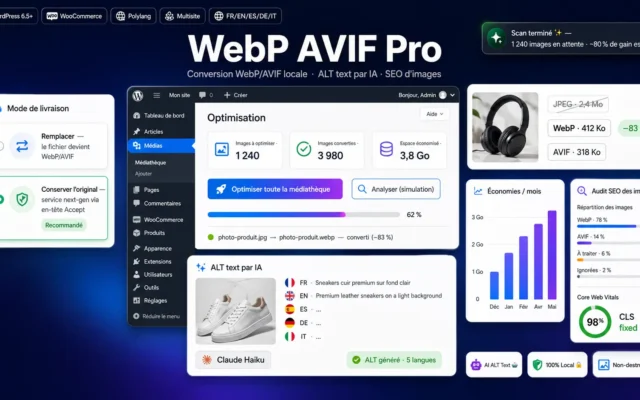
WebP & AVIF Pro — Image Optimization for WordPress/WooCommerce
First — the one mechanical winImages are the heaviest part of the page. WebP and AVIF automatically, with fallback. No rebuild.
100% local WebP/AVIF conversion, no subscription or quota. Multilingual AI ALT text, non-destructive mode and built-in image SEO.
€49.00 View the module -
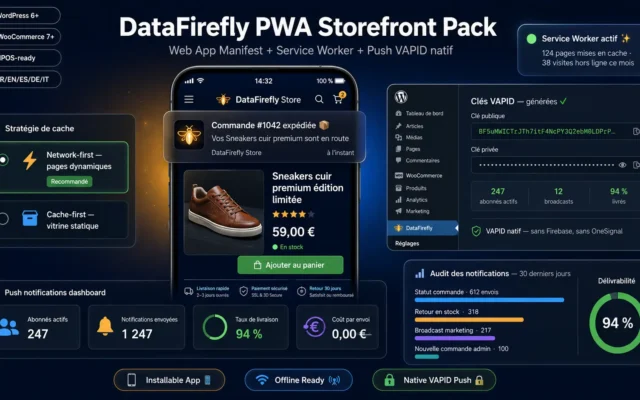
Instant navigation, offline mode, installable. Doesn't make the server faster — makes the use faster.
Turn your WooCommerce store into an installable Progressive Web App: home screen icon, offline mode and native VAPID push notifications. No Firebase, no OneSignal.
€79.00 View the module -
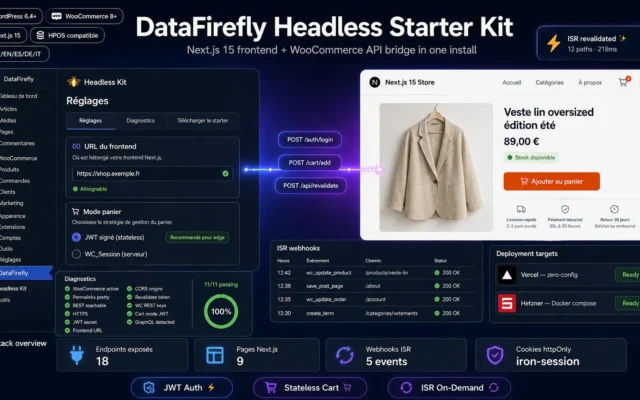
Headless Starter Kit for WooCommerce — Decoupled Front & API
When no plugin is enoughThe honest answer once images and caching are exhausted: a decoupled front end. A project, not a click.
Plug-and-play Next.js 15 frontend connected to WooCommerce: JWT auth, cart, checkout, ISR webhooks, Vercel or Hetzner deployment in one command. WordPress plugin + downloadable…
€49.00 View the module
Side-by-side comparison
| Module | Best for | Price | Rating | Link |
|---|---|---|---|---|
| WebP & AVIF Pro — Image Optimization for WordPress/WooCommerce | First — the one mechanical win | €49.00 | — | |
| PWA Storefront Pack — Installable WooCommerce App + Native Push Notifications | Perceived speed | €79.00 | — | |
| Headless Starter Kit for WooCommerce — Decoupled Front & API | When no plugin is enough | €49.00 | — |
WooCommerce isn’t slow. Your forty plugins are
WooCommerce is an extension of WordPress — and WordPress was built to be extended. That very extensibility, the one that lets you add a feature in two clicks, is the cause of your load time. The cause isn’t a bug: it’s the feature.
A Lighthouse score of 100 proves almost nothing
Google doesn’t judge your site with the test running on your machine. It judges field data — real users, real phones, real networks. A beautiful lab score is not evidence; it’s reassurance.
And the one line item that pays without a rebuild
Images. On a product page they account for most of the weight. After that you stop buying speed and start buying perceived speed — and at some point the honest answer stops being a plugin and becomes a different architecture.
Further reading
One in-depth guide from the blog completes this selection: the complete Core Web Vitals guide.
How to choose
Measure properly first
Not the lab score. Google judges field data — real users, real phones, real networks. A score of 100 on your machine only proves your machine is fast.
Then images — the one mechanical win
On a product page, images are the heaviest item. Modern formats cut that weight sharply, automatically, without touching the theme. It's the only measure that reliably pays without a rebuild.
After that you buy perception, not milliseconds
A PWA doesn't make your server faster. It makes navigation feel instant — and perception drives bounce. That's legitimate, as long as you know what you're buying.
And eventually, no plugin is the answer
Once images and caching are exhausted, the problem is architectural. A decoupled front end solves it — at the price of a real project. Anyone selling you that as a plugin is selling you something else.
What you gain
The one mechanical win
Images are the heaviest part of a product page. Modern formats pay immediately, with no rebuild.
WebP and AVIF, without the manual work
Automatic conversion, right sizes, fallback for old browsers. No manual re-uploading.
Perceived speed — which also counts
Instant navigation, offline mode, install to home screen. The user experiences speed.
Core Web Vitals in the field, not the lab
Google measures field data, not your lab score. Optimise for real devices.
Headless — when it's genuinely needed
Once images and caching are exhausted, the honest answer stops being a plugin.
Three levels, no illusions
You know what you're buying: a real gain, a perception, or an architecture change.
From install to results
-
Measure properly
Field data, not lab scores. Google judges real devices — not your machine.
-
Start with images
The heaviest item on a product page. Modern formats pay immediately.
-
Don't expect everything from cache
It helps the cached visitor — not the first one, and barely at checkout.
-
Then buy perception
Instant navigation and offline mode. Perception isn't a lie, but it isn't a millisecond either.
-
Only then, headless
Images and cache exhausted? Then it's the architecture — and that's a project.
“Our Lighthouse score was 96. Search Console still reported poor field data. It was the images — invisible on our fibre connection, very visible on our customers' phones.”
Frequently asked questions
My Lighthouse score is good. Why is the site still slow?
Because it's measured in a lab — your machine, your network. Google judges the field data of real users on real phones. A perfect lab score with a poor field measurement is a perfectly ordinary combination.
If I can only do one thing, where do I start?
With images. On a product page they're the heaviest item, and modern formats cut that weight sharply without touching the theme. It's the only area where the gain is mechanical — not estimated, not negotiated.
Isn't a caching plugin enough?
It moves the problem. The cached visitor gets a fast page; the first visitor to each variation doesn't — and cart, checkout and account pages barely cache anyway. A cache doesn't replace a diagnosis.
Does a PWA actually make my site faster?
No. It buys perceived speed: instant transitions, offline capability, installation on the home screen. That isn't cheating — perception drives bounce. But it doesn't replace lighter images.
When does headless become the right answer?
When images and caching are exhausted and response time still comes from an overloaded PHP stack. At that point the honest answer isn't another plugin — it's a decoupled front end, with everything that implies in effort.
Which metric tells me speed is costing me money?
Mobile conversion rate compared with desktop. If it's clearly lower, it's rarely the design — it's load time. That number is more honest than any performance score.
Is deactivating plugins worth it?
Only if you do it without measuring. Deactivate, measure in the field, keep what you need. One plugin fewer isn't a goal in itself — one useless plugin fewer is.
This need on other platforms
Not sure which one fits your store?
Tell us your context — we answer with a straight recommendation, not a sales pitch.