
Our best PrestaShop modules for credible urgency and scarcity
Eight modules to build pressure, without manufacturing scarcity.
Urgency is the most powerful conversion lever in e-commerce — and the most badly used. Simulated scarcity is paid for twice: in credibility, then in fines. These are the PrestaShop modules that build urgency on real data.
Sound familiar?
The countdown that never ends
It resets on every visit. Your regulars notice — and from that point on, none of your deadlines is credible again.
"Only 3 left" — for six months
The number is hard-coded into the theme. It hasn't moved in six months. That's decorative scarcity, and it shows.
The stockout that earns you nothing
The product is sold out, the page shows a greyed-out button, the visitor leaves. Nobody captured a perfectly explicit demand.
Urgency that exposes you legally
A false limited-time offer is a practice deemed unfair in all circumstances. Under Omnibus: up to 4% of annual turnover.
Our selection, ranked
Every module below is built, maintained and supported by our team. The ranking reflects what we would install first on a client store.
-
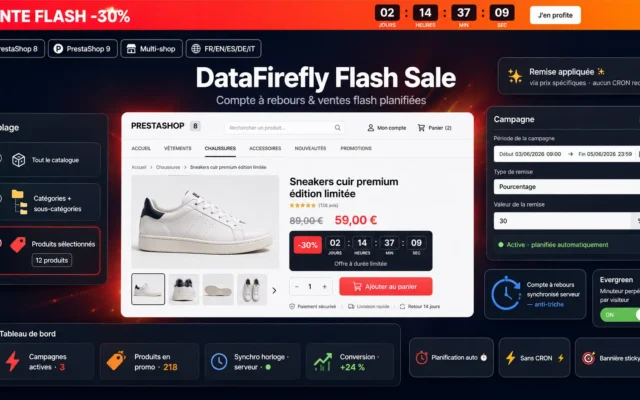
DataFirefly Flash Sale & Countdown
Best overallThe flash sale with a server-side end date, identical for every visitor, and a price that genuinely goes back up at expiry. The most powerful form of urgency, and the only lawful version of it.
Promo banner, server-synced countdown and automatic discount scheduling, with no CRON and without touching your theme.
€99.00 View the module -
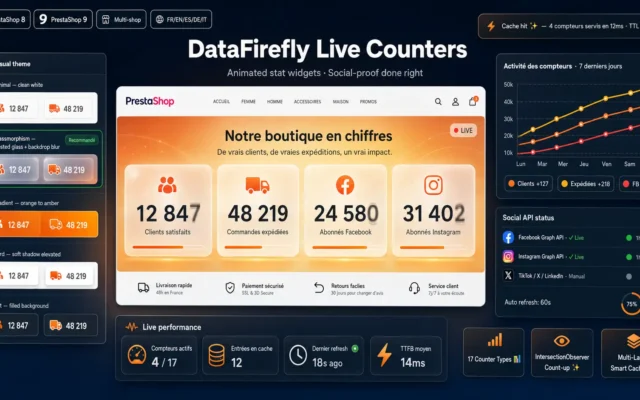
Real-Time Counters — Stock, Visitors & Sales (PrestaShop)
Best effort-to-impact ratioStock remaining, live visitors, recent sales: all three counters read the database, never a number typed in by hand. The honest foundation of any scarcity strategy. Install this one first.
17 animated counters (customers, shipments, FB/IG live followers, reviews, CO₂…), 5 visual themes, scroll-triggered CountUp animation, multi-layer cache. The premium social-proof widget for PrestaShop…
€49.00 View the module -
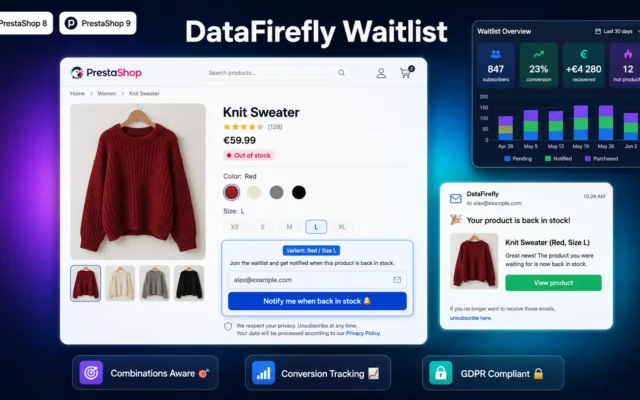
DataFirefly Waitlist — Back-in-stock alert with conversion tracking for PrestaShop 8 & 9
Best for stockoutsThe only module that turns bad news into an asset: the greyed-out button becomes a qualified waiting list, with a restock notification and tracking of the conversion it actually generated.
"Notify me when back in stock" button on out-of-stock product pages. Automatic email at restock with conversion dashboard. Combinations support, GDPR double opt-in, merchant…
€49.00 View the module -
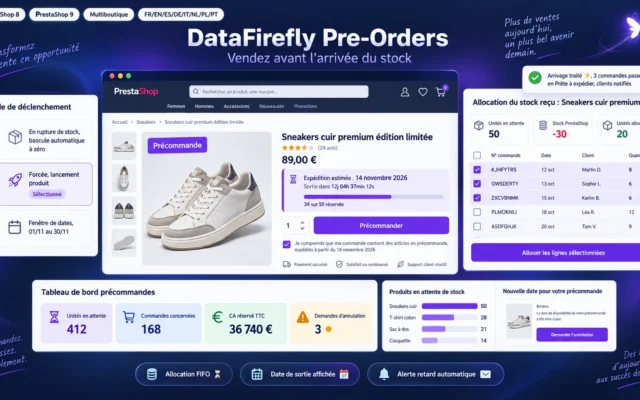
PrestaShop Pre-Order Module 8 & 9: Sell Products That Are Out of Stock
Selling through the stockoutThe sold-out product page stays purchasable: the customer pre-orders with an announced availability date. The stockout becomes revenue collected, not a waiting list.
Sell your products before they reach your warehouse: pre-order rules per product or combination, estimated shipping date on the product page, quantity caps, stock…
€89.00 View the module -
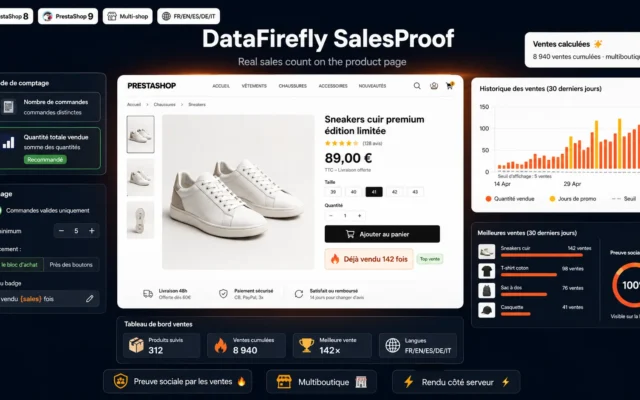
The real sales count, displayed on the product page. Nothing to configure, nothing to invent: the figure comes from your confirmed orders. The cheapest popularity signal in the catalogue.
Show "Already sold 142 times" on your product pages and reassure shoppers with social proof based on your real sales.
€29.00 View the module -
Best Seller Flag — Automatic best-seller badge for PrestaShop 8
Automatic social scarcityThe best-seller badge, awarded from your real sales, with a configurable threshold. Be demanding: a badge on three quarters of the catalogue means nothing at all.
Automatic social proof on your best-sellers. The module displays a "Best Seller" badge on the products that actually sell best, detected from real sales…
€29.00 View the module -
Trending Products & Popular Searches Module PrestaShop 8/9
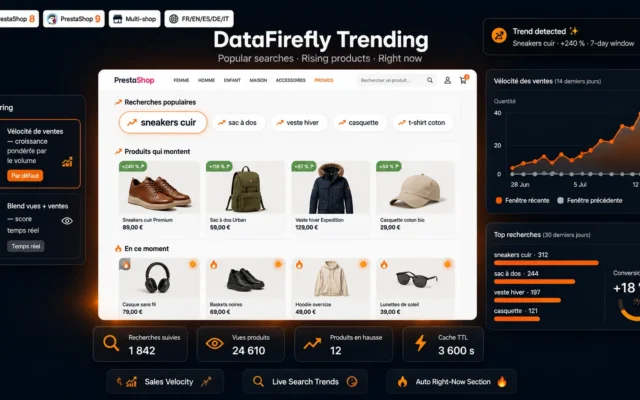
Urgency without theatreTrending products and popular searches, computed from the shop's real activity. The most honest form of social pressure there is: it simply describes what's happening.
Trending widget for PrestaShop 8 and 9: popular searches of the moment, products accelerating in sales and an auto-generated Right now section, with a…
€59.00 View the module -
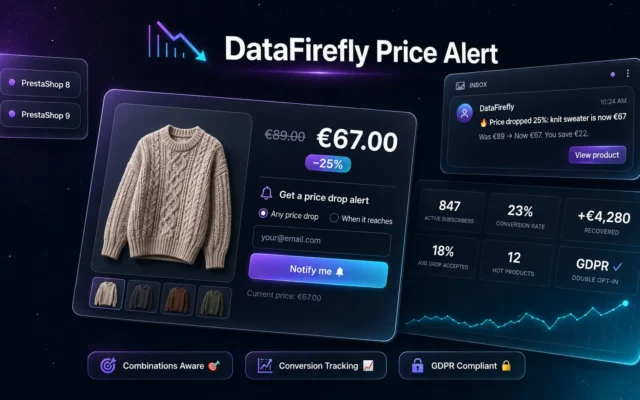
Rather than forcing the purchase now, the price-drop alert captures the customer who was going to wait, and brings them back at the right moment. The indispensable counterweight to this entire page.
Automatic price-drop alert for PrestaShop 8 and 9: customers subscribe from the product page in 'any drop' or 'target price' mode, receive an email…
€49.00 View the module

Side-by-side comparison
| Module | Best for | Price | Rating | Link |
|---|---|---|---|---|
| DataFirefly Flash Sale & Countdown | Best overall | €99.00 | — | |
| Real-Time Counters — Stock, Visitors & Sales (PrestaShop) | Best effort-to-impact ratio | €49.00 | — | |
| DataFirefly Waitlist — Back-in-stock alert with conversion tracking for PrestaShop 8 & 9 | Best for stockouts | €49.00 | — | |
| PrestaShop Pre-Order Module 8 & 9: Sell Products That Are Out of Stock | Selling through the stockout | €89.00 | — | |
| Sales Counter — Number of sales shown on the product page (PrestaShop 8 & 9) | The hard number | €29.00 | — | |
| Best Seller Flag — Automatic best-seller badge for PrestaShop 8 | Automatic social scarcity | €29.00 | — | |
| Trending Products & Popular Searches Module PrestaShop 8/9 | Urgency without theatre | €59.00 | — | |
| DataFirefly Price Alert — Price drop alert with conversion tracking for PrestaShop | Inverted urgency | €49.00 | — |
Scarcity isn’t declared, it’s observed
Urgency is the most powerful conversion lever in e-commerce, and the most badly used. The reason is simple: it is trivial to simulate scarcity — a JavaScript countdown, an “only 3 left” hard-coded into the theme, a visitor counter pulling a random number. It takes ten minutes and costs nothing.
Except that simulated scarcity is paid for twice. First commercially: your regular customers eventually notice that the clock restarts on every visit, and from that moment none of your deadlines is credible again. Second legally — and that bill is considerably heavier.
What European law actually says
Falsely stating that a product will only be available for a very limited time, in order to force an immediate decision, appears in the blacklist of Annex I to Directive 2005/29/EC: a practice deemed unfair in all circumstances, with no need to prove any harm. The Omnibus Directive raised the penalties: up to 4% of annual turnover in the member states concerned.
A countdown that resets with every new session falls squarely into that box. This isn’t a borderline case: it’s the textbook example.
Three families of honest levers
Time levers: flash sales with a real end date, set in the back office, identical for every visitor, and a price that genuinely goes back up when the clock runs out.
Stock levers: counters wired to real inventory, and back-in-stock alerts that capture demand instead of losing it. Scarcity you didn’t choose becomes a qualified waiting list.
Popularity levers: sales counts, best-seller badges, trending products. They work because the number is true — and they only appear once the threshold is genuinely reached.
What nobody will tell you
Permanent urgency is no longer urgency. If every product page carries a clock, a visitor counter and a critical stock warning, you haven’t built pressure: you’ve built noise, and you have trained your customers to ignore it.
How to choose
The rule that comes before the modules
Every number you display must be read from somewhere, never invented. Real stock, real sales, real visitors, a real end date. If a module offers to let you type in by hand how many people are viewing the page, it is not an urgency module: it's a legal-risk generator with a nice interface.
The one module to install if you only install one
The real-time counters wired to stock, visitors and sales. They don't lie, they don't wear out, they require no editorial judgement, and they work across the entire catalogue without you orchestrating anything. That's the honest foundation everything else can rest on.
Then, in this order
- The dated flash sale — with a server-side end date and a price that goes back up. It's the most powerful lever of the set, and the most dangerous if you cheat.
- The back-in-stock alert — the only module on this page that turns bad news into a commercial asset. It costs nothing in credibility because it genuinely helps.
- Popularity signals — sales counter, best-seller badge, trending products. Enable them with demanding thresholds: a best-seller badge on three quarters of the catalogue means precisely nothing.
- The price-drop alert — inverted urgency. Rather than forcing an immediate purchase, it captures the customer who was going to wait, and brings them back at the right moment.
The metric to watch (and it isn't the spike)
Everyone watches conversion during the flash sale. Watch instead the conversion of the products with no urgency at all, before and after. If it drops, you have taught your customers to buy only on promotion — exactly as the reflex discount code teaches them to abandon their cart on purpose. The spike is easy to manufacture; it's the floor you need to watch.
The mistake you see everywhere
The "offer valid for 24h" banner that has been running for eighteen months. It ticks every box of a misleading commercial practice, it convinces none of your regulars, and a single screenshot on social media can cost you far more than it ever earned. If you take one action after reading this page: go and switch it off.
What you gain
Real scarcity, not decorative
The counters read real stock, real sales, real visitors. Nothing hard-coded, no random numbers drawn on page load.
A countdown that actually expires
The end date is set in the back office, it is the same for every visitor, and the price genuinely goes back up when the clock runs out.
Stockouts turned into demand
The back-in-stock alert captures the email of a visitor who would have walked away, then brings them back on restock — with the conversion measured.
Urgency proven by numbers
Sales counts, best-seller badges, trending products: popularity shows up because it exists, not because someone decided it should.
No legal exposure
Urgency backed by real data is not a misleading practice under the Omnibus Directive. You sleep at night.
Effect measured, not assumed
Every module tracks impressions, clicks and conversions. You find out whether urgency sells — or whether it erodes your credibility.
From install to results
-
Wire the counters to your real data
Stock, visitors, sales: all three are read from the database. Nothing typed in by hand — therefore nothing that can be a lie.
-
Set an end date, and honour it
The price must go back up when the clock runs out. Otherwise it isn't a flash sale: it's set dressing — and a misleading practice.
-
Capture the stockout instead of enduring it
The back-in-stock alert turns a greyed-out button into a qualified waiting list. Never unpublish the page: you'd lose its ranking.
-
Show popularity only where it exists
Best-seller badge, sales counter, trending products: thresholds must be met, not decided. Be demanding about them.
-
Measure the erosion, not just the spike
Permanent urgency is no longer urgency. Watch the conversion of the products WITHOUT a countdown: that's where the erosion shows.
“Our "offer valid for 24h" banner had been running for a year. A customer spotted it and posted about it. We switched it off: conversion didn't move an inch. The only thing we had built was cynicism.”
Frequently asked questions
Is a countdown that resets on every visit legal?
No. Falsely stating that a product will only be available for a very limited time, in order to force an immediate decision, appears in the blacklist of Annex I to Directive 2005/29/EC: a practice deemed unfair in all circumstances, with no need to prove harm. A clock that resets to zero on every new session is the textbook example. The Omnibus Directive raised penalties to as much as 4% of annual turnover. The end date must be real, stored server-side, and identical for every visitor.
Can I display "only X left in stock" on my product pages?
Yes, on one non-negotiable condition: the X must come from your real inventory. Displaying an accurate remaining quantity is entirely lawful and highly effective. Hard-coding "only 3 left" into the theme, or artificially capping the display at a low figure when you actually hold two hundred, is a misleading claim. A counter wired to the database costs exactly the same to install — and exposes you to nothing.
Does urgency still work, or are customers immune to it?
It works, but it wears out — and it wears out fast. If every one of your product pages shows a clock, a visitor counter and a critical stock warning, you haven't created pressure: you've created background noise that visitors learn to filter out in three seconds. Reserve urgency for the moments when it is true: a real flash sale, a real last unit, a real spike in demand. It is the scarcity of urgency that gives it value.
Is a live visitor counter credible?
Only if it's true. A live visitor counter fed by sessions genuinely active on the page is an honest and effective social signal. A counter showing a random number between 8 and 24 is exposed by opening two tabs — and one screenshot on social media costs infinitely more than the handful of conversions it scraped together. On a small, low-traffic catalogue, showing nothing is often better than showing "1 person is viewing this product".
Should I put a countdown on every product page?
Definitely not. A countdown on every product page is the surest way to have none of them work. Reserve it for real operations: clearance, end of line, a dated commercial campaign. Across the rest of the catalogue, let the permanent, honest signals speak: sales counts, best-seller badges, trending products. They don't wear out, because they don't claim anything.
What should I do with an out-of-stock product?
Don't unpublish it — you'd lose the page's ranking, often built over months. Keep the page live, replace the greyed-out button with a back-in-stock alert field, and show the restock date if you know it. The visitor who would have left without a trace becomes a qualified email with explicit purchase intent. A good module then tracks the real conversion of those alerts: you learn what the stockout earned you instead of what it cost you.
On a flash sale, does the price really have to go back up?
Yes — and this is where most shops cheat without thinking about it. If the price never goes back up once the countdown ends, the discount isn't one: the struck-through price was never actually charged. The Omnibus Directive also requires the reference price to be the lowest price applied over the previous thirty days. A flash sale whose price stays low forever is therefore doubly at fault: on the limited duration and on the reference price.
Should I install all of these modules at once?
No, and doing so is counterproductive. Start with one real time lever (a dated flash sale) and one real stock lever (the counters). Then add the back-in-stock alert, which costs nothing in credibility because it genuinely helps. Popularity signals come last, and only where thresholds are genuinely met. Stacking all seven at once turns your product page into a slot machine — and drives away precisely the customers you were trying to convince.
This need on other platforms
Not sure which one fits your store?
Tell us your context — we answer with a straight recommendation, not a sales pitch.