
Everything you'd want to know before you install.
A detailed look at how Trending Products & Popular Searches Module PrestaShop 8/9 works, why we built it the way we did, and the thinking behind the features above.
§ 01
Trends are your most persuasive salesperson
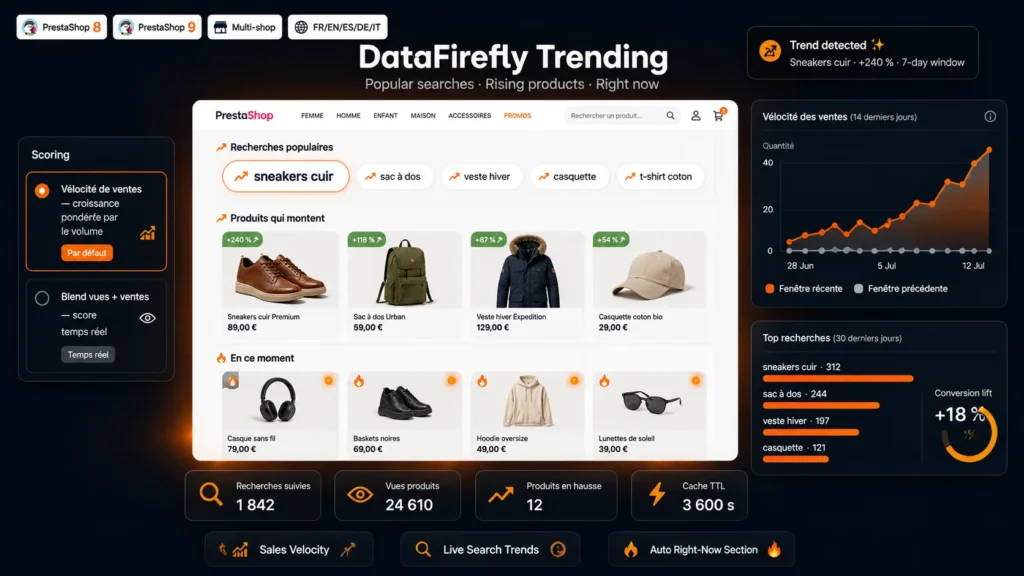
Nothing triggers a purchase like proof that others are buying. A visitor who sees what is rising and what others are searching for walks into a living shop, not a frozen catalog. The module turns data your shop already produces — searches, sales, views — into three storefront sections that regenerate on their own.
§ 02
Real searches, not guessed keywords
The module listens to the native PrestaShop search engine and aggregates every query per day, per language and per shop. Queries that are too short or malformed are filtered out, the rest are normalized and ranked. The resulting tag cloud reflects exactly what your visitors are typing right now, and every tag links to the matching results page.
§ 03
Velocity instead of a frozen leaderboard
Classic best-seller blocks reward history: the same products sit there for months. Velocity detection compares quantities sold over the recent window to the previous window of the same length, and weights growth by volume. The outcome: products in genuine acceleration surface, and new products that take off become visible before they are obvious.
§ 04
Right now, even behind a cache
The third section blends product page views and recent sales into a heat score. Views are measured in the browser by a tiny beacon sent once per product per session: counting stays correct even when your pages are served by a full page cache, where server-side counting would be blind. No personal data is stored, only anonymous daily counters.
§ 05
Built for PrestaShop 8 and 9
The widget plugs in through standard hooks and can be attached to any display position thanks to the widget interface. Products are rendered with your theme's native miniatures, inside a self-contained grid that does not depend on its styles. An internal cache with a configurable lifetime protects the database from recomputation, data is automatically purged after 90 days, and a dedicated back-office tab provides the analytical view: top searches, rising products, most viewed products.


There are no reviews yet.