
Our best PrestaShop modules for technical product documentation
Three modules to answer the question once — instead of every week.
“Is it compatible with…?” Your support answers it every week. Your product page never does. And the customer who cannot find the answer does not ask — they leave.
Sound familiar?
Documentation nobody finds
Uploaded somewhere, linked from nowhere. It does not exist for Google — nor for your customer.
The same question, ten times a week
Your support answers it every week, one by one. Your product page never does.
Customers who do not ask
Only the persistent one writes to you. The others leave — and you never know why.
A return caused by missing information
“Does not fit”: a return created by a missing piece of information. You pay the trip out and back.
Our selection, ranked
Every module below is built, maintained and supported by our team. The ranking reflects what we would install first on a client store.
-
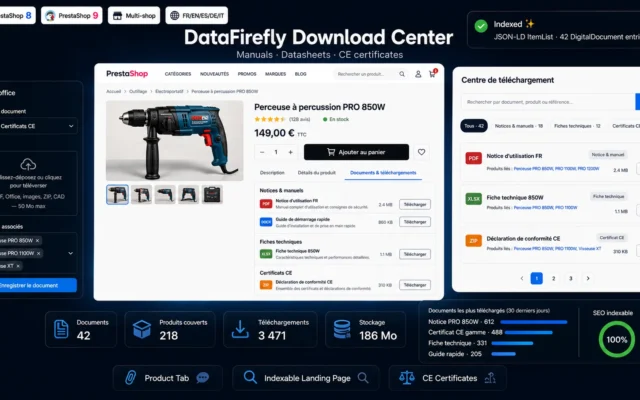
PrestaShop 8 & 9 Product Documents & Downloads Module — Manuals, Datasheets, CE Certificates on the Product Page + Indexable Download Page
The answer before the purchaseManuals, datasheets, CE certificates on the product page — plus an indexable documentation page Google can find.
Attach manuals, user guides, datasheets and CE certificates to your products. Dedicated product tab, indexable central page with search and filters, download counter. PrestaShop…
€89.00 View the module -
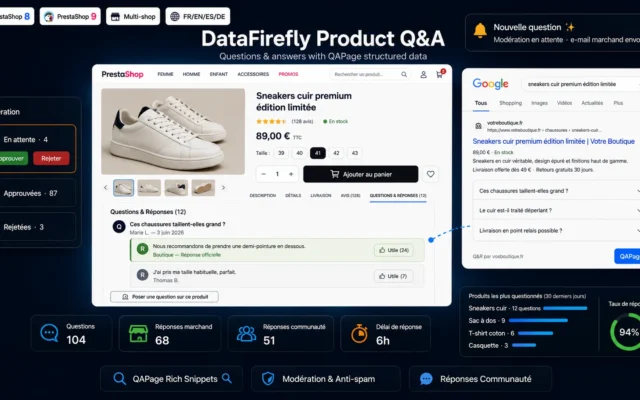
Product Questions & Answers Module PrestaShop 8/9 — Q&A with QAPage Rich Snippets
Once, for everyoneQ&A with QAPage markup. “Is it compatible with…?” answered for everyone — and for generative assistants.
A complete Questions & Answers block on your product pages: public form, back office moderation, official merchant reply, community answers, helpful votes and QAPage…
€79.00 View the module -
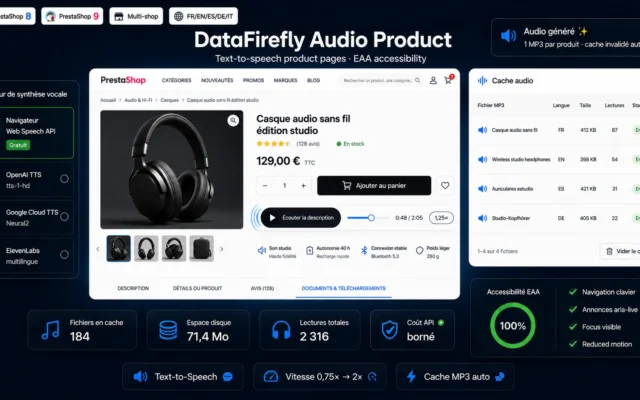
Text-to-Speech Product Audio Module PrestaShop 8/9
If your catalogue is technicalText-to-speech for dense descriptions. Noise on three lines — genuine accessibility on a datasheet.
Add a "Listen to the description" button to your product pages: free in-browser speech synthesis or premium OpenAI, Google and ElevenLabs voices, adjustable speed…
€79.00 View the module
Side-by-side comparison
| Module | Best for | Price | Rating | Link |
|---|---|---|---|---|
| PrestaShop 8 & 9 Product Documents & Downloads Module — Manuals, Datasheets, CE Certificates on the Product Page + Indexable Download Page | The answer before the purchase | €89.00 | — | |
| Product Questions & Answers Module PrestaShop 8/9 — Q&A with QAPage Rich Snippets | Once, for everyone | €79.00 | — | |
| Text-to-Speech Product Audio Module PrestaShop 8/9 | If your catalogue is technical | €79.00 | — |
Documentation is not an annex — it is a selling point
Most stores treat manuals, datasheets and CE certificates as an administrative burden: uploaded somewhere, buried in a tab, found by nobody.
But on a technical product, documentation is precisely what the customer looks for before buying. “Will this pump fit my installation?” The answer is in the datasheet — and if they cannot find it, they buy elsewhere.
And Google is looking for it too
A datasheet PDF linked from nowhere does not exist as far as Google is concerned. An indexable documentation page, by contrast, captures a very specific, very purchase-ready search: the search for the reference, the standard, the model.
The question asked twice
“Is it compatible with…?” Your support answers it every week. Your product page never does. The same question, two costs: your team’s time, and the customers who did not ask — and left.
How to choose
Sort your technical tickets first
If the same question — “is it compatible with…?”, “which standard?”, “what dimensions?” — comes back every week, that is not a support request: it is a missing page. The page costs you once. The answer costs you every week.
And think about the ones who do not ask
This is the decisive point. A customer who cannot find the answer almost never writes — they leave. Only the persistent one asks. So your tickets do not show the problem: they show the small share of customers patient enough to stay.
The PDF nobody finds does not exist
A datasheet uploaded somewhere and linked from nowhere does not exist as far as Google is concerned. An indexable documentation page, by contrast, captures a very specific search: the reference, the standard, the model. Long-tail traffic with very high purchase intent — and almost no competition.
The effect nobody computes
A return for “does not fit” is a return created by a missing piece of information. Compute what those returns cost you — and compare it with the effort of uploading a datasheet.
What you gain
The answer before they ask
Manuals, datasheets, CE certificates on the product page. What the customer looks for before buying.
A PDF Google can find
An indexable documentation page captures the search for the reference, the standard, the model — very specific, very purchase-ready.
The question asked only once
The Q&A with QAPage markup answers “is it compatible with…?” once and for all — for everyone.
The customers who do not ask
A customer who cannot find the answer does not ask: they leave. Only the persistent one writes to you.
Accessibility that sells
On technical catalogues with dense descriptions, text-to-speech is not a gadget — it is accessibility.
Fewer returns for incompatibility
A documented reference is a reference that does not generate a return because it did not fit.
From install to results
-
Sort your technical tickets
If the same question comes back every week, it is not a support request — it is a missing page.
-
Think about the ones who do not ask
The one who cannot find the answer does not write. They leave. Only the persistent one asks.
-
Make the documentation indexable
A PDF linked from nowhere does not exist for Google. An indexable page captures the search for the reference.
-
Open the Q&A
With QAPage markup: answered once, for everyone — and for generative assistants.
-
Compute the returns for incompatibility
“Does not fit” is a return created by missing information. Compute it.
“We thought our technical questions were costing us support time. In fact they were costing us sales: for every ten customers who could not find the answer, one asked. The other nine just left.”
Frequently asked questions
Why is documentation a selling point?
Because on technical products, documentation is precisely what the customer looks for before buying. “Will this pump fit my installation?” The answer is in the datasheet. If they cannot find it, they do not buy from you — they buy from whoever shows it.
Why a central documentation page?
Because a PDF linked from nowhere does not exist as far as Google is concerned. An indexable documentation page, by contrast, captures a very specific search: for the reference, the standard, the model. It is long-tail traffic with very high purchase intent — and almost no competition.
What does the Q&A bring over support?
The Q&A answers it once, for everyone — with QAPage markup, so for Google and for generative assistants too. Your support answers it afresh every week, and only for the person who asked. It is the same text, with two completely different returns.
And the customers who do not ask?
They are the invisible majority. A customer who cannot find the answer almost never writes — they leave. Only the persistent one asks. So your support tickets do not show the problem: they show the small share of customers who were patient enough.
Should I really display CE certificates publicly?
Yes, and in some sectors it is mandatory. But regardless: a visible CE certificate is a verifiable fact — that is, proof of trust, not an advertising promise. Your competitors bury it. Show it.
What is text-to-speech for?
On a catalogue with three-line descriptions: noise. On a technical catalogue with dense datasheets: genuine accessibility — for the visually impaired, for the dyslexic, and for the technician listening while working. It depends entirely on your catalogue.
Does documentation reduce returns?
Yes — and it is the most economical effect in this selection. A return for “does not fit” is a return created by a missing piece of information. Document the compatibility and the return does not happen — nor always the sale, but at least you are not paying for it.
Which metric tells me I am missing documentation?
Your support tickets by topic. If the same technical question arrives ten times a week, that is not a support request — it is a missing page. And that page costs you once, while the answer costs you every week.
Not sure which one fits your store?
Tell us your context — we answer with a straight recommendation, not a sales pitch.