
Everything you'd want to know before you install.
A detailed look at how DataFirefly Smart Offers — Smart bundled offers for PrestaShop works, why we built it the way we did, and the thinking behind the features above.
§ 01
Why four bundled offer types in one module
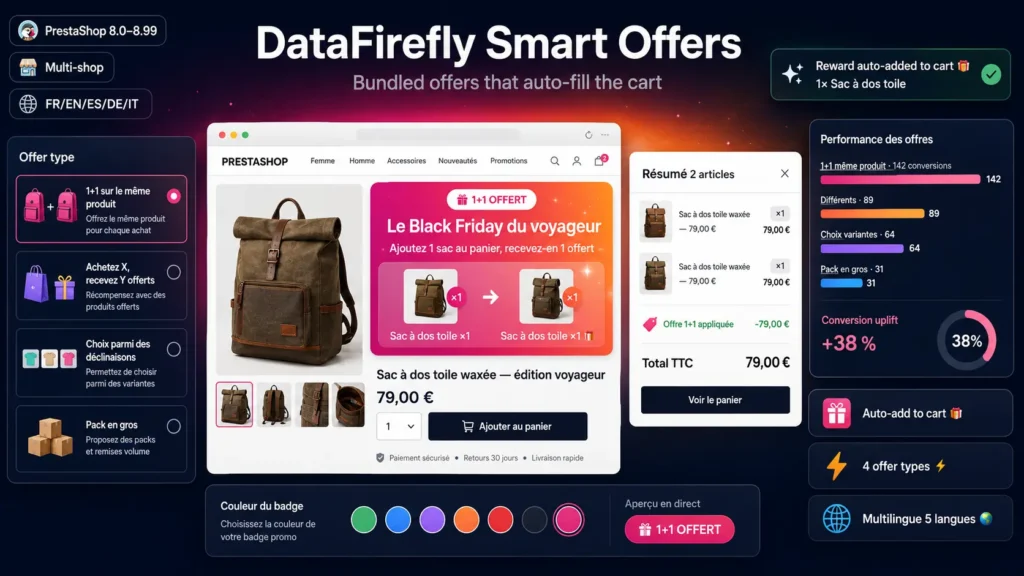
Most bundled offer modules on the market limit themselves to a single format, or require complex configuration to switch between types. Smart Offers takes the opposite approach: a merchant often needs all four formats in parallel during a commercial period, and each format deserves its own clear interface. When creating an offer, the admin picks one of four types from visual cards, and only the relevant fields for that type are shown — no generic configuration that forces understanding ten parameters for a simple operation.
§ 02
Auto-add to cart, not just a discount
When the conditions of an offer are met, the engine physically adds the reward products to the cart, then creates a cart rule that makes them free. The customer therefore sees the gift products appear without any action on their part, which matches their intent much better than just displaying a discount. The engine tracks auto-added units per cart and per offer, which allows clean revocation if the customer removes a trigger in the meantime, without risking leaving an orphan gift behind.
§ 03
Polished presentation on the product page
On every trigger product page, a gradient banner displays the badge, the title, a dynamic message based on the offer type, and clickable thumbnails of the involved products. The banner color is configurable per offer — six DataFirefly presets plus a free color picker. For types that mix triggers and rewards, the banner visually separates them with an arrow, so the customer understands at a glance what to buy and what to receive.
§ 04
Special case for 1+1 offers on the same product
The case where the trigger product is also the reward product is handled specifically by the engine. When a customer adds one unit of the product, Smart Offers adds a second one automatically and applies a discount equal to the unit price — the customer therefore sees two copies in their cart, only one of which is billed. Without this fine logic, many modules confuse the paid unit with the free unit and mistakenly make the customer's paid unit free.
§ 05
Variant choice
For operations where the customer composes their own lot, you define a list of candidate products or variants, the number of units to buy from this set, and the number of free units. Smart Offers automatically identifies the cheapest cart items as the free units, which matches the standard commercial interpretation of buy-N-get-M.
§ 06
Bulk pack for B2B and stock clearance
The bulk pack format multiplies units of another product based on the quantity bought of the first one. For ten units of one product bought, the engine adds twenty of another product. Practical for suppliers who want to push a complementary product or clear dormant stock by attaching it to a best-selling product.
§ 07
Back office built for fast input
Create an offer in under a minute: pick the type from a visual card, add trigger and reward products via a picker with live search, select combinations in one click. The form only shows fields relevant to the chosen offer type, and badge colors come as presets or a free picker. The trigger and reward product lists use a dedicated AJAX endpoint that queries the catalogue and returns name, image, price, and available combinations.
§ 08
actionCartSave hook with anti-recursion guard
The engine hooks into actionCartSave and re-evaluates all active offers on every cart change. Adding reward products via Cart::updateQty re-triggers the hook; a static guard prevents recursion. This architecture guarantees that the cart state is always consistent with applicable offers, even if the customer changes a quantity or removes a trigger during the session.
§ 09
Multilingual and multi-store
Each offer has translated fields for name, badge text, and long description in the five DataFirefly back office languages (French, English, Spanish, German, Italian). On a multi-store PrestaShop, each offer can be restricted to a subset of stores — practical to differentiate commercial operations between a premium store and an outlet store.



There are no reviews yet.