
Everything you'd want to know before you install.
A detailed look at how Free Gift Above a Cart Threshold — PrestaShop 8 & 9 works, why we built it the way we did, and the thinking behind the features above.
§ 01
The most measurable lever on average cart value
On an e-commerce store, two variables drive revenue: order count and average cart value. The cost of acquiring a new order has become very high (ads, SEO, retargeting). On the other hand, bumping up the cart of a visitor who is already about to buy costs almost nothing — it is upsell on already-paid traffic. The cart-threshold gift is one of the most effective mechanics for that: the visitor voluntarily adds a few euros so as not to miss the offer. Provided the mechanic is visible, quantified, and instantaneous. That is exactly what dffreegift does.
§ 02
The progress block: psychological mechanics to the cent
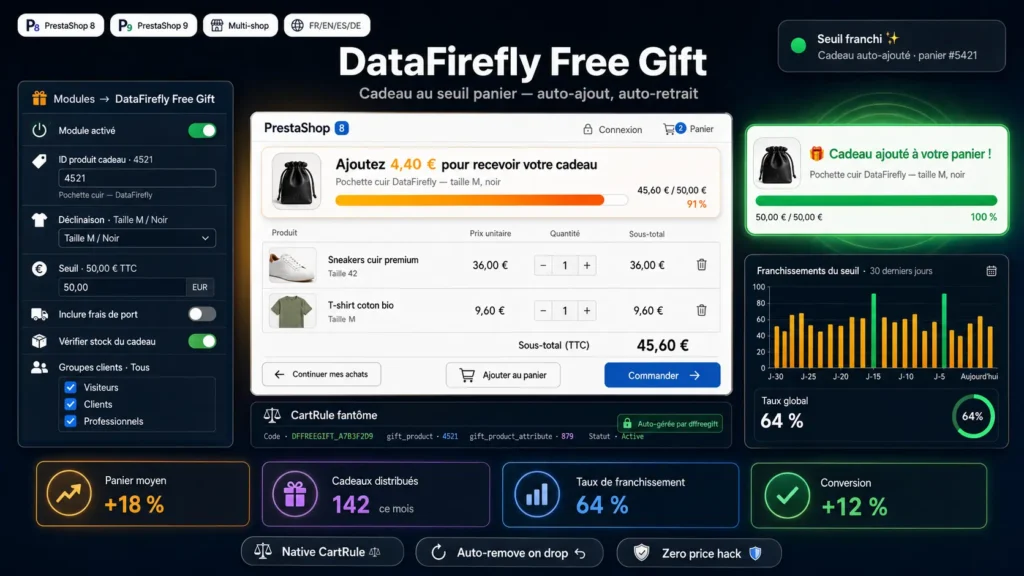
On the cart page, the module permanently shows a dedicated banner with the gift product image, its name, and a message that quantifies the remaining distance to the cent: “Add €12.40 to receive your gift”. A colored progress bar transitions from gray-orange to green as the threshold approaches. At the crossing, the banner flips to green with the “Your gift was added to the cart!” message and a pulse animation visually confirms the success. This real-time storytelling is what turns a simple conditional promotion into a behavior lever: the visitor watches the gauge fill, mentally calculates the effort needed, and tips over.
§ 03
Under the hood: PrestaShop's native mechanism, done right
Most gift modules on the market manipulate product prices directly via the actionProductPriceCalculation hook, create cart lines with a forced zero price, or inject temporary SpecificPrice rows. This approach breaks compatibility with other promotion modules later, generates inconsistencies in accounting exports, and complicates debugging. dffreegift does the opposite: at install time, it creates a standard CartRule (visible in Catalog → Discounts → Cart rules) with a DFFREEGIFT_xxxxxxxx code and a gift_product initialized to zero. On every cart save, the module synchronizes gift_product and gift_product_attribute with your configuration, then attaches or detaches the rule from the cart via the native Cart::addCartRule and Cart::removeCartRule methods. PrestaShop then takes care of everything: gift-line insertion (gift = 1, price = 0), cart display, totals, order conversion, historical snapshot. No direct price call, no invasive injection — hence native compatibility with your other promotional mechanisms.
§ 04
Three sync triggers, plus self-healing
The main logic runs on the actionCartSave hook, which PrestaShop calls on every cart save — that is, on every product add, modification or removal, but also on customer login (cart merge) and during some back-office actions. A static anti-recursion flag prevents the module from re-triggering the hook in a loop when it modifies the cart. In parallel, the actionObjectCartRuleDeleteBefore hook watches for manual deletion of our CartRule from the back office: if an admin deletes the rule by accident, the configuration is reset and the next sync recreates a clean rule. Finally, on each configuration save from the Configure screen, the module re-synchronizes gift_product and gift_product_attribute on the existing rule — you never have to touch the rule directly in the Discounts section.
§ 05
Configuration: threshold, taxes, shipping, stock, groups
The Modules → DataFirefly Free Gift → Configure screen gathers everything. A master switch to enable or disable the whole thing. The gift product ID (entered manually, with the product name shown as a hint after saving). A dropdown of the product's combinations (auto-populated after you first save the product ID, the module then reads the available combinations). The trigger threshold amount, with two associated switches: Tax-inclusive (otherwise tax-exclusive) and Include shipping costs (otherwise products only). A Check gift stock switch that suspends auto-add if the product is out of stock (respects the out-of-stock strategy configured globally in PrestaShop). A checkbox grid to restrict the offer to specific customer groups — if none is ticked, all customers are eligible, unidentified visitors included. Two independent display switches for the progress message and the progress bar.
§ 06
Typical use cases
Cosmetics shop with comfortable margins: offer a perfume sample above €40 incl. VAT to push carts of €28-35 to €40. Fashion and accessories: branded pouch as a gift from €80 incl. VAT, calculated excluding shipping, to reward first-time buyers. B2B equipment: keychain or USB stick above €200 ex. VAT, restricted to the Professionals group. Food marketplace: a free tasting product from €50 incl. VAT shipping included, to absorb the free-shipping cost and bring it to profitability. In all these cases the mechanic is the same: a clear threshold, a desirable gift, a visible progression, an automatic add. dffreegift handles it all with zero manual intervention.
§ 07
PrestaShop 8 and 9 compatibility — tested, not promised
The module only uses cross-version stable APIs: Module, Hook, Configuration, CartRule, Cart, HelperForm, Smarty. No use of the Symfony product tabs in PrestaShop 9 (which introduced incompatibilities for many third-party modules), no injection into the one-page checkout, no dependency on classes deprecated in PS 9. The admin screen uses HelperForm — a stable component identical in PS 8 and PS 9. On the frontend, the displayShoppingCart hook is present and functional in both versions, and the getCurrentLocale helper (used for price formatting) has been available since PrestaShop 1.7.6. Install the module on PS 8 today, migrate to PS 9 whenever you want: no action required from you on the module side.
§ 08
Multi-shop, multilingual, readable code
The module works with PrestaShop's multi-shop setup on the default shop context. Frontend messages are translatable via the standard PrestaShop mechanism (Modules.Dffreegift.Shop for the frontend, Modules.Dffreegift.Admin for the back office), with FR, EN, ES and DE pre-positioned. The source code is delivered open (PHP not obfuscated, compliant with standard PrestaShop conventions) with French and English comments at the top of every important method. The main logic fits in a dffreegift.php file under 700 lines — readable and auditable in less than an hour. You can modify, extend via your own hooks, or fork for a specific business need.



Spot onAutomatically translated