
Our best PrestaShop modules to migrate to PrestaShop
Three modules to move without losing two years of authority on the way.
In a migration everyone fears losing products. That is the easy part. What actually gets lost is your SEO — and nobody notices until the traffic collapses.
Sound familiar?
SEO that vanishes with the URLs
Your old URLs lead nowhere. Google finds 404s where it knew pages that ranked.
A migration that “succeeded” — and halved the traffic
You measure the visible part (products, orders) and ignore the invisible one (authority, rankings).
A history left behind
Your order history is your customer capital. A migration that drops it severs the relationship.
A channel switched off by accident
You wanted to keep Etsy and add PrestaShop. You migrated — and lost a channel.
Our selection, ranked
Every module below is built, maintained and supported by our team. The ranking reflects what we would install first on a client store.
-
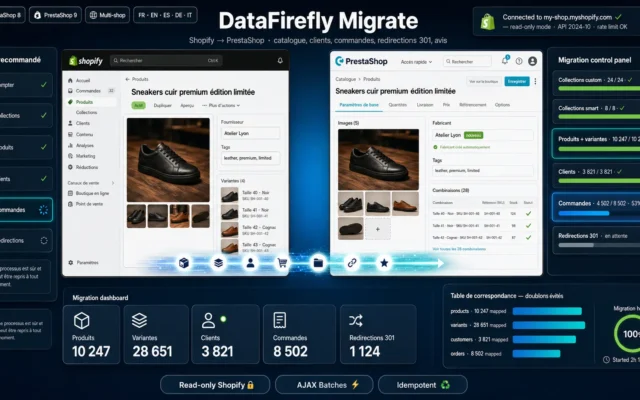
Shopify to PrestaShop Migration
If you are leaving ShopifyProducts, variants, customers, orders — and above all the 301 redirects. The only number that counts.
Import your entire Shopify store into PrestaShop: products, variants, images, customers, orders, collections, 301 redirects, and reviews. Without touching your Shopify store.
€79.00 View the module -
WooCommerce to PrestaShop 8 & 9 Migration
If you are leaving WooCommerceFull transfer with URL preservation. Your SEO authority survives the move.
Migrate your WooCommerce store to PrestaShop 8 or 9: categories, tags, global attributes, simple and variable products with combinations, images, customers and orders (HPOS…
€129.00 View the module -
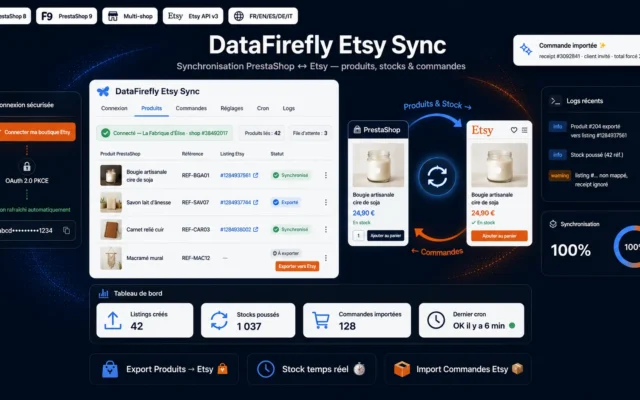
Etsy Sync for PrestaShop — Sync Products, Stock & Orders
Do not migrate — synchroniseKeep Etsy AND have your own store. Visibility on one side, margin and customer relationship on the other.
Connect your PrestaShop store to your Etsy shop: export your products as listings, keep stock in sync automatically, and import Etsy orders straight into…
€129.00 View the module

Side-by-side comparison
| Module | Best for | Price | Rating | Link |
|---|---|---|---|---|
| Shopify to PrestaShop Migration | If you are leaving Shopify | €79.00 | — | |
| WooCommerce to PrestaShop 8 & 9 Migration | If you are leaving WooCommerce | €129.00 | — | |
| Etsy Sync for PrestaShop — Sync Products, Stock & Orders | Do not migrate — synchronise | €129.00 | — |
A migration does not lose products — it loses authority
Everyone fears the same thing: losing products, orders, customer accounts. That is the easy part. What actually gets lost is invisible: your SEO.
Your old URLs vanish. Google finds 404s where it knew pages that ranked. And within a quarter half your organic traffic is gone — no incident, no warning, nobody noticed a thing.
The only number that counts
Not the number of products migrated. The number of 301 redirects put in place. A migration with no redirect plan is not a migration — it is starting from zero with a full catalogue.
What to decide before you start
Do you want to move or to sell in addition? Leaving Shopify is moving. Staying on Etsy and adding PrestaShop is running two channels — and that needs synchronisation, not migration. They are two completely different projects, and they get confused constantly.
Further reading
Two in-depth guides from the blog complete this selection: the PrestaShop 1.7 to 8 migration checklist and PrestaShop 9 vs PrestaShop 8.
How to choose
First decide which project you are running
Moving or selling in addition? Leaving Shopify or WooCommerce is a move: you switch the source off. Keeping Etsy and adding PrestaShop is a two-channel operation: you need synchronisation, not migration. That confusion costs time and money — settle it before buying anything.
The only number that decides success
Not the number of products migrated. The number of 301 redirects put in place. Before switching over, export your sitemap and your best-ranking pages from Search Console. That is your redirect plan. Without that list, you will not even know what you lost.
Dry run, then the real one
You do not migrate on a Friday evening and hope. A dry run on staging shows what comes through — and how long it takes. If you do not know the duration, you switch over at night and discover it takes six hours.
What nobody tells you
Even with perfect redirects, your SEO positions take one to three months to come back. That is normal. Plan for that dip and do not treat it as a fault — or you will panic-fix something that is not broken.
What you gain
The catalogue arrives
Products, variants, images, customers, orders: what can be migrated is migrated — automatically, not by hand.
SEO survives the move
Old URLs stay connected with a 301. Without that you lose all the SEO authority you have accumulated.
The history is not lost
Your order history is your customer capital. A migration that drops it severs your customer relationship.
Marketplace AND your own store
Sync Etsy instead of migrating it: you keep the marketplace and add your own store.
No agency, no day rate
No migration agency on day rates. You run the migration — and you keep control.
A dry run, then the real one
A dry run before switching over. You do not migrate on a Friday evening and hope.
From install to results
-
Decide: migration or synchronisation
Moving (Shopify, WooCommerce) or selling in addition (Etsy)? Two projects that get confused constantly.
-
Export the old URLs
Sitemap and best-ranking pages BEFORE switching over. That is your redirect plan — afterwards it is too late.
-
Do a dry run on staging
It shows what comes through and how long it takes. You do not migrate on a Friday evening and hope.
-
Check the 301s, not the products
Not the number of products migrated. The number of redirects in place. That is the only success number.
-
Plan for one to three months of SEO dip
Even with perfect redirects. That is normal — do not panic-fix something that is not broken.
“The migration went perfectly: every product, every order, every customer. Three months later we had lost half our Google traffic. Nobody had thought about the old URLs.”
Frequently asked questions
What do you really lose in a migration?
The 301 redirects — by a very wide margin. Your products can always be restored; your SEO authority cannot. An old URL leading nowhere is a page that ranked and no longer exists. Google remembers, and you find out a quarter later in your revenue.
Why do so many migrations fail even though “everything was migrated”?
Because they measure the visible part (products, orders) and ignore the invisible one (URLs, authority, rankings). Everything is there, nothing is missing — and traffic collapses anyway. The only number that counts is not how many products migrated: it is how many redirects were put in place.
Migration or synchronisation — what is the difference?
They are two different projects, and they get confused constantly. Leaving Shopify or WooCommerce is moving: you switch the source off. Keeping Etsy and adding PrestaShop is running two channels: you need synchronisation, not migration. Settle this before buying anything.
Does the module really migrate everything?
No, and it should be said plainly. What can be migrated is migrated: products, variants, images, customers, orders, categories. What cannot be migrated is your custom work, your apps, and everything that lives in the source platform's own logic. Plan for that work — it is real.
Should I do a dry run?
Yes, without exception. You do not migrate on a Friday evening and hope. A dry run on a staging environment shows you what comes through and what does not — and above all, how long it takes. If you do not know the duration, you switch over at midnight and discover it takes six hours.
Can I stay on Etsy and still have PrestaShop?
Yes, and it is often the right answer. Etsy brings visibility, your store brings margin and the customer relationship. Synchronisation keeps stock and orders aligned so you do not sell the same item twice. It is not a halfway house — it is a strategy.
How do I prepare the redirects?
Before migrating, export your sitemap and your best-ranking pages from Search Console. That is your redirect plan. Without that list you will not even know what you lost after switching over — and you will not be able to reconstruct it.
How long does a migration really take?
Do not count in hours, count in months. The technical move takes a day. The return of your SEO positions takes one to three months — even with perfect redirects. Plan for that dip instead of mistaking it for a fault.
Not sure which one fits your store?
Tell us your context — we answer with a straight recommendation, not a sales pitch.