
Everything you'd want to know before you install.
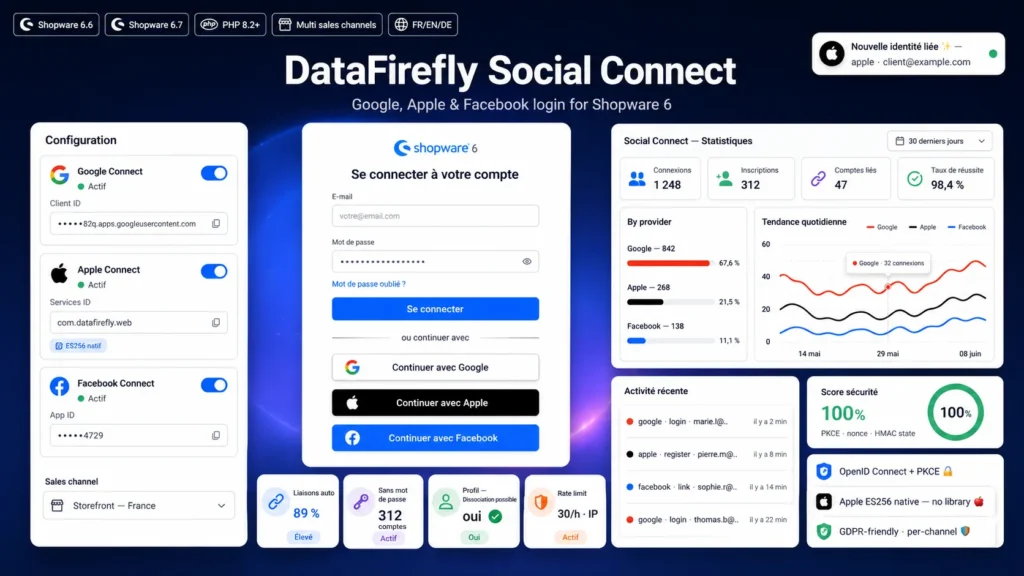
A detailed look at how DataFirefly Social Connect — Shopware 6: Google, Apple & Facebook works, why we built it the way we did, and the thinking behind the features above.
§ 01
Why social login changes conversion
Industry studies show seven to eight visitors out of ten abandon registration because of the form. Social login cuts that friction down to a single click and a consent prompt with the provider. Shops that deploy it typically see account creation rates rise by twenty to thirty-five percent per visit, and a sharp boost in registration funnel completion on mobile.
§ 02
Apple Sign In with no external dependency, really
Most Apple Sign In plugins ship firebase php-jwt or web-token. This plugin takes a radical stance and implements everything natively: the ES256 client_secret JWT signature is generated via openssl_sign with a hand-written DER to JOSE R||S conversion. You supply your .p8 private key, your Team ID, Key ID and Services ID in the configuration. The client_secret is generated on the fly for every request, no cache to invalidate.
§ 03
Solving the Apple form_post callback trap
When you request the name e-mail scope from Apple, the callback is a cross-site POST in form_post mode. The default SameSite Lax session cookie is then not sent back, which breaks state CSRF validation in most integrations. The plugin sets a signed HMAC state cookie in SameSite None on the outbound, and validates it on return when the session cookie is unavailable. The name returned by Apple on first login is extracted from the form's user field and persisted.
§ 04
Account creation in line with Shopware's architecture
No hacks on the customer table. The plugin uses AccountService loginById, the official passwordless login mechanism introduced in Shopware 6.6. The customer is created with a never-reused random password, a neutral salutation, a minimal address tied to the sales channel default country, and double opt-in can be disabled for verified social e-mails.
§ 05
Smart linking: no duplicates, no loss
Three resolution layers. First a direct lookup by provider and provider_user_id pair. Otherwise, if the provider flags the e-mail as verified, search for an existing customer by e-mail and auto-link the social identity to that account. New customer creation is the last resort only. Existing orders, customer groups and history are always preserved.
§ 06
A real analytics dashboard, not just a counter
Under Customers in the Shopware admin, a dedicated module shows logins and registrations over the period at a glance, the per-provider breakdown (with progress bars in each brand's official colour), the global success rate, recent errors, a daily trend line per provider using ApexCharts, and the recent activity grid with customer and message. Everything is filterable by period (7, 30 or 90 days) and sales channel.
§ 07
Production-grade security
HMAC-signed OAuth state, PKCE S256 on Google and OIDC nonce validated server-side, Facebook appsecret_proof enforced, Apple ES256 signature mastered. Event IP addresses are hashed before storage. A per-IP rate limit protects the authentication flow, with a configurable hourly threshold. Return URLs are sanitised to prevent any open redirect.
§ 08
Multi sales channels natively
Every setting — provider toggles, credentials, button style, double opt-in, newsletter opt-in, rate limit — is scoped to the sales channel via the standard SystemConfigService. You can enable Apple only on your premium channel, or Facebook only on the consumer channel, with no code changes.

There are no reviews yet.