
Our best PrestaShop modules for logistics and shipping
Eight modules for the three days the customer actually feels.
Your customer looks at your catalogue for an hour. They wait three days for the parcel. It is in those three days that they decide whether to come back — not in your checkout.
Sound familiar?
An order blocked by a single item
One item is missing, so the whole order waits. The customer waits for five products because of one.
A support inbox answering one question
“Where is my parcel?” is the number one ticket volume in e-commerce support. Often more than half.
A full-time job nobody budgeted for
Someone retypes orders into the logistician's portal and retypes the tracking numbers out. Every day.
A shipping price that is never right
Islands, remote regions, mountains: on a flat rate you lose money on every order to those zones.
Our selection, ranked
Every module below is built, maintained and supported by our team. The ranking reflects what we would install first on a client store.
-
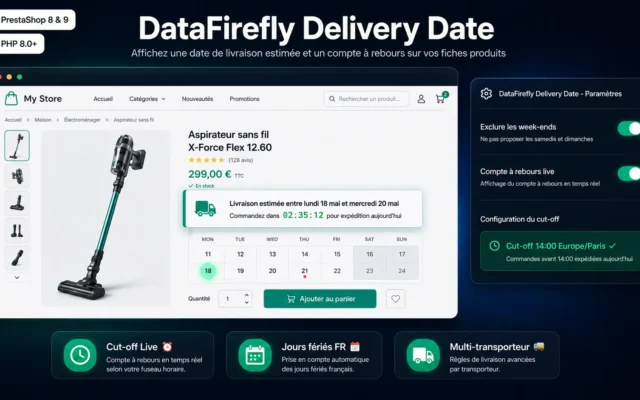
Estimated Delivery Date — PrestaShop Module
Install this firstThe only module that lifts conversion and cuts requests at the same time. Cheapest, fastest — and most effective.
Display a concrete delivery date on the product page, cart and checkout. The calculation combines each product's preparation time, the selected carrier's range, weekends,…
€59.00 View the module -
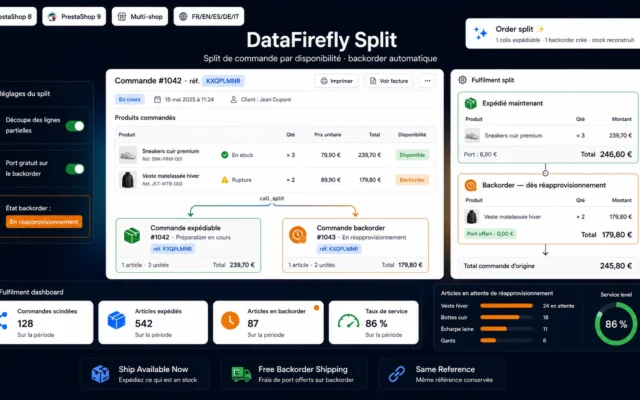
Partial Shipping & Automatic Backorders
The unblocked orderA missing item no longer blocks everything. Partial shipping costs one extra delivery; the blocked order costs the customer.
Ship in-stock items immediately and automatically place the rest on backorder. Two orders linked by the same reference, totals recalculated to the cent, free…
€109.00 View the module -
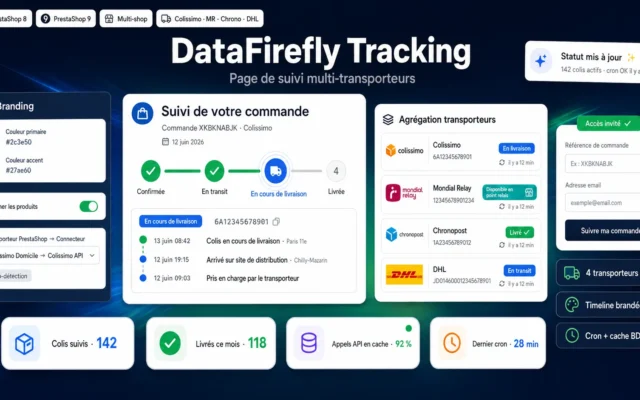
Multi-Carrier Order Tracking Page — Branded Timeline (PrestaShop 8 & 9)
What the customer seesBranded tracking page. “Where is my parcel?” is the number one ticket volume — this page all but erases it.
Give your customers a branded order tracking page: Colissimo, Mondial Relay, Chronopost and DHL statuses aggregated on a clear timeline — without ever leaving…
€49.00 View the module -
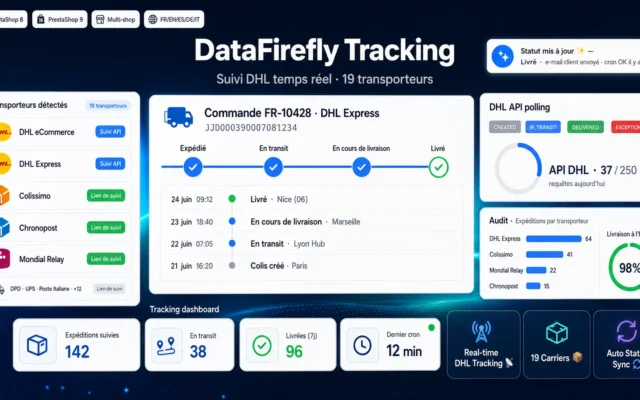
Automatic DHL & Multi-Carrier Tracking — Real-time API polling and auto statuses (PrestaShop 8 & 9)
What you seeAutomatic polling: order statuses update without anyone opening the carrier's website.
Real-time DHL eCommerce & Express tracking via the DHL API, automatic order-status sync, and a branded tracking page for 19 carriers (Colissimo, Chronopost, Mondial…
€59.00 View the module -
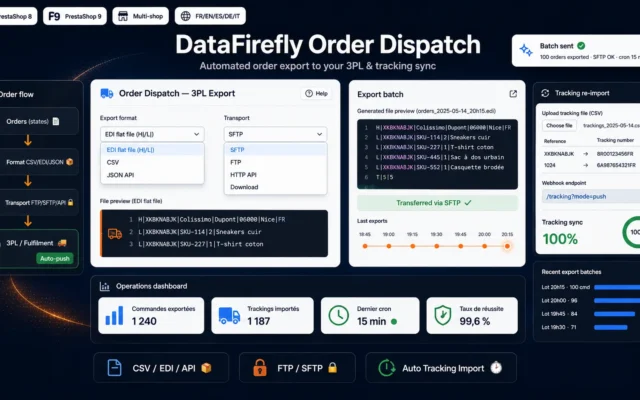
Export PrestaShop Orders to 3PL / Fulfilment Provider — CSV, EDI, API + Tracking Import
If you use a 3PLOrders out (CSV, EDI, API), tracking numbers back in. Replaces a full-time job nobody budgeted for.
Automatically send your PrestaShop orders to your 3PL or fulfilment provider in CSV, EDI or API format, on a schedule, then re-import the tracking…
€99.00 View the module -
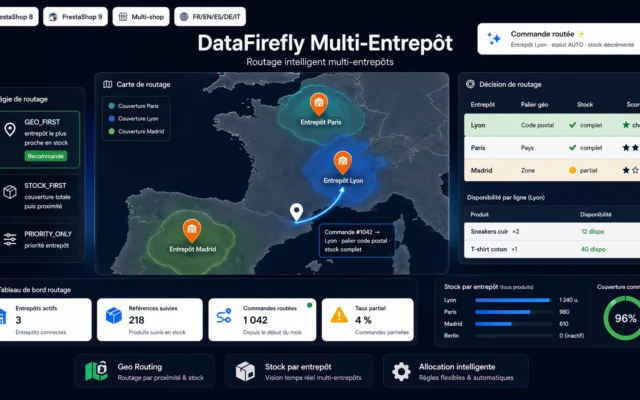
Multi-Warehouse PrestaShop 8 & 9 — Automatic Order Routing by Stock and Geographic Zone
If you have two warehousesAutomatic routing by stock and zone. The parcel leaves the right warehouse without anyone deciding.
Assign every order to the optimal warehouse automatically, based on real stock and the delivery zone. Three routing strategies, per-warehouse stock, zero external dependencies.
€189.00 View the module -
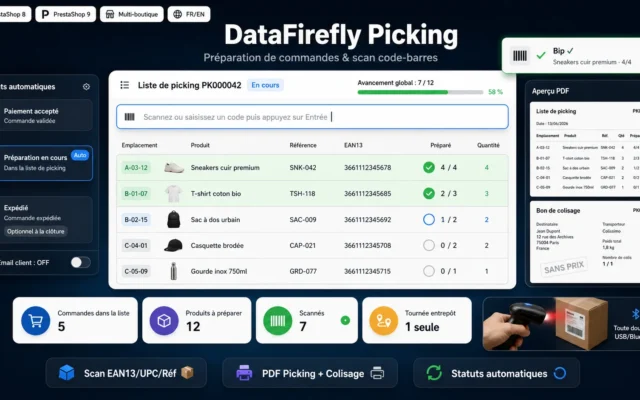
Order Preparation & Picking — Barcode Scanning and Packing Slips (PrestaShop 8 & 9)
The most expensive returnBarcode scanning and packing lists. A picking error costs you the trip out, the trip back, restocking and a second shipment.
Prepare several orders in a single warehouse run: picking list aggregated by product with stock locations, barcode scanning (handheld scanner), automatic switch to the…
€79.00 View the module -
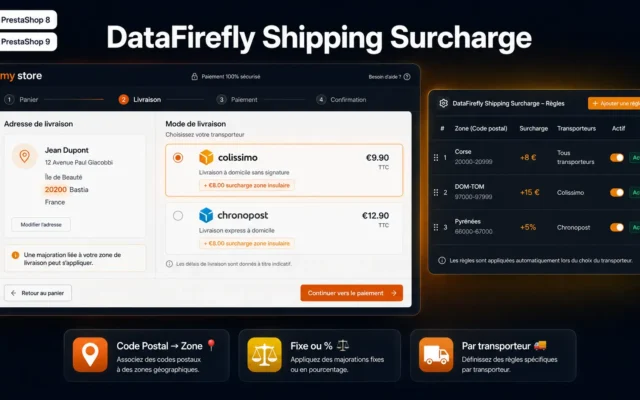
Shipping Surcharge by Postal Code for PrestaShop
The real shipping pricePostcode surcharge. You charge the real price only where it is real — instead of raising it for everyone.
Add targeted shipping surcharges by postal code range on PrestaShop 8 & 9. Fixed amount or cart percentage, per country and carrier. Configured in…
€49.00 View the module
Side-by-side comparison
| Module | Best for | Price | Rating | Link |
|---|---|---|---|---|
| Estimated Delivery Date — PrestaShop Module | Install this first | €59.00 | — | |
| Partial Shipping & Automatic Backorders | The unblocked order | €109.00 | — | |
| Multi-Carrier Order Tracking Page — Branded Timeline (PrestaShop 8 & 9) | What the customer sees | €49.00 | — | |
| Automatic DHL & Multi-Carrier Tracking — Real-time API polling and auto statuses (PrestaShop 8 & 9) | What you see | €59.00 | — | |
| Export PrestaShop Orders to 3PL / Fulfilment Provider — CSV, EDI, API + Tracking Import | If you use a 3PL | €99.00 | — | |
| Multi-Warehouse PrestaShop 8 & 9 — Automatic Order Routing by Stock and Geographic Zone | If you have two warehouses | €189.00 | — | |
| Order Preparation & Picking — Barcode Scanning and Packing Slips (PrestaShop 8 & 9) | The most expensive return | €79.00 | — | |
| Shipping Surcharge by Postal Code for PrestaShop | The real shipping price | €49.00 | — |
Logistics is the only stage the customer actually feels
Your customer looks at your catalogue for an hour. They wait three days for their parcel. And it is in those three days that they decide whether to come back — not in your checkout.
Yet most logistics faults are invisible until they become support tickets: an order waiting because one item is missing; a parcel sitting in the wrong warehouse; a customer asking five times where their delivery is.
The three costs nobody computes
The order that blocks. One item is missing, so the whole order waits. The customer waits for five products because of one. Partial shipping solves it — and nobody turns it on.
The “where is my parcel?” tickets. They are the number one volume in any e-commerce support inbox. A good tracking page all but erases them — it is not cosmetic, it is a cost reduction.
The wrong shipping price. Islands, remote regions, mountains: a flat rate makes you lose money on every order to those zones — or drives everyone else away.
What to do first
The estimated delivery date. It is the cheapest module in this selection, the fastest to install — and the only one that simultaneously lifts conversion and cuts support requests. Everything else can wait.
How to choose
The module you install first is not the one you think
It is the estimated delivery date. Not because it is impressive, but because it is the only one that simultaneously lifts conversion and cuts support requests. A customer who knows when the parcel arrives is more likely to buy — and does not need to ask.
Then the order that blocks
Partial shipping. Most stores do not turn it on because they fear paying shipping twice. Compute the alternative: an order waiting ten days, a customer chasing three times, a cancellation in a third of cases. Partial shipping costs one extra delivery; the blocked order costs the customer.
Then drain the requests at the source
Tracking page and automatic carrier polling. The first is what the customer sees; the second is what updates your order statuses without anyone opening the carrier's website. Together they erase the number one ticket volume in e-commerce support.
And only then, the warehouse
Multi-warehouse routing, barcode picking, 3PL export. These modules solve real problems — but only if you have them. Below two warehouses and with no 3PL, they are noise. Above that, they replace a full-time job nobody budgeted for.
What you gain
A delivery date before the purchase
The customer knows before buying when the parcel arrives. It lifts conversion and cuts requests — at the same time.
The order that no longer blocks
A missing item no longer blocks the whole order. The customer gets what is available, the rest follows.
The requests disappear
“Where is my parcel?” is the number one ticket volume in e-commerce support. A good tracking page all but erases it.
The right warehouse, automatically
Automatic routing by stock and geographic zone. The parcel leaves the right warehouse without anyone thinking about it.
Fewer picking errors
Barcode scanning and packing lists: a picking error is the most expensive return — you pay the trip out and back.
A shipping price that is right
Islands, remote regions, mountains: a flat rate makes you lose there — or drives everyone else away.
From install to results
-
The delivery date first
The only one that lifts conversion and cuts requests at once. A customer who knows buys — and does not ask.
-
Turn on partial shipping
It costs one extra delivery; the blocked order costs the customer. Compute both.
-
Drain the requests at the source
Tracking page and automatic polling. The first is for the customer, the second for you. Together, a loop.
-
Connect the 3PL if you have one
Orders out, tracking numbers in. Without it, someone retypes everything every day.
-
The warehouse last
A picking error costs the trip out, the trip back, restocking and a second shipment — on an order with no margin left.
“We did not turn on partial shipping so as not to pay shipping twice. Then we did the maths: a third of blocked orders were cancelled. We saved the shipping and lost the customer.”
Frequently asked questions
Which module first?
The estimated delivery date. It is the cheapest and the fastest to install — and the only one that simultaneously lifts conversion (the customer knows when it arrives) and cuts support requests (they do not need to ask). No other module in this selection does both.
Why do so few stores turn on partial shipping?
Because they fear paying shipping twice. Compute the alternative instead: an order waiting ten days, a customer chasing three times, and a cancellation in a third of cases. Partial shipping costs you one extra delivery; the blocked order costs you the customer.
Is a custom tracking page really useful?
Yes, and it is one of the rare measurable cost reductions in e-commerce. “Where is my parcel?” is the number one ticket volume in any support inbox — often more than half. A branded tracking page showing real-time status all but erases it. It is not cosmetic, it is a headcount question.
Tracking page and carrier tracking — the same thing?
Not quite. The tracking page is what the customer sees. Automatic carrier polling is what you see: it updates order statuses in PrestaShop without anyone opening the carrier's website. One cuts requests, the other cuts manual work. Together they form a loop.
When do I need multi-warehouse routing?
As soon as you have two warehouses or work with a 3PL. Before that it is noise. After that it is the difference between “a human decides which warehouse ships” and “the parcel automatically leaves the nearest warehouse with stock”. The gain is in time and in shipping margin.
Why a picking module with barcode scanning?
Because a picking error is the most expensive return there is: you pay the trip out, the trip back, the restocking and the second shipment — for an order on which you now earn nothing. Barcode scanning makes the error practically impossible. Past a few dozen orders a day it pays for itself immediately.
Is a postcode shipping surcharge not customer-hostile?
Not for everyone. With a flat rate you lose on every order to remote zones — or you raise the price for everyone and drive the rest away. A postcode surcharge solves exactly that: you charge the real price only where it is real.
Do I need the 3PL export?
If you use a 3PL, yes — and it is where most manual work disappears. The module exports orders (CSV, EDI or API) and imports the tracking numbers back. Without it, someone retypes orders into the logistician's portal and retypes the numbers out. That is a full-time job nobody budgeted for.
Not sure which one fits your store?
Tell us your context — we answer with a straight recommendation, not a sales pitch.