PrestaShop PrestaShop Modules

Multi-Carrier Order Tracking Page — Branded Timeline (PrestaShop 8 & 9)

Package tracking, on your store, in your colors

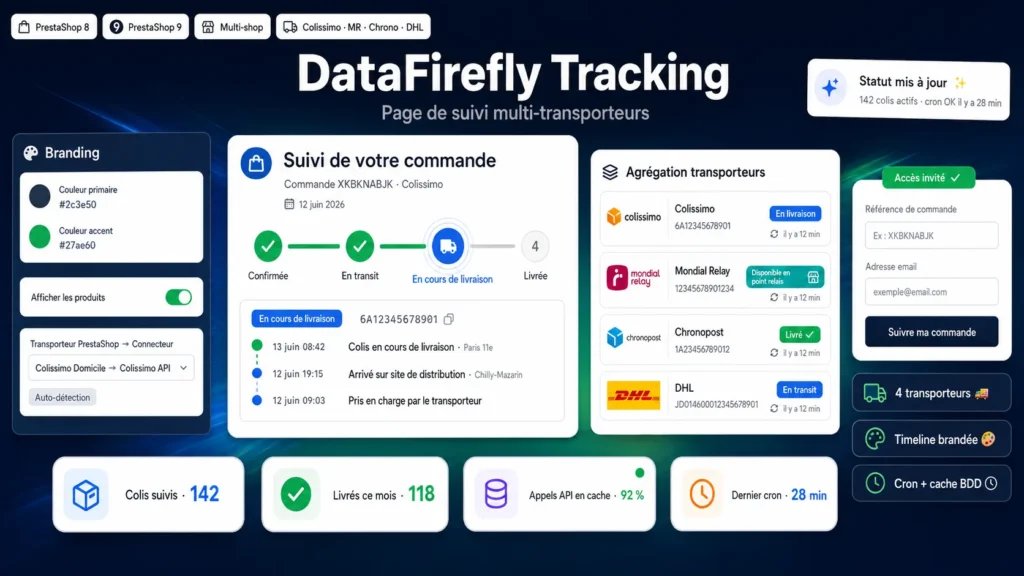
Colissimo, Mondial Relay, Chronopost and DHL statuses aggregated on a branded tracking page with timeline — your customers never leave your store.

PrestaShop 8 & 9 4 carriers included Customer + guest access Cron + DB cache
  • 30-day refund
  • 12 months updates
  • 24h support
www.datafirefly.com/en/
Page de suivi de commande multi-transporteurs — Timeline brandée (PrestaShop 8 & 9)
v1.0.0 · updated 2026-06-13
What it does

The short version.

01

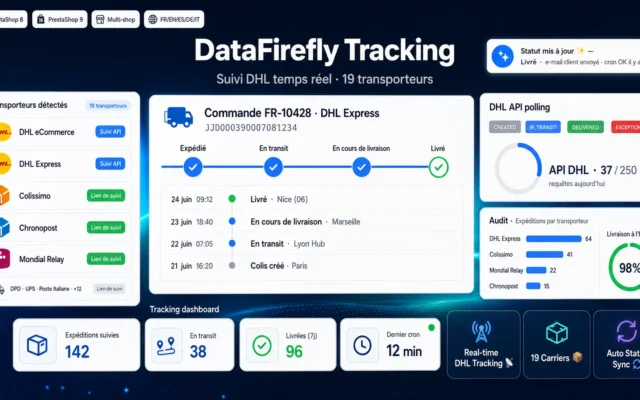
4 carriers, one single page

Native API connectors for Colissimo (La Poste Okapi), Mondial Relay, Chronopost and DHL. Statuses are normalized (in transit, out for delivery, pickup point, delivered, incident…) and displayed consistently, whatever the carrier.

02

Branded timeline in your colors

A 4-step timeline — confirmed, in transit, out for delivery, delivered — with detailed events for each package. Colors, headline and order products display configurable in the back office.

03

Accessible to customers and guests

A “Track my package” link in the order detail and customer account, plus a reference + email form for guest orders. Fewer “where is my order?” support tickets.

04

Fast and API-quota friendly

Statuses are cached in the database and refreshed by a token-secured cron task. Configurable TTL, fallback refresh on page view.

The long version

Everything you'd want to know before you install.

A detailed look at how Multi-Carrier Order Tracking Page — Branded Timeline (PrestaShop 8 & 9) works, why we built it the way we did, and the thinking behind the features above.

§ 01

Your customers stay with you, not with the carrier

As soon as a tracking number is set on an order, the module queries the matching carrier API and shows the progress on a tracking page embedded in your store: a 4-step timeline, a detailed event history, and a status per package. Customers are no longer redirected to a third-party website in someone else's colors — your brand follows the order all the way to delivery.

§ 02

Simple setup, robust operation

Enter your API credentials in the back office, map your PrestaShop carriers to the connectors (or let name-based auto-detection do the work), and you're set. Statuses are cached in the database and refreshed by a secured cron: the page stays instant even with many orders, and your API quotas are preserved. Delivered packages are no longer polled.

§ 03

Built to reduce support load

The “Track my package” link appears in the order detail and customer account; guests find their order with their reference and email. In case of a delivery incident or a package waiting at a pickup point, the status is clearly highlighted — your customers are informed before they even think of contacting support.