PrestaShop PrestaShop Modules

Order Preparation & Picking — Barcode Scanning and Packing Slips (PrestaShop 8 & 9)

Prepare orders faster, with zero packing mistakes

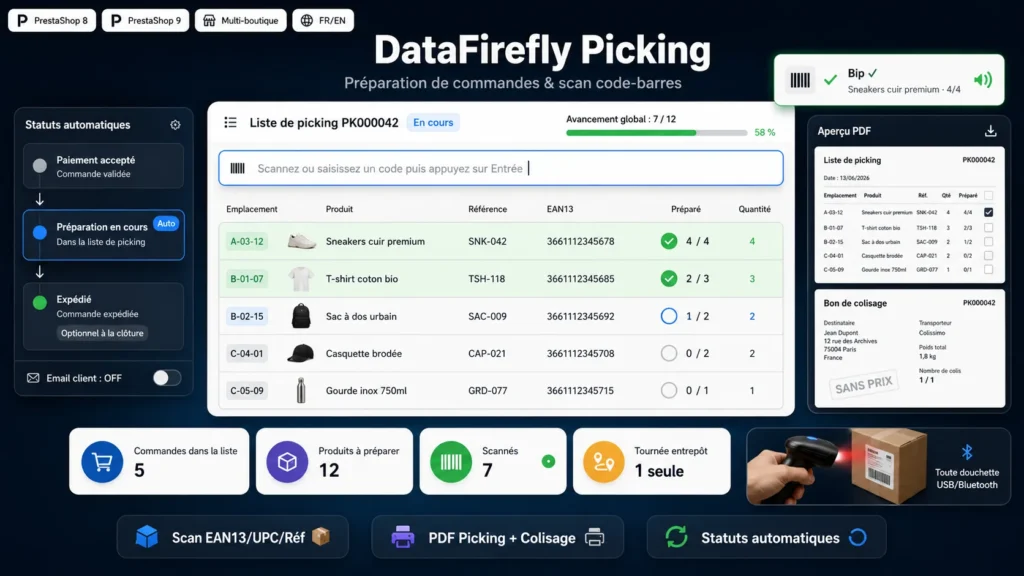
Group your orders into picking lists, walk the warehouse once, scan every product with a barcode scanner and print the packing slips — orders automatically switch to the native preparation status.

PrestaShop 8 & 9 Handheld scanner support Picking + packing PDFs Automatic statuses
  • 30-day refund
  • 12 months updates
  • 24h support
www.datafirefly.com/en/
Préparation de commandes & Picking — Scan code-barres et bons de colisage (PrestaShop 8 & 9)
v1.0.0 · updated 2026-06-13
What it does

The short version.

01

Multi-order picking lists

Select the orders ready to prepare in a few clicks (eligible statuses are configurable). The module aggregates quantities per product and combination, sorted by stock location: one warehouse run for many orders.

02

Barcode scanning

An always-active scan field recognizes EAN13, UPC, ISBN and product reference. Each beep increments the right order, with sound feedback, rows turning green as you go and a global progress bar. Manual +/− adjustment available.

03

Automatic preparation status

When a list is created, every order switches to the native PrestaShop processing-in-progress status (or any status you choose). Optional closing status and optional customer email — everything is configurable in the module.

04

Picking PDF and packing slips

A picking list aggregated per product with locations, EAN13 and a per-order breakdown, plus one packing slip per order — deliberately without prices — showing delivery address, carrier, weight and checkboxes.

The long version

Everything you'd want to know before you install.

A detailed look at how Order Preparation & Picking — Barcode Scanning and Packing Slips (PrestaShop 8 & 9) works, why we built it the way we did, and the thinking behind the features above.

§ 01

One warehouse run instead of ten

Preparing orders one by one multiplies trips through the aisles. With dfpicking you select all the orders ready to ship and the module merges them into a single picking list: each product appears once with its total quantity, stock location and per-order breakdown. You walk the warehouse once, in location order, and everything gets picked.

§ 02

Scanning that eliminates packing mistakes

On the preparation screen, scan each item with your handheld scanner: the module recognizes EAN13, UPC, ISBN or reference, allocates the item to the right order and updates progress in real time, beep included. An unknown code or an already-complete product triggers an immediate alert. The right product ends up in the right parcel, every time.

§ 03

Statuses and documents that follow along

As soon as an order joins a list, it switches to the preparation status — your customers and your team know where it stands. At printing time you get the warehouse picking list and one packing slip per order, deliberately price-free, ready to slip into the parcel. On completion, an optional closing status can be applied automatically.