
Everything you'd want to know before you install.
A detailed look at how Shipping Surcharge by Postal Code for PrestaShop works, why we built it the way we did, and the thinking behind the features above.
§ 01
Why a shipping surcharge by postal code?
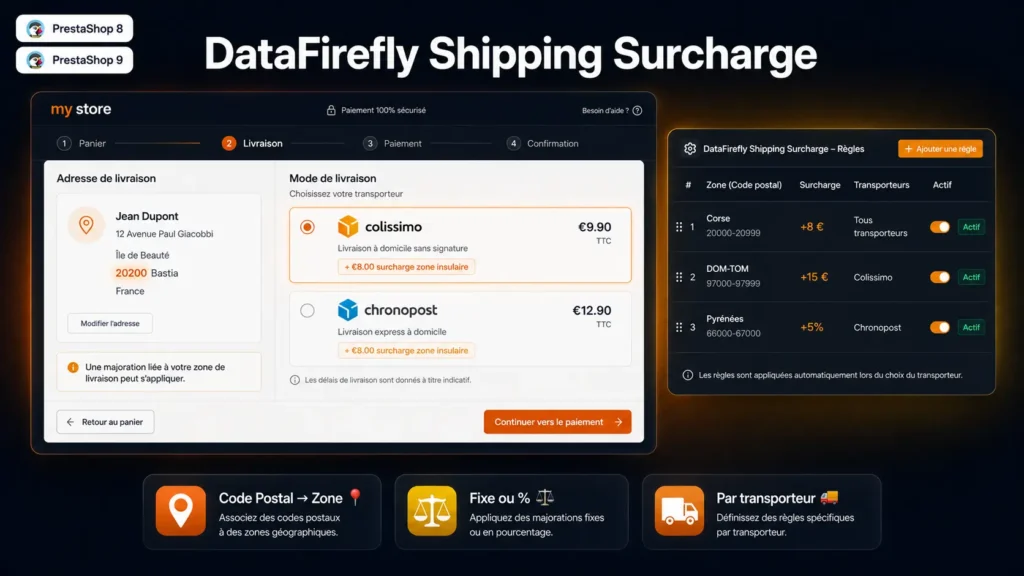
Some geographic areas genuinely cost more to deliver to: border regions, mountain areas, islands or overseas territories. Carriers charge extra fees that PrestaShop does not natively allow merchants to pass on to the customer. DFShippingSurcharge fills this gap by automatically adding a surcharge as soon as the delivery address matches a defined postal code range.
§ 02
One rule, five parameters, zero development
From the back-office Shipping > Shipping Surcharges, create a rule by entering: the country, the postal code range (from / to), the amount, the type (fixed or %), and optionally the carrier. The rule is active immediately. For a more complex zone covering multiple areas, simply create several rules: they stack automatically.
§ 03
Fixed or percentage, per carrier or global
The surcharge type is configurable per rule. A fixed surcharge suits zones with a flat extra fee (e.g. €8 for Corsica). A percentage surcharge is better suited to passing on a tax proportional to the order amount. Per-carrier targeting lets you charge differently depending on the shipping method the customer chooses.
§ 04
Native integration and multi-shop
The module integrates with PrestaShop’s native hooks (actionCarrierProcess, displayCarrierExtraContent, actionCartSave, displayOrderConfirmation) without overriding core files. It is fully multi-shop compatible: each rule is associated with one or more shops, and names and descriptions are translated per language from the back-office.

There are no reviews yet.