
Our best Shopware plugins for speed
Three plugins — and an order by weight, not by visibility.
A good PageSpeed score isn't a fast store — Lighthouse measures a lab, your customer experiences the opposite. And the biggest weight is almost always the same: images.
Sound familiar?
A score that measures something else
95 in the lab, slow in reality. The score doesn't measure what your customer experiences.
Images that fill the wire
A single unoptimised image weighs more than your entire CSS.
Scripts in the wrong place
A marketing script at the start of the page blocks rendering, even when needed late.
Fine-tuning before weight
Optimising milliseconds while the megabytes stay untouched.
Our selection, ranked
Every module below is built, maintained and supported by our team. The ranking reflects what we would install first on a client store.
-
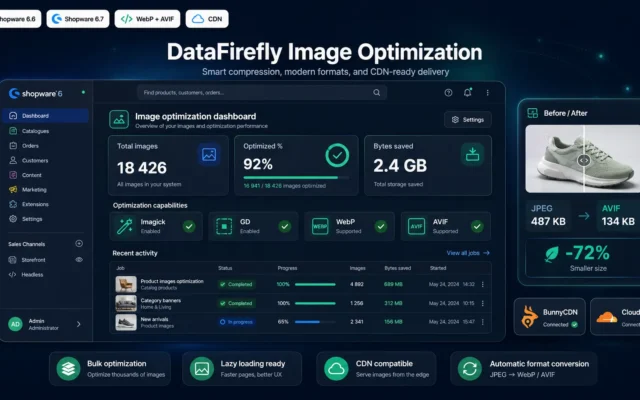
DataFirefly Image Optimizer — WebP, AVIF, Compression and CDN for Shopware 6
First — the biggest weightWebP, AVIF, correct sizing, CDN. A product image often weighs more than your entire CSS.
Native image optimization for Shopware 6.6 and 6.7. Automatic WebP and AVIF generation alongside every image, JPEG and PNG re-compression without visible quality loss,…
€59.00 View the module -
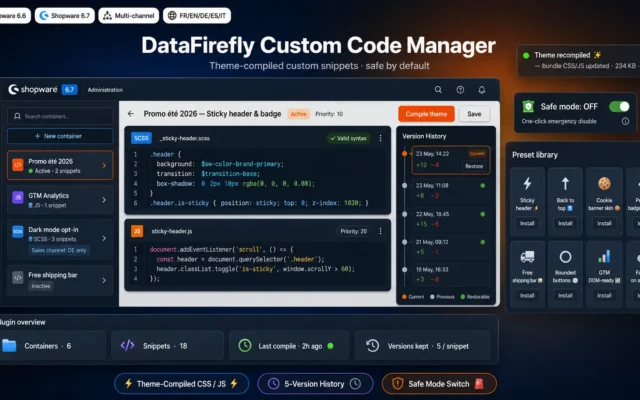
Custom Code Manager — CSS / JS snippets for Shopware 6
Control over your own scriptsEvery snippet you added loads somewhere. See which, and put it in the right place — not everywhere.
Inject and organise your CSS and JavaScript snippets straight into the Shopware 6 theme compilation. Built-in code editor, multi-channel containers, version history, preset library,…
€49.00 View the module -
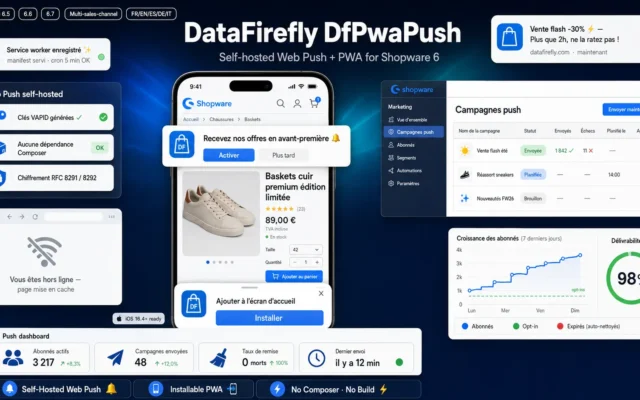
Shopware 6 PWA & Push Notifications Plugin — DfPwaPush: Self-Hosted VAPID Web Push, Manifest + Service Worker, Campaigns, Zero Dependency
The second page, instantlyThe PWA caches what doesn't change and rewards the returning visitor. Not the first impression — the return.
Turn your Shopware 6.5, 6.6 and 6.7 storefront into an installable PWA (dynamic manifest and service worker, offline page, install banner) and send fully…
€99.00 View the module
Side-by-side comparison
| Module | Best for | Price | Rating | Link |
|---|---|---|---|---|
| DataFirefly Image Optimizer — WebP, AVIF, Compression and CDN for Shopware 6 | First — the biggest weight | €59.00 | — | |
| Custom Code Manager — CSS / JS snippets for Shopware 6 | Control over your own scripts | €49.00 | — | |
| Shopware 6 PWA & Push Notifications Plugin — DfPwaPush: Self-Hosted VAPID Web Push, Manifest + Service Worker, Campaigns, Zero Dependency | The second page, instantly | €99.00 | — |
A good PageSpeed score isn’t a fast store
That’s the trap everyone falls into. Lighthouse measures a lab page, on a simulated connection, without your cookies, without your consent script, without your marketing tags. Your customer experiences the opposite: a real phone, a busy network, all the scripts at once.
And the biggest weight is almost always the same
Images. Not your theme, not Shopware. A single unoptimised product image weighs more than your entire CSS. Before touching anything else, weigh what actually travels down the wire.
And the right order isn’t the one you’d expect
Images first — the biggest weight. Then the scripts you added yourself. Only then the fine-tuning. Do it the other way round and you optimise milliseconds while ignoring megabytes.
How to choose
First, stop believing the score
A good PageSpeed score isn't a fast store. Lighthouse measures a lab: simulated connection, without your cookies, without your consent script, without your tags. Your customer experiences the opposite. Measure on a real device, on a real network — where selling happens.
Then images — the biggest weight
A single unoptimised product image often weighs more than your entire CSS. WebP and AVIF, correctly sized, with a CDN: this is where the biggest gain is, and it costs nothing in quality.
Then what you added yourself
Every marketing script, every snippet loads somewhere — often in the wrong place, where it blocks rendering. Controlling where and when they fire is often more powerful than any theme optimisation.
And the PWA rewards the one who stays
It doesn't speed up the first visit, it speeds up the second page: the cache makes the return almost instant. Last in the order, because the first impression is decided by the images.
What you gain
Images that stop filling the wire
WebP and AVIF, correctly sized, with a CDN. The biggest weight first — not the most visible.
Control over what you added yourself
Every script you added loads somewhere. See which — and when it fires.
Scripts in the right place, not everywhere
A snippet at the end of the page doesn't block rendering at the start. Placement counts.
The second page, instantly
The PWA turns the second page into an instant one. The cache works for the returning visitor.
The right metric
Not the Lighthouse score. Time to the first visible product is the number that sells.
The right order
You weigh before you optimise. Megabytes first, milliseconds after.
From install to results
-
Stop believing the score
Lighthouse measures a lab. Measure on a real device, on a real network.
-
Weigh the images first
A product image often weighs more than your entire CSS.
-
Optimise the biggest weight
WebP, AVIF, CDN. Same quality, a fraction of the weight.
-
Control your own scripts
A snippet at the start blocks rendering. Placement counts.
-
Measure the right number
Not the score. Time to the first visible product.
“We were proud of our 92 on PageSpeed. Then we tested on a real phone on a train: eight seconds to the first image. The problem was never the scripts — it was four megabytes of product photos per page.”
Frequently asked questions
I score 95 on PageSpeed, why is my store still slow?
Because Lighthouse measures a lab page: simulated connection, without your cookies, without your consent script, without your marketing tags. Your customer experiences the opposite — real phone, busy network, all scripts together. A good score is good news about a lab, not about your store.
What slows a Shopware store the most?
Almost always the images. A single unoptimised product image often weighs more than your entire CSS. Before tweaking scripts or theme, weigh what travels down the wire — and you'll see where the megabytes are.
Do I lose quality with WebP or AVIF?
No. WebP and AVIF are newer formats: same quality, a fraction of the weight. A fallback handles very old browsers. The gain is real and costs you nothing in image quality.
Why does script placement matter?
Because a script that fires at the start of the page blocks rendering — even if it's only needed at the end. Controlling where and when snippets fire is often more effective than trimming the script itself.
Why a PWA for speed?
For the returning visitor. The PWA caches what doesn't change and makes the second page almost instant. It doesn't speed up the first visit — it rewards the person who stays and keeps clicking.
Which metric should I track?
Time to the first visible product, not the Lighthouse score. The customer doesn't wait for a full load — they wait until they see their product. Measure that, on a real device, on a real network.
Where do I start?
With images, because they're the biggest weight. Then the scripts you added. The PWA last — it improves the return, not the first impression. Order by weight, not by visibility.
This need on other platforms
Not sure which one fits your store?
Tell us your context — we answer with a straight recommendation, not a sales pitch.