
Everything you'd want to know before you install.
A detailed look at how Custom Code Manager — CSS / JS snippets for Shopware 6 works, why we built it the way we did, and the thinking behind the features above.
Why a dedicated custom code manager
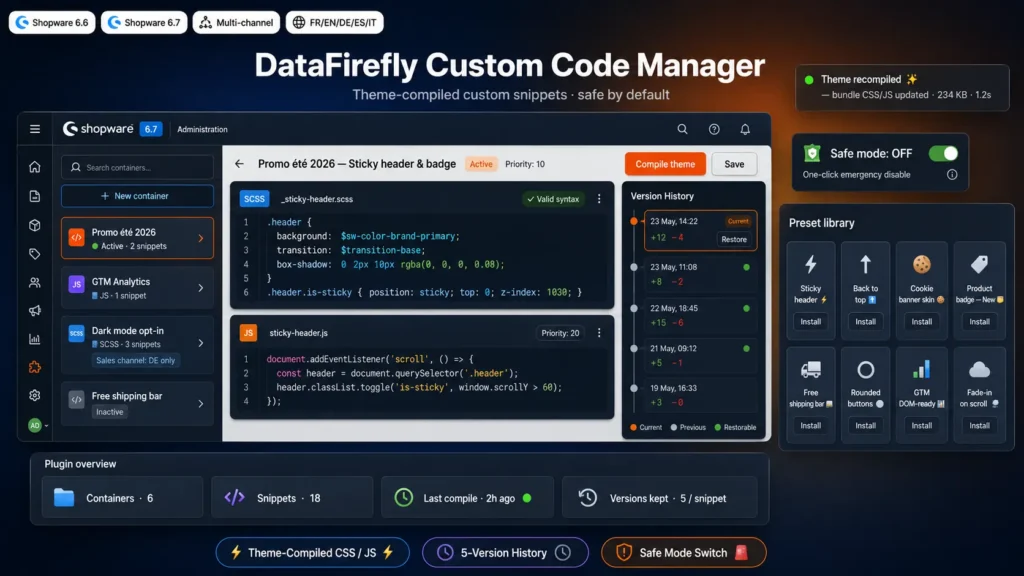
In the real life of a Shopware store, graphical and behavioural customisation needs pile up: a promo banner for the sales period, a New badge on certain products, an enriched GTM event to better measure conversions, an opt-in dark mode for the users who ask for it, a quick A/B test on the add-to-cart button colour. The standard practice is to edit the theme over SSH, or to stack third-party plugins that each inject their own little CSS file into the page. The result? Theme files impossible to maintain, modifications forgotten at update time, loading times that drag on because of additional requests. Custom Code Manager offers a simple answer: a single plugin, a dedicated interface, all your customisations grouped by theme in one place, injected straight into the native Shopware bundle.
The magic of direct injection into compilation
Most plugins that let you add custom CSS work by loading an extra file in the storefront head tag. It's simple to implement but it costs one more HTTP request per visitor, and it completely bypasses Shopware's optimisation chain (concatenation, minification, cache fingerprinting). Custom Code Manager takes the opposite road: it subscribes to the theme compilation events (ThemeCompilerEnrichScssVariablesEvent, ThemeCompilerConcatenatedStylesEvent, ThemeCompilerConcatenatedScriptsEvent) and appends your code directly to the main CSS and JavaScript bundle generated by Shopware. Concrete consequences: zero additional request for the visitor, your SCSS automatically benefits from the active theme's variables and mixins, and the whole browser cache chain works exactly as with native theme code.
Containers, snippets, priority: the mental model
The plugin is organised in two levels. A container is a logical group: Summer 2026 promo, GTM analytics, Dark mode opt-in, CTA button A/B test, etc. Each container can hold one or more snippets, and each snippet is either SCSS or JavaScript. Both containers and snippets have their own load priority (an integer, higher to be injected later in the bundle) and their own active inactive toggle. You can therefore temporarily disable an entire container for a period, or disable a specific snippet without losing its code. And the multi-channel scope lets you reserve a container to only some stores of your Shopware instance.
Version history and safe mode: the safety net
As soon as a snippet is saved, a version is automatically created. The plugin keeps the last 5 versions per snippet, which covers rollback needs after a slip. The history modal lets you quickly compare and restore a previous version in one click. And for those panic moments where a poorly tested change breaks something in production, the global safe mode (a simple toggle in the Shopware plugin configuration) instantly disables every container without having to edit them one by one. Just recompile the theme and the storefront is back to its previous state. That safety net makes all the difference when you're alone at 10pm on an incident.
Preset library to start faster
For the most common use cases, no need to reinvent the wheel. The plugin ships a library of 8 ready-to-install presets in one click: a sticky header that transforms on scroll, a back-to-top button, a re-skin of the native cookie banner to align with your brand guidelines, a New badge on recent products, a free shipping bar with progress bar, a rounded buttons look across the whole site, a GTM DOM ready event to prime your data layers, and a progressive fade-in effect on elements as you scroll. Click Install, the container and the snippets are created, you recompile, it's live.
Validation, import export, multi-environment
Every snippet can be syntactically validated before save, which prevents pushing code that would break theme compilation. The SCSS is dry-compiled with the real theme variables to detect broken references, and JavaScript goes through a brace, parenthesis and bracket balance check after stripping strings and comments. To move your snippets between development, staging and production environments, the Export button generates a JSON file of the selection (one or more containers with all their snippets), which you reimport on the other side. Also convenient to share an internal library across multiple stores of your group.
What the plugin does not do
Custom Code Manager is deliberately focused on CSS and JavaScript code injected into the storefront theme compilation. It does not touch PHP, does not modify Twig templates, does not deal with SEO meta, does not generate script tags in the storefront head, and does not work on Shopware Cloud (the SaaS version hosted by Shopware, which does not allow installing server plugins). For these needs, other plugins from the DataFirefly range cover those scopes. This focus is intentional: one plugin, one job, done well.
There are no reviews yet.