
Our best PrestaShop modules to connect your ERP and CRM
Five modules to decide which version is the truth.
Your orders in PrestaShop, your customers in the CRM, your invoices in the ERP — and between them a human being retyping. It is not about time. It is about which version is the truth.
Sound familiar?
A human being retyping
Someone transfers orders into the ERP by hand. Every day. It is in nobody's job description.
Two versions drifting apart
The same information in two places, maintained by hand. There is no source of truth — there are two versions.
Delays that cost money
Stock lagging by two hours is an oversell. A price out of sync is an order with no margin.
Errors nobody notices
The double-entry typo is invisible — until the invoice goes to the wrong address.
Our selection, ranked
Every module below is built, maintained and supported by our team. The ranking reflects what we would install first on a client store.
-
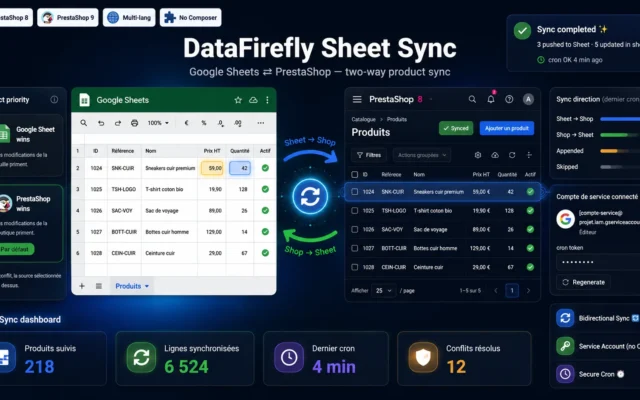
Not an ERP — and that is precisely the strength. Your team already knows how, and it solves eighty percent of cases with no subscription.
Edit product prices, quantities and titles right in a Google Sheet: the module syncs the changes automatically into PrestaShop, and pushes any back-office edit…
€89.00 View the module -
Odoo Connector for PrestaShop 8 & 9
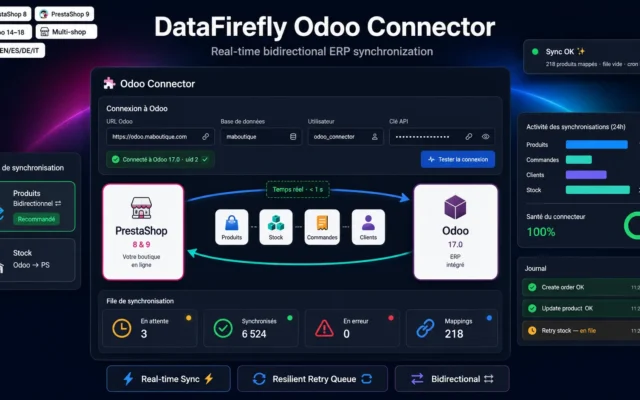
The real ERPOdoo: stock, purchasing, accounting. If you want to steer your stock, this is the connector.
Sync products and combinations, stock, orders, invoices and customers between PrestaShop and Odoo, in real time and in both directions, without ever blocking your…
€149.00 View the module -
Sellsy PrestaShop Connector – CRM/ERP Sync (customers, orders, invoices)
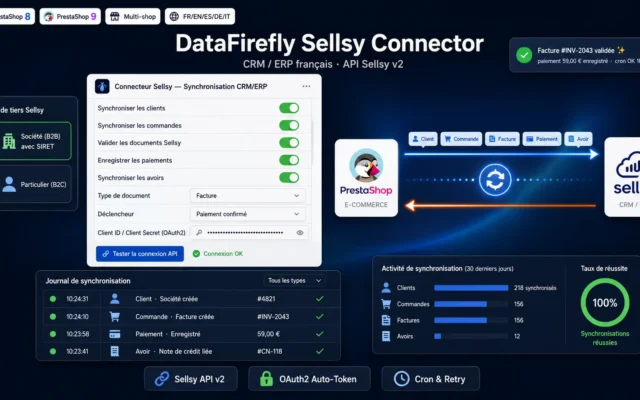
CRM and business managementSellsy: customers, orders, invoices. Not the same problem as Odoo — do not confuse them.
Automatically sync your PrestaShop customers, products, orders, invoices and credit notes to Sellsy, the French SaaS CRM/ERP, through the Sellsy API v2. Compatible with…
€129.00 View the module -
Axonaut PrestaShop Connector — Sync customers, invoices & quotes
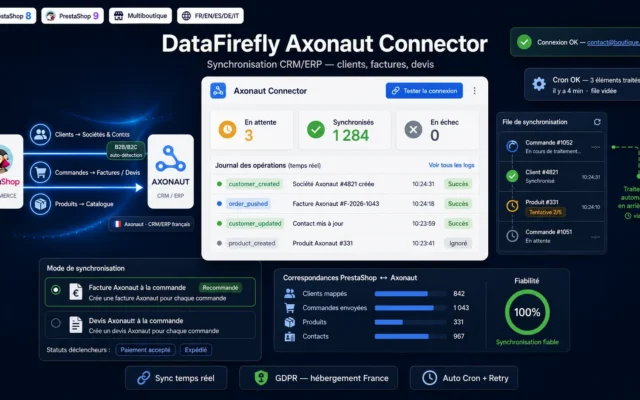
The SME alternativeAxonaut: CRM, quotes, invoices. Lighter than an ERP, sufficient for most stores.
Automatically sync your PrestaShop customers, orders and products with Axonaut, the French business-management software. Invoices or quotes generated on order validation, contacts and companies…
€129.00 View the module -
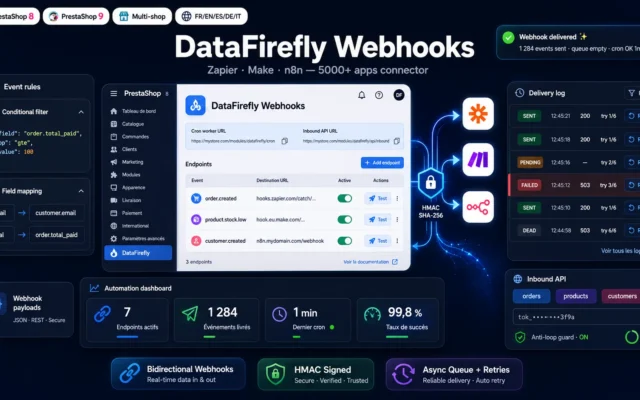
DataFirefly Webhooks — Zapier, Make & n8n Connector
If nothing fitsWebhooks to Zapier, Make, n8n. Connects practically anything with an API — and costs only your time.
Bidirectional no-code webhook connector: link PrestaShop to Zapier, Make, n8n and 5000+ apps, with an async queue, automatic retries and HMAC signing.
€109.00 View the module
Side-by-side comparison
| Module | Best for | Price | Rating | Link |
|---|---|---|---|---|
| Bidirectional Google Sheets Sync — Edit prices, stock & titles in a Sheet, auto-sync to PrestaShop (PrestaShop 8 & 9) | Start here | €89.00 | — | |
| Odoo Connector for PrestaShop 8 & 9 | The real ERP | €149.00 | — | |
| Sellsy PrestaShop Connector – CRM/ERP Sync (customers, orders, invoices) | CRM and business management | €129.00 | — | |
| Axonaut PrestaShop Connector — Sync customers, invoices & quotes | The SME alternative | €129.00 | — | |
| DataFirefly Webhooks — Zapier, Make & n8n Connector | If nothing fits | €109.00 | — |
Double entry is a tax you levy on yourself
Your orders live in PrestaShop. Your customers live in the CRM. Your invoices live in the ERP. And between the three: a human being retyping.
That person has no job description for it. They do it because it has to be done. They do it every day, and every day it produces typos nobody notices — until the stock no longer adds up or an invoice goes to the wrong address.
What a connector actually solves
Not time. Truth. As long as the same information is maintained by hand in two places, there is no source of truth — there are two versions drifting apart. A connector decides which one wins.
The tool everyone underrates
Google Sheets. It is not an ERP, and that is precisely its strength: your team already knows how to use it. Editing prices, stock and titles in a spreadsheet that syncs automatically solves eighty percent of cases — at a fraction of the cost and with no training.
How to choose
Do not start with the ERP
Start with the question: which information is maintained twice, by hand? Usually it is prices and stock. And usually the right answer is not an ERP connector — it is Google Sheets. No subscription, no training, your team already knows how, and it solves eighty percent of cases.
Then the native connector, if you have the tool
Odoo for the ERP (stock, purchasing, accounting). Sellsy or Axonaut for the CRM (customers, quotes, invoices). They are not the same tools and not the same problems — do not confuse them.
The decision that governs everything
Who wins in a conflict? This is not a technical question, it is a business decision. Typically: stock and price from the ERP (that is where goods are received and margin is set), product copy from PrestaShop (that is where you sell). Settle it before switching on. Settle it afterwards and you settle it in panic mode.
And if nothing fits
Webhooks into Zapier, Make or n8n. Less elegant than a native connector, but it connects practically anything with an API — and it costs nothing but your time.
The warning nobody gives
A connector on dirty data merely accelerates the spread of the chaos. If your product data is a mess, clean up first. Connect second.
What you gain
The end of double entry
Customers, orders, invoices: one single source of truth instead of two versions drifting apart.
The connectors that already exist
Odoo, Sellsy, Axonaut: native connectors. You are not buying an integration — you are switching one on.
Google Sheets, the underrated ERP
Edit prices, stock and titles in a spreadsheet that syncs automatically. Your team already knows how.
Connect everything else
Webhooks into Zapier, Make or n8n: if your tool has no connector, you build one in an hour.
Errors that disappear
The double-entry typo is invisible until the stock stops adding up or the invoice goes to the wrong address.
No subscription, no agency
No monthly subscription, no integration agency. The modules are yours — and so is the data flow.
From install to results
-
Ask what is entered twice
Usually prices and stock. The answer is more often Google Sheets than an ERP.
-
Start with Google Sheets
No subscription, no training, your team already knows how. Eighty percent of cases solved.
-
Decide who wins in a conflict
Stock and price from the ERP, product copy from PrestaShop. Settle this BEFORE switching on.
-
Wire in the native connector
Odoo for the ERP, Sellsy or Axonaut for the CRM. Not the same tools, not the same problems.
-
Clean up first, connect second
A connector on dirty data merely accelerates the spread of the chaos.
“We bought an ERP to end the double entry. Six months later someone was still retyping — because we had never decided who wins in a conflict.”
Frequently asked questions
When do I need an ERP connector?
At two to five orders a day, double entry is bearable. Past twenty it is half a headcount. And the moment two people maintain the same information in two places, it stops being a time question — it becomes a truth question: which version is right?
Why Google Sheets in an ERP selection?
Because it is not an ERP — and because your team already knows how to use it. Editing prices, stock and titles in a spreadsheet that syncs both ways solves eighty percent of cases with no training and no subscription. It is the most underrated option in this selection, and often the right one.
What happens when the ERP and the shop disagree?
You have to decide who wins — and that is a business decision, not a technical one. Usually: stock comes from the ERP (that is where goods are received), price comes from the ERP (that is where margin is set), product copy comes from PrestaShop (that is where you sell). Settle this before switching the connector on, or you will settle it during the first conflict — in panic mode.
What if my ERP is not on the list?
Then you build it yourself — in an hour. Webhooks push your events (new order, status change, new customer) into Zapier, Make or n8n, and from there into practically any tool with an API. It is less elegant than a native connector, but it works — and it costs nothing but your time.
Odoo, Sellsy, Axonaut — the same thing?
No, and it matters. Odoo is an ERP: stock, purchasing, accounting. Sellsy and Axonaut are closer to CRM/business management: customers, quotes, invoices. If you want to steer your stock, you need the first. If you want to steer the customer relationship and your invoices, the second. Many stores need both — but not at the same time.
Can synchronisation run both ways?
Yes, provided you set the direction. The classic mistake is syncing both ways without deciding who wins: each side then overwrites the other in turn, and you spend your days chasing ghosts. Set a direction for each field — and only one.
What is the bigger gain: time or accuracy?
It is where most manual work disappears and most errors are born. Stock lagging by two hours is an oversell. A price out of sync is an order with negative margin. These are not annoyances — they are losses.
Is a connector enough to tidy everything up?
No. A connector synchronises data — it does not cure a broken organisation. If your product data is a mess in PrestaShop, the connector will carry that mess into the ERP unchanged. Clean up first, connect second. A connector on dirty data merely accelerates the spread of the chaos.
Not sure which one fits your store?
Tell us your context — we answer with a straight recommendation, not a sales pitch.