
Everything you'd want to know before you install.
A detailed look at how Digital Product Passport (DPP) — ESPR Compliance for PrestaShop works, why we built it the way we did, and the thinking behind the features above.
§ 01
Why a Digital Product Passport?
The European Ecodesign for Sustainable Products Regulation (ESPR), which entered into force in 2024, plans the gradual rollout of a mandatory Digital Product Passport. The first delegated acts target textiles, batteries and consumer electronics in 2027, before generalising to virtually every product placed on the European market. This passport must expose, via a unique scannable identifier, the origin, composition, traceability, repairability and environmental footprint of the product. It's a heavy obligation if you tackle it late, and a huge marketing asset if you tackle it early.
§ 02
What you get by installing the module
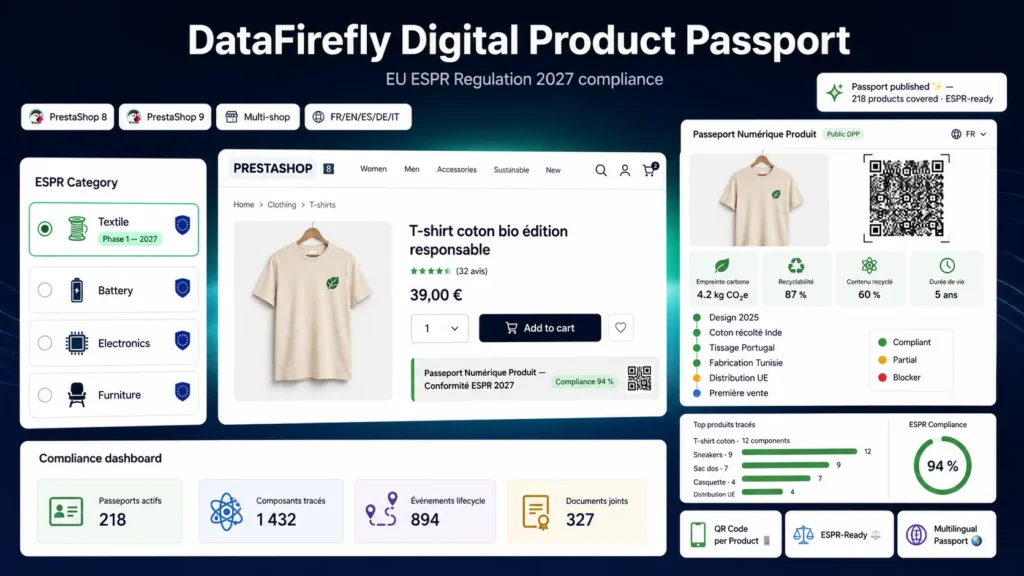
Upon installation, the module creates its six tables, adds a Product Passports menu under Catalog with three screens (Passports, Registry, Events) and registers its public routes. Every product — or every combination — can receive a passport with a stable UUID v4, a server-side generated QR code and a clean public page at /dpp/{uuid}. The public page displays the passport with a responsive design, natively embeds schema.org JSON-LD and offers a JSON export. A dedicated tab also appears in the back-office product sheet to create or open the passport in one click.
§ 03
A compliance score that works for you
Each ESPR category has its own rule set: a t-shirt doesn't carry the same obligations as a battery or a piece of furniture. The module evaluates each passport, displays a score out of 100 with a level (compliant, partial, draft, non-compliant) and precisely lists the blockers — missing field, expired certificate, incomplete composition. You always know what's left to fill in to be ready.
§ 04
Which sectors are concerned?
Textile and fashion brands subject to the textile delegated act planned for 2027. Battery manufacturers and resellers affected by the Battery Passport. Consumer electronics, furniture and footwear brands targeted by later acts. More broadly, any PrestaShop store wishing to get ahead on product transparency to differentiate itself today.
§ 05
How it works in practice
You install the module via the provided ZIP from the module manager. You configure the default ESPR category, the QR code options and the responsible operator's identity. On each product, you create the passport from the dedicated tab or the passport list, fill in the identification, sustainability, composition and components, then publish. The public URL becomes active, the QR code is ready to print on the label and the Digital Passport tab appears on the front-office product page.
§ 06
Privacy and data
No data is sent to any external service: QR code generation is 100 percent server-side via the Endroid library already present in PrestaShop core, with a GD fallback renderer. The public access log is anonymised through SHA-256 hashing with a daily salt — no exploitable personal data is stored, and the option can be disabled. On uninstall, passport data is preserved in line with the ESPR availability obligation throughout the product's lifetime.
§ 07
Why DataFirefly
DataFirefly has been developing premium e-commerce modules for PrestaShop, WooCommerce and Shopware 6 for several years. All modules respect the standards of the target platform, are tested in production environments, delivered with their documentation and a compatibility update included. Support is provided in French and English. A WooCommerce version of this module is also available in the catalogue.



There are no reviews yet.