
Everything you'd want to know before you install.
A detailed look at how Private Shop and Hidden Prices for PrestaShop 8 & 9 works, why we built it the way we did, and the thinking behind the features above.
Closing the shop without losing your rankings
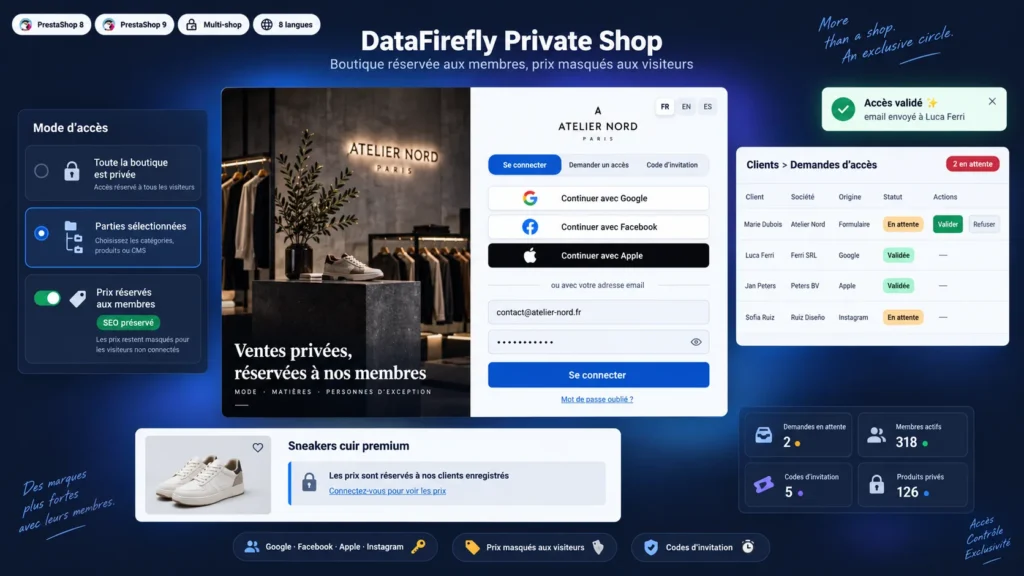
Closing everything suits a B2B shop or a private club, but it costs Google visibility. The module therefore offers three levels. Whole shop: every page requires an account, except the CMS pages and the contact page you keep public. Selected parts: only the categories, products, brands, suppliers, CMS pages or URL patterns you designate are protected. Members-only pricing: the catalog stays public and indexable, but prices and the add to cart button only appear for approved customers.
A private page, not a blunt redirect
The private page is standalone: it loads no menu, no search and no cart, so nothing of the catalog shows through. It displays your texts, your logo, the language switcher and up to three tabs: sign in, request access and invitation code. The background accepts an image, a three-image slideshow, a video hosted on the shop, a YouTube video in enhanced privacy mode or a Vimeo video. The video loads neither on phones by default, nor when the visitor has data saver on or asked for reduced motion.
Account approval and request tracking
Each access request creates an inactive account and a row in the Customers > Access requests screen. You approve or reject, one by one or in bulk, and the customer gets the matching email. Addresses from your trusted domains can be approved automatically. The customer page recalls the request and the linked social accounts. Activating a customer from the back office also approves their request and sends the email, with nothing else to do.
Social login with no SDK and no dependency
The four providers are implemented directly in OAuth 2.0 and OpenID Connect: PKCE S256 for Google, appsecret_proof for Facebook, a client secret signed in ES256 from the .p8 key for Apple, and Business Login for Instagram. No third party library, no Composer. The back office shows the exact redirect URI to declare with each provider, and you only enable the providers you want. Since Instagram never returns an email address, the customer types it in a short form after signing in.
What other modules let through
Protecting a product page is not enough: its name, image and price stay visible in search, home blocks and filters. Here, private products are removed from listings, search, autocomplete, facets and the product blocks of any module, even when their HTML comes from the cache. Pages rendered for a member, an invitation code, a whitelisted IP or a bot are sent with no-store headers, including for LiteSpeed and CDN caches, so a cache never serves them to an anonymous visitor.
There are no reviews yet.