



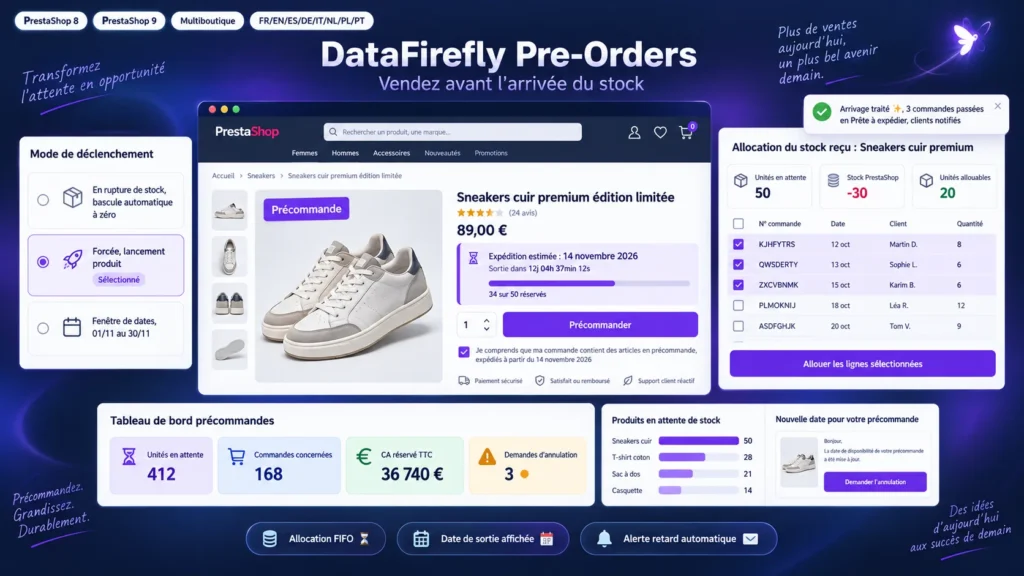
Everything you'd want to know before you install.
A detailed look at how PrestaShop Pre-Order Module 8 & 9: Sell Products That Are Out of Stock works, why we built it the way we did, and the thinking behind the features above.
What PrestaShop does, and what it does not
PrestaShop can allow orders when a product is out of stock, and that is where it stops. No reliable availability date on the product page, no pre-order cap, no tracking of what is reserved, no way to share a partial delivery between the customers who are waiting. This module adds that layer: a rule decides when pre-orders are open, what the customer sees, how many units you accept, and how incoming stock is distributed.
One rule per product, or per combination
Size M is out of stock while L is available: a rule on the M combination alone is enough. On every cart save the module checks that the other combinations still follow the original shop setting. Rules are created one by one, in bulk by category, brand or supplier, or through a CSV import. When a supplier announces a delay, one action moves the date of all its products without touching caps or modes, and notifies the customers involved.
Mixed orders: you choose how to ship
A customer orders one in-stock item and one pre-order item. Three answers are available: one shipment once everything is available; a partial shipment, where in-stock items leave right away with their tracking number and the order moves to Partially shipped, with a single invoice; or a split into two orders under the same reference at checkout, using PrestaShop's native mechanism and no override. In that last case the customer can choose in the cart, seeing the shipping cost of each parcel.
Pre-orders you can actually serve
A pre-order lowers the stock like any other order, which pushes it below zero. The module relies on that behaviour: the units actually available for pre-orders are the waiting units plus the current stock. The dashboard shows, product by product, what is reserved, what can be allocated right now and what is left to order from the supplier. The allocation screen ticks the oldest orders, shows a live total and flags any selection above the physical stock.
Follow-up on the customer side
Customers find their pre-orders in their account, with the status of each line, the estimated date and the tracking of parcels already sent. E-mails follow them at every step: confirmation, partial shipment, date change, announcement when the items are ready to leave. If they no longer want to wait, a link lets them request cancellation, which you confirm or refuse from the back office.
Built for daily back office work
The native orders list gains a filterable Pre-order column, so orders awaiting stock are one click away. The rules list shows the thumbnail and the real status of each rule, and the form previews the front office block while you type. The module handles multistore, eight languages and the schema.org PreOrder output, and runs from PrestaShop 8.0 to 9.x with the same ZIP.
There are no reviews yet.