



Everything you'd want to know before you install.
A detailed look at how Let Customers Choose Pack Combinations in PrestaShop 8 works, why we built it the way we did, and the thinking behind the features above.
What PrestaShop cannot do
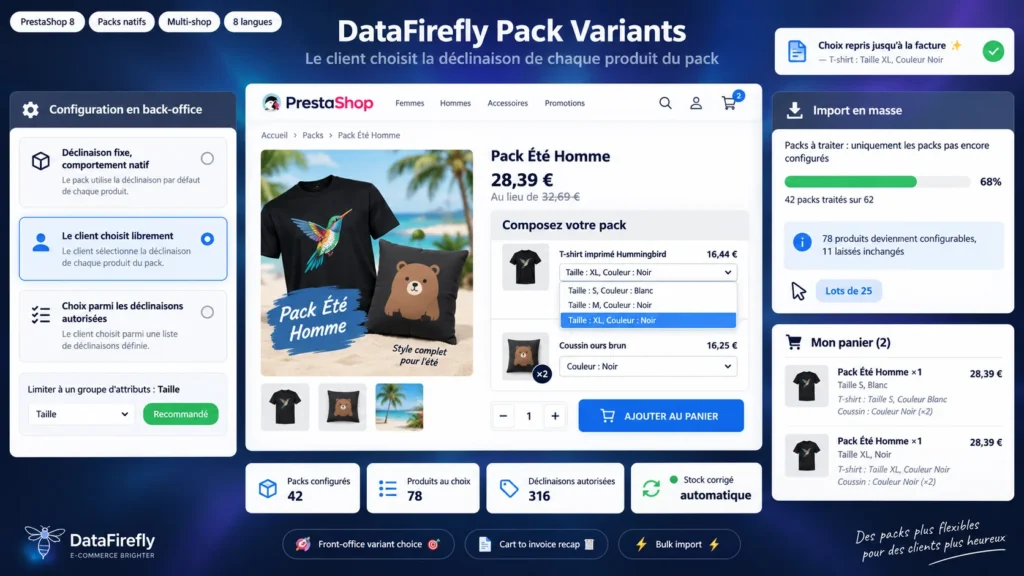
In the back office pack tab, every product you add forces you to pick one precise combination. That product and combination pair is written to the database, and nothing on the front end lets the customer change it. To sell a pack with a t-shirt in four sizes, the only native option is to create four packs, then maintain them one by one.
A customer choice without duplicating your packs
The module keeps your packs as they are and adds a configuration layer per item. For each one you decide whether the combination stays fixed, whether the customer chooses freely, or whether he chooses from a list you approve. The attribute group restriction covers the most common case: let the size be chosen, keep the colour you set.
From cart to invoice, with no hack
The choice is stored in the native PrestaShop customization. That mechanism is what keeps two identical packs with different compositions on two separate lines, in the cart and in the order, and what makes the recap appear automatically in the confirmation, the emails, the back office and the PDF invoice. No theme template is overridden.
Stock that stays accurate
A native pack decrements the stock of the combination written in the database, not the one the customer picked. At order validation the module corrects it: the declared combination is credited back, the chosen one is debited, shop by shop. Packs set to decrement their own stock only are left alone.
A whole catalogue configured in one pass
If you already run dozens of packs, the import screen applies one rule to the whole catalogue: free choice everywhere, or a size restriction on every item that carries one. A preview counts the packs and items involved without writing anything, then the run advances in batches with a cursor, which avoids timeouts on large catalogues. The same screen resets everything back to the native combinations.

There are no reviews yet.