
Everything you'd want to know before you install.
A detailed look at how Shopware 6 Backup Plugin — DfBackup SW: Database + Files, AES-256 Encryption, S3/FTP/Dropbox, 1-Click Restore works, why we built it the way we did, and the thinking behind the features above.
A real Shopware backup, not a duct-taped script
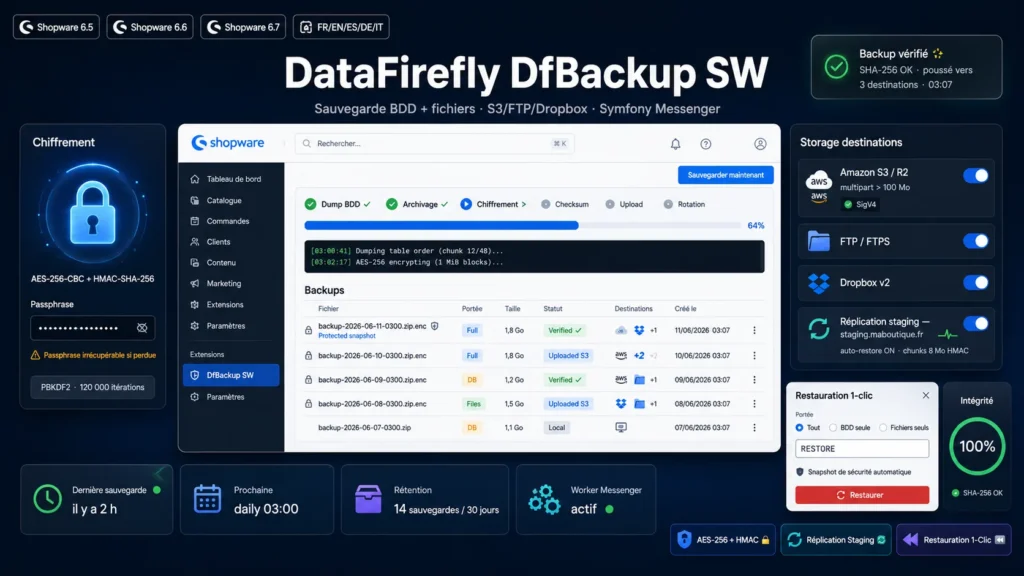
Most Shopware backup solutions just call mysqldump and tar the folder, which causes three problems in production: mysqldump is unavailable on many shared hostings, shell_exec is often disabled, and unencrypted archives sitting on disk are a time bomb in case of compromise. DfBackup SW solves all three: pure-PHP database dump via DBAL, archiving via ZipArchive, and optional authenticated AES-256 encryption with a user passphrase. Everything works without special sysadmin configuration, on shared hosting as well as on a VPS.
A dump that understands the Shopware schema
A naive SQL dump breaks on Shopware: primary keys are BINARY 16 UUIDs that must be emitted as hexadecimal literals, some columns are generated (STORED or VIRTUAL) and must never appear in INSERTs, and views must be recreated after the tables. DfBackup SW handles all of this natively: SHOW FULL COLUMNS inspection per table, exclusion of generated columns, hex encoding of binary columns, keyset pagination on integer primary keys for large tables (order, log_entry), and views dumped last. The produced file re-imports cleanly, statement by statement, with FOREIGN_KEY_CHECKS disabled during import.
AES-256 encryption with HMAC: encrypt-then-MAC done right
The encrypt-then-MAC pattern is the recommended standard for symmetric schemes: encrypt first, then compute an HMAC over the ciphertext. On read, the HMAC is verified before decrypting — protection against bit-flip attacks and padding oracle attacks. The user passphrase goes through PBKDF2-SHA256 with 120000 iterations to derive separate encryption and HMAC keys. Encryption is performed in streaming 1 MiB blocks with manual CBC chaining: a 5 GB archive encrypts with the same memory footprint as a 50 MB one. The binary format (magic header, salt, IV, HMAC, ciphertext) is documented and auditable.
Native S3 SigV4: multipart, MinIO, R2, OVH, Scaleway, Wasabi, B2
Instead of shipping the official AWS SDK, DfBackup SW implements AWS Signature V4 directly in cURL. Zero additional Composer dependency, a canonical signature compatible with every S3-speaking service. You can point the plugin at Amazon S3, MinIO on your own VPS, Cloudflare R2 (10 GB free, zero egress cost — ideal for backups), OVH Object Storage, Scaleway, Wasabi or Backblaze B2 — by just changing the endpoint and region. Above 100 MB, the upload automatically switches to multipart with 10 MB parts, letting you transfer several gigabytes without exhausting memory.
Push replication: a nightly staging without sysadmin work
This is the feature that sets DfBackup SW apart: pushing every backup to a second Shopware installation. Install the plugin on production and staging, share a common secret, enable Replication as a destination. On every backup — manual or scheduled — the archive is uploaded in 8 MB HMAC-SHA-256-signed chunks to dedicated endpoints on the target, with timestamp anti-replay at a 5-minute tolerance. If auto-restore is enabled on the target, the backup is applied automatically — your staging mirrors yesterday's production the next morning. Combined with domain migration, the clone is immediately browsable on its own domain. No more rsync or sysadmin cron scripts.
1-click restore with a safety net
A restore is the riskiest operation in a shop's lifecycle: the live database is overwritten, files are replaced, and if anything goes wrong, rolling back is complex. DfBackup SW adds an automatic safety net: before every restore, a protected database snapshot is silently created. If the restore fails halfway, you restore that snapshot and return to the initial state in minutes. The plugin's tables are never overwritten during a restore — your backup history is preserved even when restoring a six-month-old version. The explicit confirmation (typing RESTORE) prevents accidental clicks.
Messenger, ScheduledTask and web-cron: background the Shopware way
DfBackup SW builds on Shopware's native infrastructure: backups are dispatched as asynchronous Symfony Messenger messages and executed by the worker, blocking neither the admin nor the storefront. A native ScheduledTask checks every 10 minutes whether a scheduled backup is due (daily, weekly or monthly, target hour, 30-minute window, 60-minute deduplication). For hostings without a system cron or permanent worker, a token-signed web-cron URL takes over: call the URL every 10 to 15 minutes from cron-job.org or your monitoring, the internal schedule gate does the rest. The administration module shows live progress with 15 polled milestones.
Audit log, alerts and notifications: defense in depth
Three complementary mechanisms so that no backup gets lost unnoticed. The audit log traces every sensitive action (run, restore, deletion, verification, download) with admin user, IP and timestamp. The in-module alert flags when the last successful backup is older than N days. Notifications go out by email (Symfony Mailer, success or failure as you choose) and by webhook with format auto-detection: Slack, Discord, Microsoft Teams or generic JSON for your custom integrations.
There are no reviews yet.