
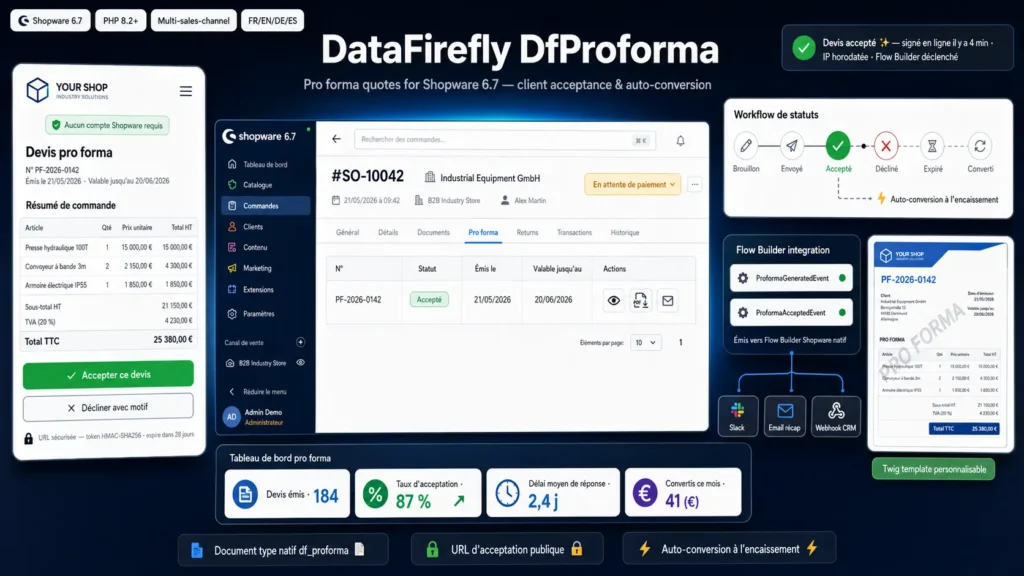
Everything you'd want to know before you install.
A detailed look at how DfProforma Shopware — Pro forma quotes for Shopware 6.7 with client acceptance and auto-conversion works, why we built it the way we did, and the thinking behind the features above.
§ 01
Pro forma quotes: the missing piece of B2B on Shopware
Shopware 6.7 knows how to issue invoices, delivery notes, and credit notes, but not pro forma quotes. Yet in nearly all B2B contexts — industrial equipment, business services, public procurement, bid-based sales — the client must receive a formal document they accept before the order becomes firm. DfProforma fills this gap without workarounds: a real native Shopware document type, its own number range, a branded PDF template, and a standalone client acceptance workflow with a secure public URL.
§ 02
How it works, step by step
Your sales rep receives an order, opens its detail in the Shopware administration, clicks Pro forma, generates the quote. The module immediately creates a real Shopware df_proforma document with its PF number and branded Twig PDF, and records it in a dedicated DAL entity. It then sends the quote by email — customizable transactional template, multilingual, signed with the sales rep's name. The email contains an encrypted public URL. The client clicks, lands on a standalone acceptance page (no Shopware account needed), sees the order summary, and chooses Accept this quote or Decline with reason. The signature is timestamped and persisted. Your Flow Builder workflows fire automatically, your team is notified, and everything is tracked for audit.
§ 03
Complete and auditable status workflow
Six business statuses cover the entire quote lifecycle: draft (created but not sent), sent (awaiting client response), accepted (client clicked Accept), declined (client clicked Decline with reason), expired (30-day validity passed without response), converted (underlying order paid). Each transition is persisted with second-level timestamp, actor identifier, trigger type (sales rep, client, system, payment), and JSON payload for free metadata. You can reconstruct the exact history of any quote at any time — useful in case of client dispute, internal audit, or commercial question.
§ 04
Frictionless public client acceptance URL
This is the module's main contribution. Each sent quote carries a public URL of the form your-shop.com/proforma/accept/{signed_token}. The token is encrypted and signed HMAC-SHA256 with Shopware's secret key, making forgery impossible. The client opens the URL without any Shopware account (the page bypasses standard customer account auth), sees a polished order summary with lines, prices and terms, and explicitly chooses Accept this quote or Decline. On rejection, a mandatory Reason field is requested — useful for your sales reps who can then reach back out with a counter-proposal. The signature is timestamped to the millisecond, and the client's IP address is persisted for proof.
§ 05
Auto-conversion on payment, no human intervention
A classic trap of pro forma quote modules: after the client has accepted and paid, the quote status stays frozen at accepted until a human manually moves it to converted. Result: your dashboard lies, your reports are wrong, your sales reps spend time updating statuses instead of selling. DfProforma solves this with a Subscriber on the order_transaction.state.paid event from Shopware's state machine. As soon as the order's transaction transitions to paid, the module detects that an accepted pro forma quote is attached to this order, and automatically switches its status to converted, with the transition history correctly marked (trigger type: payment). No clicks, no cron, no intervention.
§ 06
Flow Builder ready: hook your existing workflows
The module emits two standard Shopware Business Events: ProformaGeneratedEvent (at generation time) and ProformaAcceptedEvent (at client acceptance time). Both implement BusinessEventInterface and are automatically visible in the Flow Builder's trigger list. You can thus hook all your existing workflows onto them: Slack notification to the sales team when a quote is accepted, internal summary email, webhook to your CRM, custom field update on the customer, automatic tag on the order. No intervention in the module's code required — everything goes through Shopware admin.
§ 07
Vite admin module extending the order detail
The sales rep experience is integrated directly into the native Shopware administration. A new Pro forma tab appears on the order detail (extension of sw-order-detail-base), with the list of quotes attached to this order, their status, dates, and PF number. Three main actions per quote: Generate (initial creation), Send (PDF email with configurable template), and manual transition actions (mark sent, accept, decline) for the exceptional cases where you want to force a status. The admin JavaScript bundle is in Vite (the module ships with its vite.config.mjs configuration); after install, run bin/build-administration.sh to recompile the global administration bundle, and the tab appears.
§ 08
Fully customizable Twig PDF template
The pro forma quote PDF is rendered via Shopware's native Twig engine, from the template src/Resources/views/documents/proforma.html.twig shipped with the module. You can override it from your theme or custom plugin following Shopware's standard Twig template hierarchy. The shipped template includes a header with your logo and company details, a customer block, the order lines summary, HT and TTC totals with VAT breakdown, a summary strip at the bottom (PF number, issue date, expiry date), a discreet watermark, and a configurable brand accent. Compliance with your shop's visual identity without writing a line of code.
§ 09
Typical use cases
B2B industrial equipment store: pro forma quote mandatory before order validation above a threshold, online client acceptance, automatic conversion on bank transfer received. Business services: quote sent after client brief, online acceptance with possible rejection reason to iterate, conversion on deposit payment. Public procurement: formal document required by the contracting authority, auditable transition history for compliance, timestamped signature and persisted IP. B2B wholesale fashion store: quote sent to reseller clients, online acceptance without them needing to create an account, automatic conversion on payment. Vertical marketplace: quotes sent on demand for out-of-stock products, 30-day validity, automatic expiration to free up the pipeline.

There are no reviews yet.