
Our best PrestaShop modules for visual merchandising
Three modules — and the insight that an image resolves a doubt, it doesn't decorate.
Online, people don't buy what they can't inspect — everything the photo doesn't show is a doubt that slows the purchase. The question isn't how to make prettier images, but which doubt each image resolves.
Sound familiar?
A product you can't pick up
In a shop the customer turns the product. Online they have a photo — and must guess the rest.
A beautiful photo that answers nothing
A catalogue shot is pretty, but it doesn't show the stitching, the back, the size.
A return that was a doubt
The customer orders in doubt and sends it back because it was "not as expected".
A product with no context
A product on white. The customer sees it — but doesn't picture themselves with it.
Our selection, ranked
Every module below is built, maintained and supported by our team. The ranking reflects what we would install first on a client store.
-
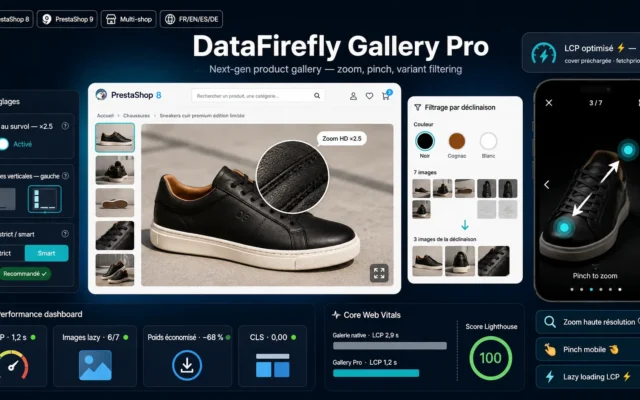
PrestaShop Product Gallery — HD Zoom, Fullscreen & Variant Filter
First — show the detailHD zoom, fullscreen, variant filter. The stitching, the texture, the finish: what the customer would touch in a shop.
Replace the native PrestaShop gallery: HD hover zoom based on the original image, vertical thumbnails, fullscreen viewer with pinch on mobile, image filtering by…
€69.00 View the module -
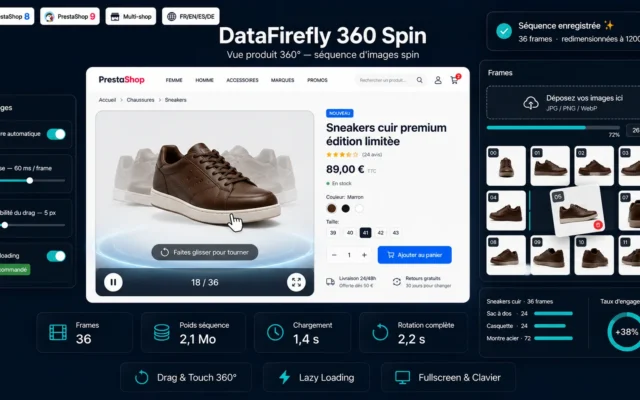
360° Product View PrestaShop — Spin Viewer from Image Sequence
Close the blind angle360° view by image sequence. The back, the side, the volume — exactly where the doubt sits.
Add an interactive 360° product view to your PrestaShop pages from a spin image sequence: mouse and touch drag rotation with inertia, autoplay, fullscreen,…
€79.00 View the module -
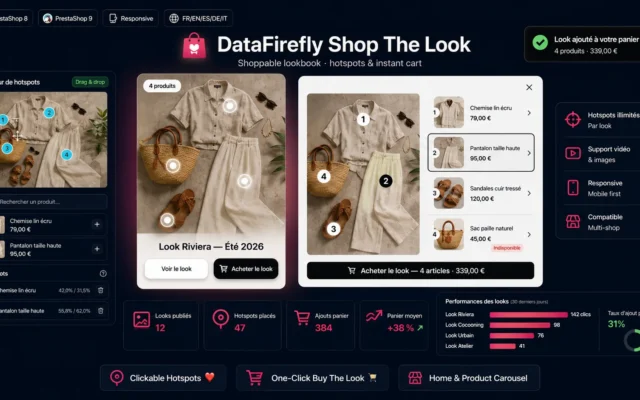
Shoppable Lookbook — Shop the Look & Clickable Hotspots
The product in contextShoppable look with clickable hotspots. The product worn, combined — and several items sold in one image.
Turn your lifestyle photos into clickable storefronts. Place hotspots on your products while picking the combination shown on the photo, display your looks as…
€79.00 View the module
Side-by-side comparison
| Module | Best for | Price | Rating | Link |
|---|---|---|---|---|
| PrestaShop Product Gallery — HD Zoom, Fullscreen & Variant Filter | First — show the detail | €69.00 | — | |
| 360° Product View PrestaShop — Spin Viewer from Image Sequence | Close the blind angle | €79.00 | — | |
| Shoppable Lookbook — Shop the Look & Clickable Hotspots | The product in context | €79.00 | — |
Online, people don’t buy what they can’t inspect
That’s the limit of every online store. In a shop the customer turns the product, feels the material, sees the size. Online they have a photo — and everything the photo doesn’t show is a doubt that slows the purchase.
And a beautiful photo isn’t the same as a useful one
A catalogue shot is pretty. A zoom that shows the stitching, a 360° view that shows the back, a look that shows the product worn: that answers the question the customer asks before clicking away.
The right question isn’t “how do I make prettier images”
It’s: which doubt does each image resolve. Because merchandising that doesn’t convince doesn’t produce fewer sales — it produces returns.
How to choose
First, accept the limit every online store has
Online, people don't buy what they can't inspect. In a shop the customer turns the product; online they have a photo. Everything the photo doesn't show is a doubt — and a doubt slows the purchase or produces a return.
Then show the detail — the HD zoom
The zoom shows the stitching, the texture, the finish: what the customer would touch in a shop. It's the first doubt to resolve, and the brick whose absence costs most.
Then close the blind angle — the 360° view
A single photo hides the back and the side. For anything whose shape matters, the blind angle is exactly where the doubt sits. The 360° view turns the product the way the hand would.
And lift the basket — the shoppable look
The product in context, worn, combined. The customer pictures themselves with it, and clickable hotspots sell the whole look at once. Last in the order, because it only works once each product is well shown on its own.
What you gain
The detail the zoom shows
The HD zoom shows the stitching, the texture, the detail. What the customer would touch in a shop.
The side no photo shows
The 360° view shows the back, the side, what a single photo hides. No more blind angle.
The product in context, not on white
The shoppable look shows the product in context, worn, combined. The customer pictures themselves with it.
The return that doesn't happen
Every doubt resolved is a return that doesn't happen. Merchandising is logistics too.
Several products in one image
A look with clickable hotspots sells several products at once. One image, a full basket.
The right metric
Not the number of photos. The return rate for "not as expected" is the number that counts.
From install to results
-
Understand what the photo hides
Everything the photo doesn't show is a doubt — or a return.
-
Show the detail first
The HD zoom shows the stitching and the texture. The most common doubt.
-
Close the blind angle
The 360° view turns the product the way the hand would.
-
Lift the basket
The shoppable look shows the product in context and sells several at once.
-
Measure the right number
Not the number of photos. The return rate for "not as expected".
“Our return rate was a third, and we blamed sizing. The truth was people couldn't see the finish of the leather. We added HD zoom and the 360° view — same products, same prices, a third fewer returns.”
Frequently asked questions
Why is the image so decisive online?
Because in a shop the customer inspects the product: they turn it, feel it, see the size. Online they have a photo — and everything the photo doesn't show is a doubt. Good visual merchandising doesn't replace the hand, but it answers the questions the hand would ask.
What separates a beautiful image from a useful one?
A catalogue shot is pretty; a useful shot answers. A zoom on the stitching, a 360° view of the back, a worn look: each resolves a concrete doubt. Beauty decorates — usefulness sells.
How does merchandising cut returns?
Because a return is often an unresolved doubt. The customer orders, uncertain about a detail — and sends it back because it was "not as expected". A zoom or a 360° view that shows the detail up front prevents the order that comes back.
Why a 360° view?
It shows what a single photo hides: the back, the side, the volume. For anything whose shape matters — shoes, bags, objects, furniture — the blind angle is exactly where the doubt sits. The 360° view closes it.
What does the shoppable look add?
It shows the product worn, combined, in context — not on white. The customer pictures themselves with it, and clickable hotspots let them buy the whole look. One image that sells several products at once.
Which metric should I track?
The return rate for the reason "not as expected" — not the number of your photos. That rate measures exactly the gap between what the customer saw and what they received. Cutting it means showing better — and that's the real purpose of merchandising.
Where do I start?
With the HD zoom, because it touches every item and resolves the most common doubt. Then the 360° view for anything whose shape matters. The shoppable look last — it lifts the basket once the product itself is well shown.
Not sure which one fits your store?
Tell us your context — we answer with a straight recommendation, not a sales pitch.