PrestaShop Design & Navigation

PrestaShop Product Gallery — HD Zoom, Fullscreen & Variant Filter

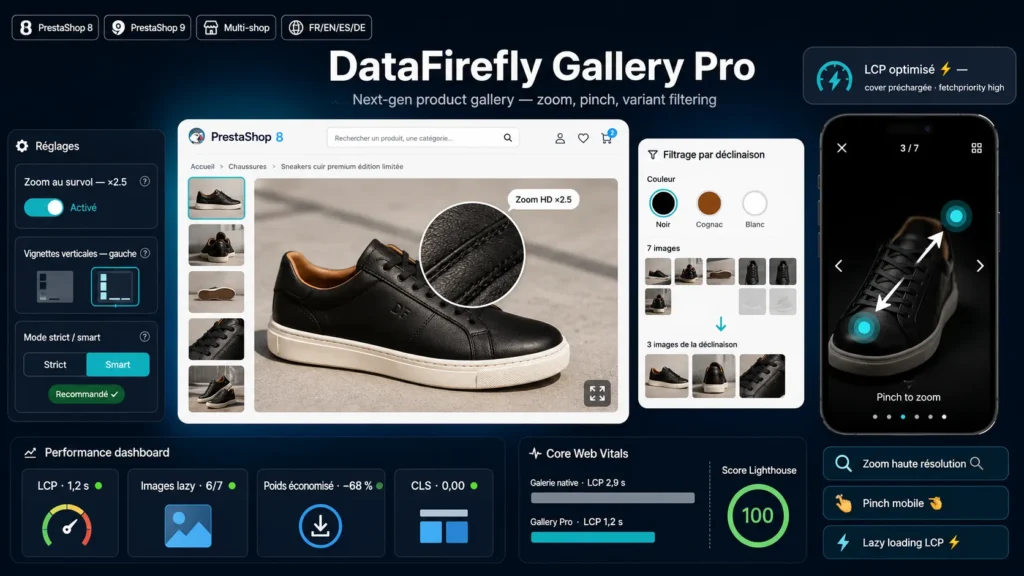
Next generation product gallery: HD zoom, vertical thumbnails, mobile fullscreen with pinch and variant based image filtering.

The product gallery PrestaShop should have shipped: high resolution zoom, mobile fullscreen and variant filtered images.

At a glance
  • HD inner zoom on hover: automatic switch to the untouched original source image
  • Mobile fullscreen viewer: two finger pinch, double tap, swipe navigation, image counter
  • Image filtering by selected combination, strict or smart mode, resynchronized on every variant change
  • LCP optimized loading: cover preloaded with high priority, thumbnails and neighbor images deferred
  • PrestaShop 8 & 9, no override or SQL table, vanilla JS without jQuery
PrestaShop 8 & 9 HD zoom Mobile pinch Variant filter LCP optimized
  • 30-day refund
  • 12 months updates
  • 24h support
www.datafirefly.com/en/
PrestaShop product gallery with HD zoom and fullscreen view
v1.0.0 · updated 2026-07-16
What it does

The short version.

01

High resolution zoom, for real

The hover zoom follows the cursor with a configurable factor from 1.5 to 4. On first hover, the gallery silently preloads the untouched original source image and switches to it: the zoom stays crisp even on highly detailed photos, where the native zoom is stuck with the large format.

02

Mobile fullscreen with pinch

An immersive viewer built on Pointer Events: two finger pinch with continuously recalculated pan limits, double tap to zoom, swipe to navigate, image counter, and closing via the Escape key or a tap on the backdrop. Mouse wheel zoom on desktop.

03

Images filtered by variant

The gallery reads the native image-to-combination associations of the product page and only shows relevant images: strict mode (combination images only) or smart mode (combination images first, then the rest). It resynchronizes on every variant change, including after the core AJAX refresh of the image block.

04

Built for the Largest Contentful Paint

The cover image is announced as a high priority preload in the page head, the first stage image loads with priority while thumbnails and subsequent images are deferred, and neighbor images are prefetched on every navigation. Your product page gets faster, both perceived and measured.

The long version

Everything you'd want to know before you install.

A detailed look at how PrestaShop Product Gallery — HD Zoom, Fullscreen & Variant Filter works, why we built it the way we did, and the thinking behind the features above.

§ 01

Replace the native gallery without touching the theme

The module overrides no template: it injects the product page data at load time, then mounts the gallery with JavaScript in place of the native image block, which it hides cleanly. This approach makes it compatible with the classic theme and the vast majority of themes derived from it, with no template conflict and no maintenance debt on every theme update. The quick view modal deliberately keeps the native gallery to avoid any interference with the core.

§ 02

A zoom that finally uses your photos at full resolution

The native PrestaShop zoom is limited to the large format generated by the shop, often 800 pixels. Here, the inner zoom follows the cursor with an adjustable factor, and from the first hover the gallery preloads the original source image you uploaded in the background, then switches to it invisibly. Stitching, textures and fine details stay sharp even at high magnification - a real asset for fashion, jewelry, furniture or any carefully shot product photography.

§ 03

The mobile fullscreen your visitors expect

On mobile, the fullscreen viewer opens with a single tap: dark backdrop, two finger pinch with continuously recalculated pan boundaries, double tap to zoom in and out, horizontal swipe to move between images and a position counter. On desktop, the same viewer responds to the mouse wheel, keyboard arrows and the Escape key. The experience gets close to what the big marketplaces offer, right on your own shop.

§ 04

Images consistent with the chosen combination

When a customer selects the cognac color, showing them the photos of the black model creates doubt and returns. The gallery reads the native image-to-combination table and filters the display accordingly: in strict mode, only the images of the selected combination appear; in smart mode, they come first and the others follow. If a combination has no associated image, the full gallery is shown as a fallback. Resynchronization happens on every variant change, including after the core PrestaShop AJAX replacement of the image block.