PrestaShop Design & Navigation

360° Product View PrestaShop — Spin Viewer from Image Sequence

Interactive 360° product view from an image sequence: mouse and touch drag rotation, autoplay, fullscreen and lazy loading.

Let your customers turn the product a full 360°: a smooth spin viewer, built from a simple image sequence, without touching your theme.

At a glance
  • Mouse and touch drag rotation with inertia, built from a 360° image sequence
  • Autoplay, fullscreen, frame counter and keyboard navigation
  • Lazy loading: frames load when the viewer enters the screen
  • Drag-and-drop frame management: multi-upload, reordering, preview, automatic resizing
  • PrestaShop 8 & 9, no override, one sequence per product managed per shop, vanilla JS without jQuery
PrestaShop 8 & 9 Drag & touch Autoplay Fullscreen Lazy loading
  • 30-day refund
  • 12 months updates
  • 24h support
www.datafirefly.com/en/
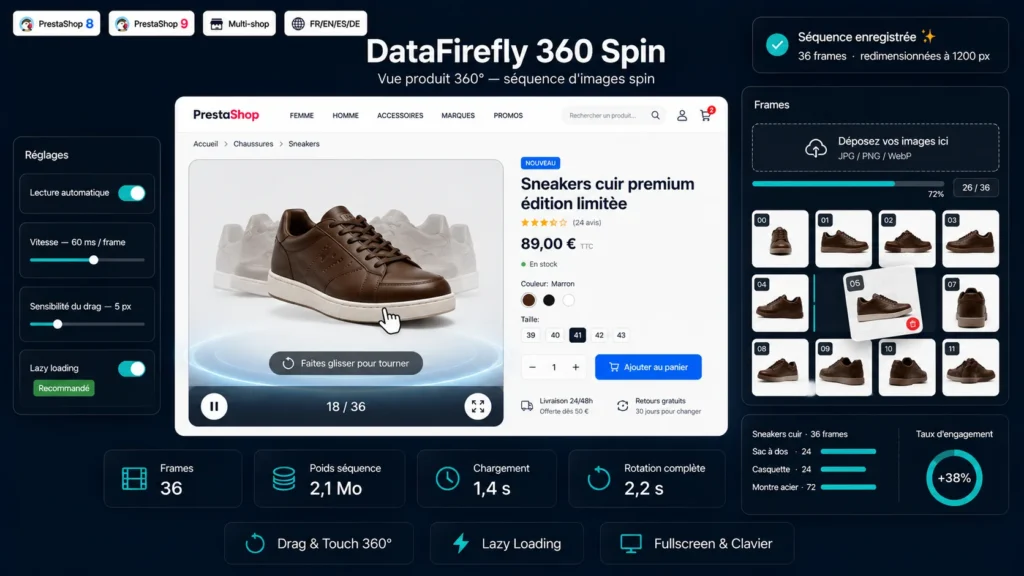
360-degree spin viewer rotating a product on a PrestaShop product page
v1.0.0 · updated 2026-07-16
What it does

The short version.

01

A rotation that responds to the gesture

The viewer is built on Pointer Events: visitors drag the product with mouse or finger to spin it, with adjustable sensitivity and natural inertia at the end of the gesture. The rotation stays smooth on mobile and desktop alike, with no dependency on jQuery or any third-party library.

02

Autoplay and fullscreen

The sequence can start spinning on its own in a continuous rotation, at a configurable speed, with a play / pause button and a frame counter. Fullscreen mode enlarges the product for detailed inspection, and the keyboard arrows and space bar drive the rotation. The autoplay setting can be global or overridden sequence by sequence.

03

Frictionless frame management

In the back office, you attach a sequence to a product through an instant search, then drop all your images at once into the dropzone. They are sorted by filename, uploaded in batches with a progress bar, reorderable by drag and drop and deletable one by one. A preview replays the rotation before publishing.

04

Built for product page speed

The sequence images are only loaded when the viewer enters the visible area, thanks to an intersection observer, with a progress bar during preloading. Oversized frames are automatically resized on upload according to a configurable maximum width, for a controlled weight and a crisp render.

The long version

Everything you'd want to know before you install.

A detailed look at how 360° Product View PrestaShop — Spin Viewer from Image Sequence works, why we built it the way we did, and the thinking behind the features above.

§ 01

The 360° view without a studio or a proprietary format

No 3D scanner or exotic file format required: a 360° view is just a series of photos taken all around the product, usually on a turntable. You shoot 24, 36, 48 or 72 evenly spaced images, in the same framing and lighting, name them in order, and the viewer rebuilds the rotation. The module handles import, sorting, resizing and display — you keep control over the shoot.

§ 02

Natural interaction on every screen

Built on Pointer Events, the viewer treats mouse and touch the same way. Visitors grab the product and turn it whichever way they want; at the end of the gesture, inertia extends the rotation then gradually slows it down. Sensitivity is adjustable to match the number of frames in your sequence. On the keyboard, the arrows advance frame by frame and the space bar starts or pauses autoplay.

§ 03

Fast by default, discreet for your theme

Images are only downloaded when the viewer becomes visible on screen, which avoids weighing down the initial load of the product page. A progress bar informs the visitor during preloading, then the rotation becomes available. On upload, every frame wider than the defined limit is resized server-side, for a controlled weight without degrading sharpness. The module overrides no template: it inserts itself through a display hook that you choose.

§ 04

A back office designed for speed

From the dedicated catalog tab, you create a sequence, find the product through an instant search on its name, reference or ID, then drop all your images in one gesture. They are sorted by filename to respect the shooting order, uploaded in batches with a progress bar, then reorderable by drag and drop and deletable one by one. A preview button replays the rotation directly in the admin before you publish.