


Everything you'd want to know before you install.
A detailed look at how Shoppable Lookbook — Shop the Look & Clickable Hotspots works, why we built it the way we did, and the thinking behind the features above.
§ 01
Sell the vibe, not just the product
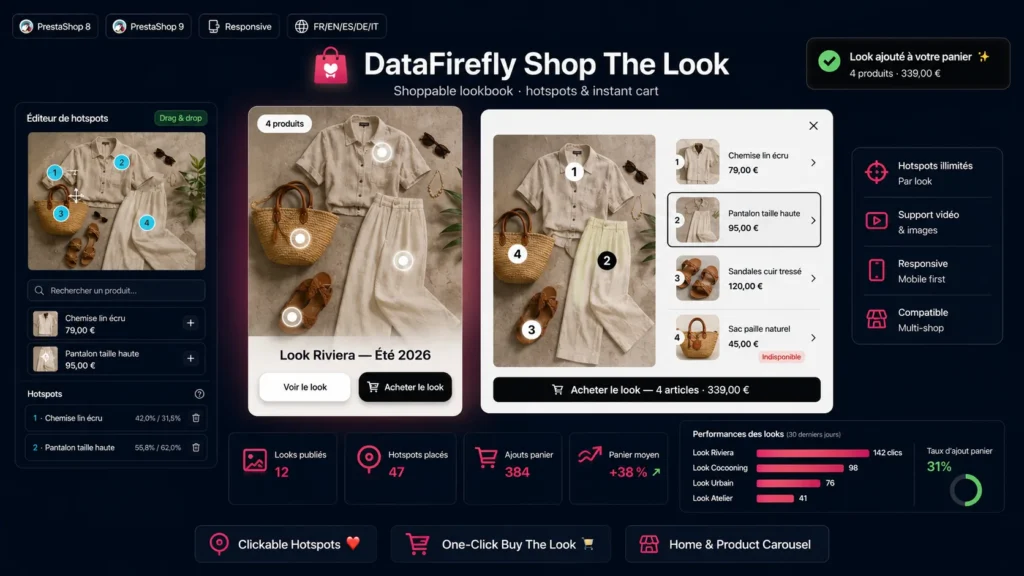
In fashion and home decor, customers don't buy a single item: they buy a style, a combination, a complete look. This module turns your best lifestyle photos into interactive storefronts where every visible product becomes clickable and shoppable, straight from the image.
§ 02
A hotspot editor built for non-technical users
From the back office, upload your visual, click where you want to drop a dot, then search the product to link by its name or reference. If that product has combinations, you flag the one actually shown on the photo, and you can change it later without touching the dot. Hotspots are dragged with the mouse for pixel-perfect placement.
§ 03
Carousel or expanded display, to match your layout
The carousel presents several looks side by side and opens an immersive window on click. The expanded display embeds a single look right in the page instead: image on the left, product list on the right, with no popup at all. Each placement is set independently, so you can run a large expanded look on the home page and a carousel on the product page.
§ 04
You decide what appears in the shop window
Each look can be flagged as featured on the home page, in one click from the list. Only those looks feed the home page carousel: you keep a catalogue of looks as large as you want while precisely controlling your shop window. In expanded display, you pick the look to showcase directly.
§ 05
Buying the look in a single click
The "Buy the look" button adds all the products tied to the visual to the cart at once: chosen combination, minimum quantity respected, out-of-stock items skipped automatically, and deduplication when the same product appears on several dots. The PrestaShop cart refreshes natively and a notification confirms the addition.
§ 06
Fast, clean and dependency-free
The front end is written in vanilla JavaScript, without jQuery, and only loads its assets on the pages where it's useful. The interface is translated into eight languages and the full source code is provided, unencrypted, following PrestaShop 8 and 9 conventions.

There are no reviews yet.