
Our best Shopware plugins for design and personalisation
Three plugins — and one question: who can change your store?
A beautiful store only a developer can change is a dead store. The right question isn't "how does it look", it's "who can change it".
Sound familiar?
A design you can't change yourself
A theme only a developer can touch turns every change into a ticket.
A campaign waiting for a sprint
A landing page for a campaign should take minutes, not a sprint.
A detail that works against the visitor
A forced dark mode is as annoying as none. The preference is what counts.
A snippet that demands a deployment
A small piece of CSS in the right place shouldn't mean a deployment and a risk.
Our selection, ranked
Every module below is built, maintained and supported by our team. The ranking reflects what we would install first on a client store.
-
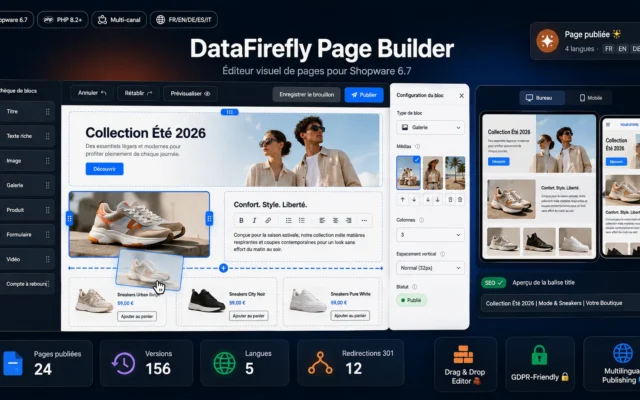
Page Builder for Shopware 6.7 – Visual Page Editor
First — the autonomyBuild landing pages, banners, blocks visually. No ticket, no deployment. The campaign becomes a matter of minutes.
Build landing pages and content pages without a developer: drag & drop editor with 15 blocks (products, forms, GDPR videos), drafts, versions, scheduled publishing…
€99.00 View the module -
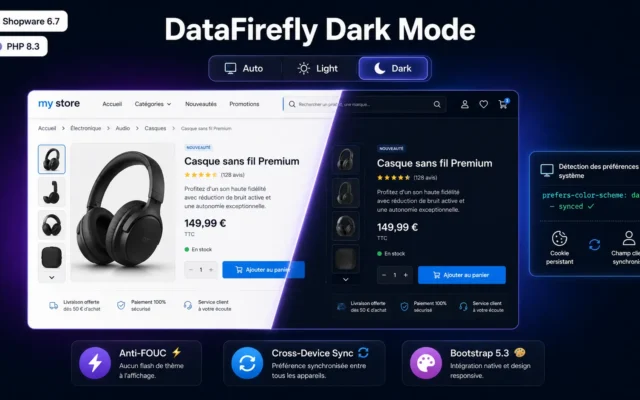
DataFirefly Dark Mode — Browser-Aware Dark Mode with Customer Preference for Shopware 6.7
A detail that respects the visitorDark mode with browser detection and a saved preference. Not a forced mode.
Add a complete dark mode to your Shopware 6.7 storefront: browser detection, 3-state toggle (Auto / Light / Dark), customer preference persisted via cookie…
€49.00 View the module -
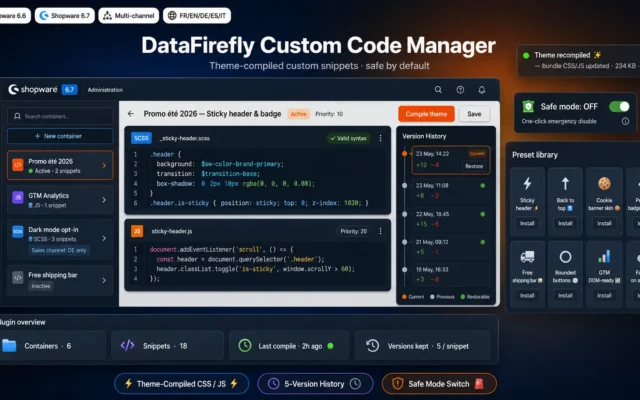
Custom Code Manager — CSS / JS snippets for Shopware 6
Fine-tuning without a deploymentA CSS or JS snippet exactly in the right place, without touching the theme.
Inject and organise your CSS and JavaScript snippets straight into the Shopware 6 theme compilation. Built-in code editor, multi-channel containers, version history, preset library,…
€49.00 View the module
Side-by-side comparison
| Module | Best for | Price | Rating | Link |
|---|---|---|---|---|
| Page Builder for Shopware 6.7 – Visual Page Editor | First — the autonomy | €99.00 | — | |
| DataFirefly Dark Mode — Browser-Aware Dark Mode with Customer Preference for Shopware 6.7 | A detail that respects the visitor | €49.00 | — | |
| Custom Code Manager — CSS / JS snippets for Shopware 6 | Fine-tuning without a deployment | €49.00 | — |
A beautiful store you can only change through a developer is a dead store
That’s the trap nobody sees coming. A theme gets built, it looks great — and then every small change costs a ticket, a wait, a budget. In the end you change nothing, because it’s too expensive to change anything.
The right question isn’t “how does it look”, it’s “who can change it”
A landing page for a campaign, a banner for a promo, a seasonal block: those aren’t development projects. When they become one, your store stops moving.
And the design details aren’t cosmetic
A dark mode that respects the customer’s preference. A snippet that sits exactly where it should. Small things you have to be able to change without a deployment — otherwise you never change them.
How to choose
First, ask the right question
Not "how does my store look", but "who can change it". A beautiful theme that turns every tweak into a developer ticket freezes your store. In the end you change nothing — because it's too expensive to change anything.
Then autonomy — the page builder
Landing pages, banners, seasonal blocks don't belong in a development sprint. A visual builder makes them a matter of minutes. That's the difference between a store that reacts and one that waits.
Then the details that respect the visitor
A dark mode that detects the system preference and saves the choice. Not a forced mode — one that signals the store is built for the user.
And fine-tuning without a deployment
A CSS or JS snippet exactly in the right place, without touching the theme. Small things you have to be able to change without risk — otherwise you never change them.
What you gain
Change without needing a developer
Build landing pages, banners, seasonal blocks visually. No ticket, no wait, no deployment.
The campaign that goes live today
A campaign doesn't wait for a sprint. The page builder makes it a matter of minutes.
A detail that respects the visitor
Dark mode with browser detection and a saved customer preference. Respects what the visitor wants.
Fine-tuning without a theme change
A CSS or JS snippet exactly in the right place, without touching the theme. No deployment.
The right criterion
Not how it looks. Who can change it decides whether your store stays alive.
A store that stays alive
A store that moves sells more than a beautiful one that's frozen.
From install to results
-
Ask the right question
Not how it looks. Who can change it without opening a ticket.
-
Take back the autonomy
Landing pages, banners, blocks in minutes instead of a sprint.
-
Respect the visitor in the details
Dark mode that detects and saves the preference. Not a forced mode.
-
Fine-tune without a deployment
A snippet in the right place, without touching the theme.
-
Keep the store alive
A store that moves weekly beats a beautiful one that's frozen.
“Our theme was beautiful — and completely frozen. Every campaign banner cost a ticket and three days. Since we build pages ourselves, we change the storefront every week. The design was never the problem, autonomy was.”
Frequently asked questions
Why isn't a beautiful theme enough?
Because a theme only a developer can change turns every small tweak into a ticket. In the end you change nothing — not because it's unnecessary, but because it's too expensive. A store that doesn't move is a store that quietly ages.
What does a page builder actually give me?
A page builder lets you build landing pages, banners and blocks visually — no code, no deployment. A campaign becomes a matter of minutes instead of a sprint. The difference isn't the look, it's the speed at which you can react.
Why is dark mode more than cosmetic?
Because a forced dark mode is as annoying as none at all. The right one detects the visitor's system setting and saves their choice. It's a small detail — but it signals the store is built for the user, not against them.
Why a snippet manager if I have a theme?
Because you often need a small piece of CSS or JS in a specific place — and touching the theme for it means a deployment, a risk, a wait. A snippet manager puts it exactly there, without touching the theme.
Which criterion really matters in design?
Not beauty. The speed at which you can change a page. A store you can adjust weekly beats a perfect one that's frozen — because the business moves, and your storefront has to move with it.
Where do I start?
With the page builder, because it brings the most autonomy: you change things yourself, instantly. Then the details — dark mode, snippets — that refine the rest without touching the theme.
Not sure which one fits your store?
Tell us your context — we answer with a straight recommendation, not a sales pitch.