
Everything you'd want to know before you install.
A detailed look at how External Blog Carousel for PrestaShop works, why we built it the way we did, and the thinking behind the features above.
Why a blog carousel on your PrestaShop store?
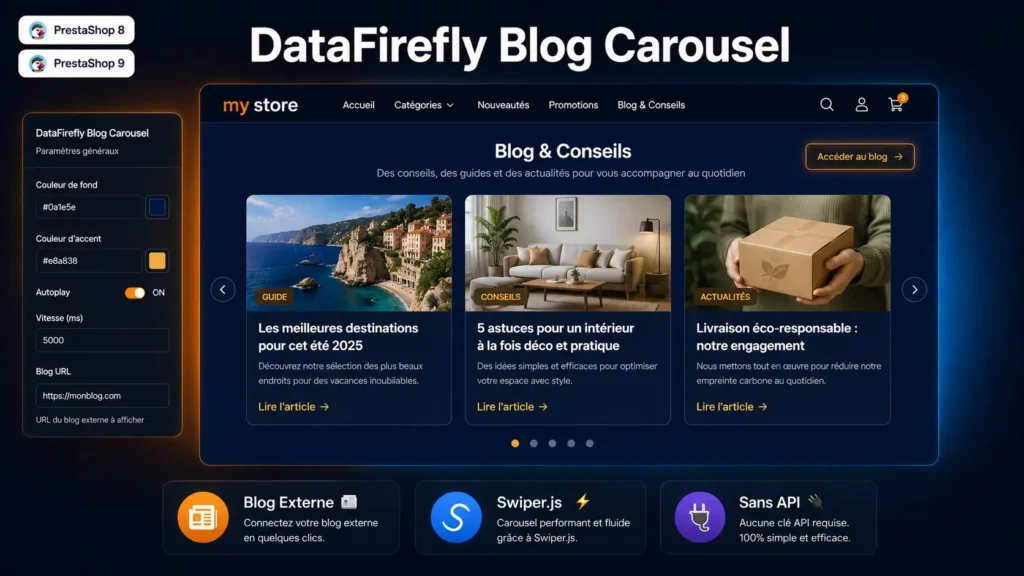
Displaying blog articles on an e-commerce store is not trivial: it builds a connection with visitors, increases time on site and reinforces brand expertise. Yet many merchants have their blog on an external platform (WordPress, Ghost, Webflow, Medium…) and have no simple way to relay it on their PrestaShop store without custom development. DfBlogCarousel solves this with a direct approach: you manually enter the articles you want to feature, choose the image, title, description and link to the full article, and the module displays it all in a smooth carousel on the homepage.
Simple management from the back-office
From the module configuration page in the PrestaShop back-office, you manage two things: the section settings (title, subtitle, colours, blog URL, button label, autoplay) and the article list. Each article has a title and description translated per language, a directly uploaded image, an external link and an active/inactive status. The display order is customisable by position. No complex dashboard, no obscure settings: everything is in two simple forms.
Swiper.js: performance and compatibility
The carousel uses Swiper.js, the most widely used carousel library in the web ecosystem. The module is smart: it checks whether Swiper is already loaded by another module or your theme before injecting it from the CDN. If Swiper is already present, no additional loading is performed, avoiding conflicts and preserving your page performance.
Full customisation without CSS
From the module settings, you configure the section background colour (e.g. a deep blue for a health sector, a green for wellness), the accent colour used on the “Read article” links, the section title and subtitle in each language, the full blog URL and the button label leading to it. Everything applies instantly, without touching your theme’s code or CSS.


There are no reviews yet.