
Everything you'd want to know before you install.
A detailed look at how Front Office Admin Bar PrestaShop 8 & 9 - Edit Products from Your Storefront works, why we built it the way we did, and the thinking behind the features above.
The WordPress reflex, finally on PrestaShop
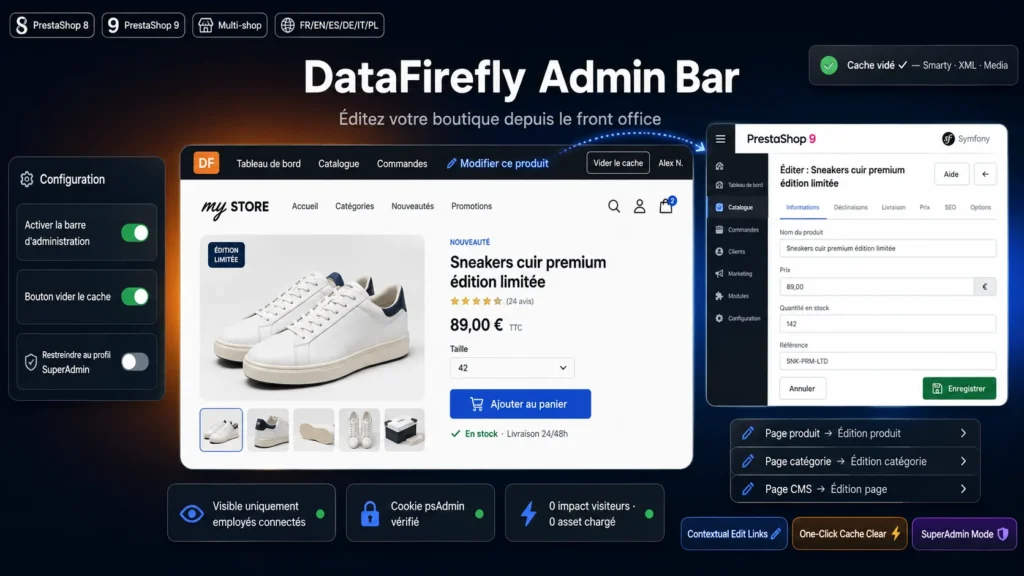
On WooCommerce, the black bar at the top of the site takes you from the storefront to the product edit page in one click. PrestaShop offers nothing similar: you have to open the back office, search the catalog, then open the product sheet. This module reproduces that exact reflex: you browse your store, spot a wrong price or a description to fix, click Edit this product and the edit page opens immediately.
Reliable, invisible employee detection
The bar only shows up when an employee is logged into the back office in the same browser. The module validates the employee cookie against the password hash and checks that the account is active. Nothing changes for your customers: no module CSS or JavaScript is loaded, the performance impact is zero.
Contextual links based on the current page
On a product page, the bar points to the product edit screen. On a category page, to the category edit screen. On a CMS page, to the page edit screen. Links carry valid back office tokens and are automatically converted to the modern edit pages of PrestaShop 8 and 9.
Cache clearing without opening the back office
After a template or CSS change, one click on the bar button clears the Smarty, XML and Media caches and regenerates the class index. The AJAX call is protected by a dedicated token bound to the logged in employee.
Installed in two minutes
Install the ZIP and the bar is immediately active for logged in employees. Four settings in the configuration: enable or disable the bar, show the cache button, restrict to the SuperAdmin profile. No override, no SQL table, clean uninstall.

great, it makes it much easier to quickly edit a product page by going directly from the front office to the back office and back again so you can immediately see the result of the changeAutomatically translated