
Our best PrestaShop modules for maintenance, backup and reliability
Seven modules so the worst day stays an administrative act: backup, staging, cleanup, broken links, trash and direct database access.
Nobody sees the maintenance, everybody sees the outage. A backed-up, tested and cleaned store turns the worst day into an administrative act: restore, check, move on. Without these foundations, the same day becomes a crisis.
Sound familiar?
No backup, no plan B
Server failure, botched update, wrong operation: without an off-site, tested backup, there is no way back.
Production as a test environment
A core update or a new module tested straight in production: when it breaks, it breaks in front of customers.
A database full of ballast
Orphan carts, endless logs, dead associations: the database swells, everything slows down, backups too.
The product deleted for good
One wrong click and the sheet with its images, combinations and associations is gone, with no restore.
Our selection, ranked
Every module below is built, maintained and supported by our team. The ranking reflects what we would install first on a client store.
-
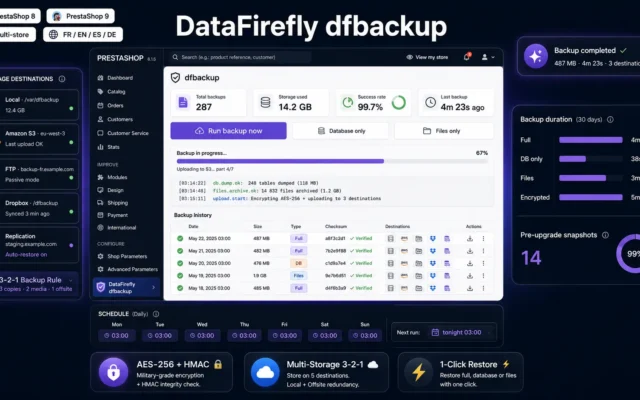
Encrypted backup of database and files to S3 or FTP, scheduled and with generations: the insurance every store needs.
Scheduled DB and files backup for PrestaShop 8 and 9, with Local / S3 / FTP / Dropbox storage, authenticated AES-256 encryption, SHA-256 verification,…
€129.00 View the module -
Store Staging & Cloning for PrestaShop 8 & 9
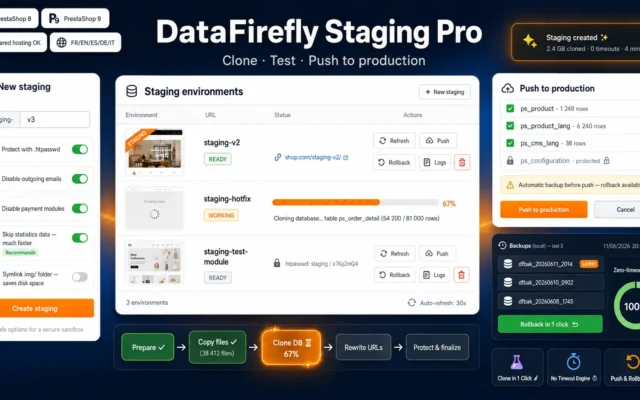
The test environmentStaging and store cloning: updates, modules and theme changes are rehearsed on a copy, never in production.
Create a full staging copy of your PrestaShop 8 or 9 shop in one click: files and database cloned in batches with no timeout,…
€79.00 View the module -
DataFirefly Cleanup — PrestaShop 8 & 9 Database Cleaner
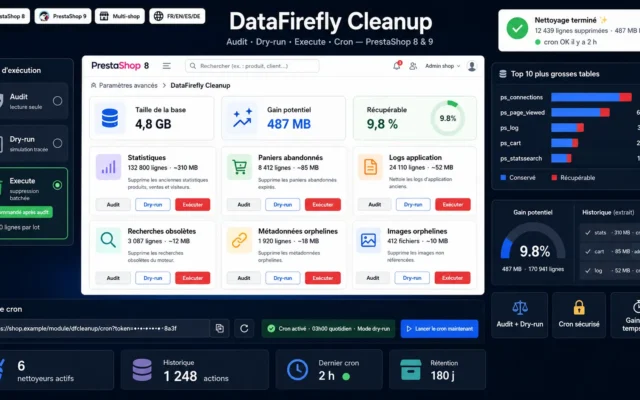
The database cureDatabase cleanup with preview and backup: orphan carts, logs and dead associations disappear, performance returns.
Take back control of your PrestaShop database. Six specialised cleaners, three safe modes (audit / dry-run / execute), MB-gain report before action, token-secured cron…
€19.00 View the module -
Broken Link Checker PrestaShop 8 & 9 — Dead Links & Missing Images
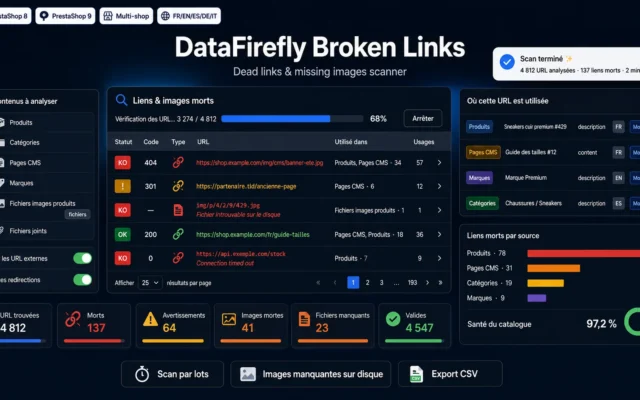
The error hunterBroken link and missing image check across the whole catalogue: errors are found before Google and customers see them.
Scan your entire catalogue for links that no longer respond and images that no longer display. The module checks the HTTP status of every…
€59.00 View the module -
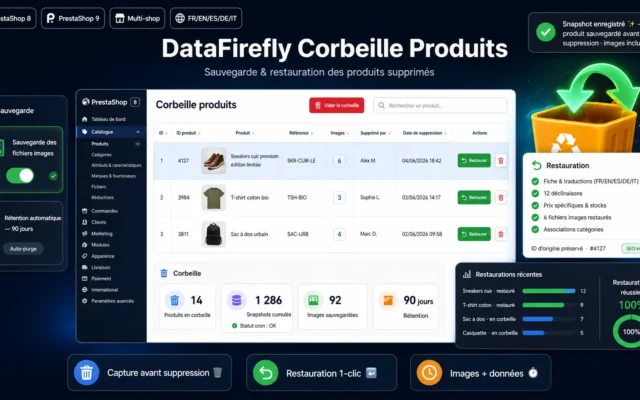
DataFirefly Product Trash
The safety netProduct trash: every deleted sheet can be fully restored, with images, combinations and associations.
Every product deleted in PrestaShop is automatically backed up (data + image files) to a trash bin. Restore it identically in one click, with…
€59.00 View the module -
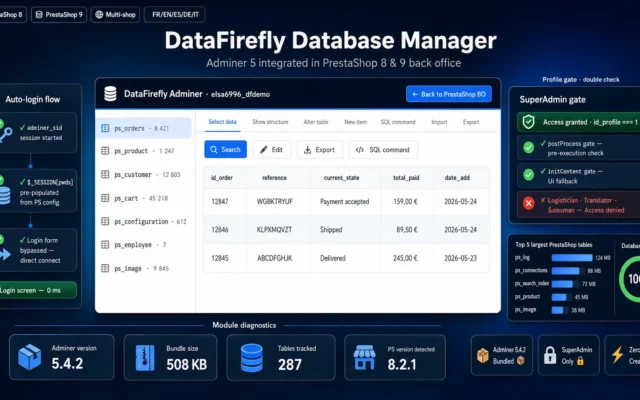
Adminer embedded in the back office: quick database checks and targeted fixes without the phpMyAdmin detour.
Adminer 5.4.2 integrated directly into the PrestaShop back office. Auto-login, SuperAdmin-only access, full database management without leaving the BO.
€69.00 View the module -
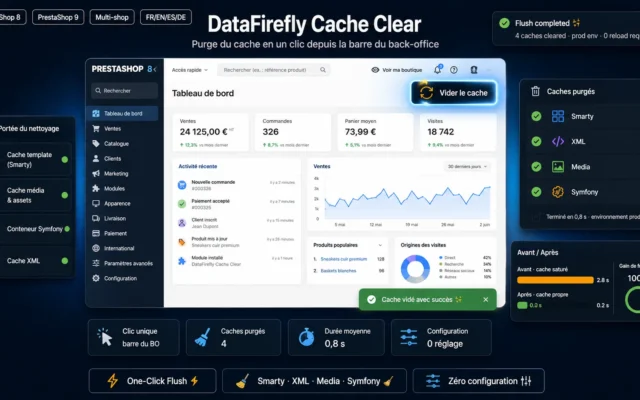
Clear PrestaShop Cache — One-Click Purge (PS 8 & 9)
The final touchCache purge in one click or automatic: every fix becomes visible immediately, without deleting folders on the server.
Add a "Clear cache" button to the back-office toolbar. One click purges Smarty, XML, Media and Symfony. Compatible with PrestaShop 8 and 9, multistore.…
€0.00 View the module
Side-by-side comparison
| Module | Best for | Price | Rating | Link |
|---|---|---|---|---|
| PrestaShop 8 & 9 Backup — Database + Files, Encrypted to S3/FTP | The way back | €129.00 | — | |
| Store Staging & Cloning for PrestaShop 8 & 9 | The test environment | €79.00 | — | |
| DataFirefly Cleanup — PrestaShop 8 & 9 Database Cleaner | The database cure | €19.00 | — | |
| Broken Link Checker PrestaShop 8 & 9 — Dead Links & Missing Images | The error hunter | €59.00 | — | |
| DataFirefly Product Trash | The safety net | €59.00 | — | |
| Database Manager Back Office — Adminer for PrestaShop 8 & 9 | Direct access | €69.00 | — | |
| Clear PrestaShop Cache — One-Click Purge (PS 8 & 9) | The final touch | €0.00 | — |
A store that runs is a store that gets maintained
You only notice when it is too late: a database nobody backs up, an update tested straight in production, a product deleted by mistake with no way back. Maintenance is invisible, but it decides whether an incident costs five minutes or five days.
Prevent, test, clean
Encrypted backup creates the way back. Staging tests updates and modules without risk. Cleanup removes what slows the database down: orphan carts, logs, dead associations. The rest of the selection catches everyday mistakes before they reach the customer.
And when something does happen
The product trash restores a deleted sheet in seconds, the database manager gives direct access without the phpMyAdmin detour, and cache purge makes every fix visible immediately.
How to choose
Backup first, everything else after
No maintenance plan without a working, off-site, tested backup. Tested means: actually restore it once, not just see the file. Encryption and multi-generation retention are part of the standard.
Never again straight into production
The rule is simple: anything that changes code or structure (core update, new module, theme change) runs in staging first. The clone takes minutes to create and saves the nights spent fixing a broken checkout under live traffic.
Cleaning is performance work
A PrestaShop database accumulates ballast: carts, logs, stats, orphans. Regular cleanup keeps queries fast and backups compact. Once a month is enough, with a preview before every deletion.
Catch the small mistakes early
A broken link, a missing image, a wrongly deleted sheet: harmless individually, reputation-damaging in aggregate. The link checker and the trash turn these everyday mistakes into routines instead of incidents.
What you gain
A way back always exists
Database and files, encrypted and stored off-site (S3, FTP), on a schedule: the worst day becomes a restore operation.
Test without risk
A copy of the store to test updates, modules and theme changes: production stays production.
A database that stays light
Orphan carts, old logs, dead associations: cleanup keeps the database fast and the backup small.
Errors caught before the customer
Broken links and missing images are detected before Google and your customers find them.
Deletion without drama
Deleted products go to a trash and can be fully restored: a misclick is no longer a disaster.
From install to results
-
Set up the backup and test it
Database daily, files weekly, stored off-site, actually restored once.
-
Clone into a staging
Every update and every new module runs on the copy first, never in production.
-
Clean the database
Monthly cleanup with preview: the database stays fast, backups stay compact.
-
Catch the small mistakes
Broken link check and trash: everyday mistakes become routines instead of incidents.
-
Keep direct access
Adminer for targeted interventions, cache purge so every fix takes effect immediately.
“A module update broke our checkout on a Saturday evening. Restored the 6am backup, tested the update in staging on Monday, found the bug. The difference with before: we slept.”
Frequently asked questions
How often should I back up?
Daily for the database, weekly for files, keeping several generations. The key point is off-site storage (S3, FTP): a backup on the same server disappears with it.
What is a staging environment for?
A staging is a copy of the store in a test environment. Every core update, every new module and every theme change is rehearsed there first. What breaks in staging would have cost revenue in production.
Can database cleanup speed up the store?
Yes, that is its purpose: orphan carts, expired connections, old logs and stats weigh the tables down. Cleanup works with a preview and a backup before every deletion, so nothing useful is lost.
A product was deleted by mistake: what now?
The product trash intercepts every deletion: the sheet, its images, combinations and associations are kept and can be fully restored. Without it, a deleted sheet can only be saved by a full backup restore.
What is the point of a database manager in the back office?
It embeds Adminer directly in the back office, with access protection. For quick checks and targeted fixes, it saves the detour through phpMyAdmin and hosting consoles.
Is this compatible with PrestaShop 9?
Yes. The whole selection covers PrestaShop 8.0 to 9.x, using native hooks and no core overrides.
Not sure which one fits your store?
Tell us your context — we answer with a straight recommendation, not a sales pitch.