
Everything you'd want to know before you install.
A detailed look at how Google Calendar Module for PrestaShop 8 & 9: New Orders Added to Your Calendar Automatically works, why we built it the way we did, and the thinking behind the features above.
Your orders, visible where you plan your day
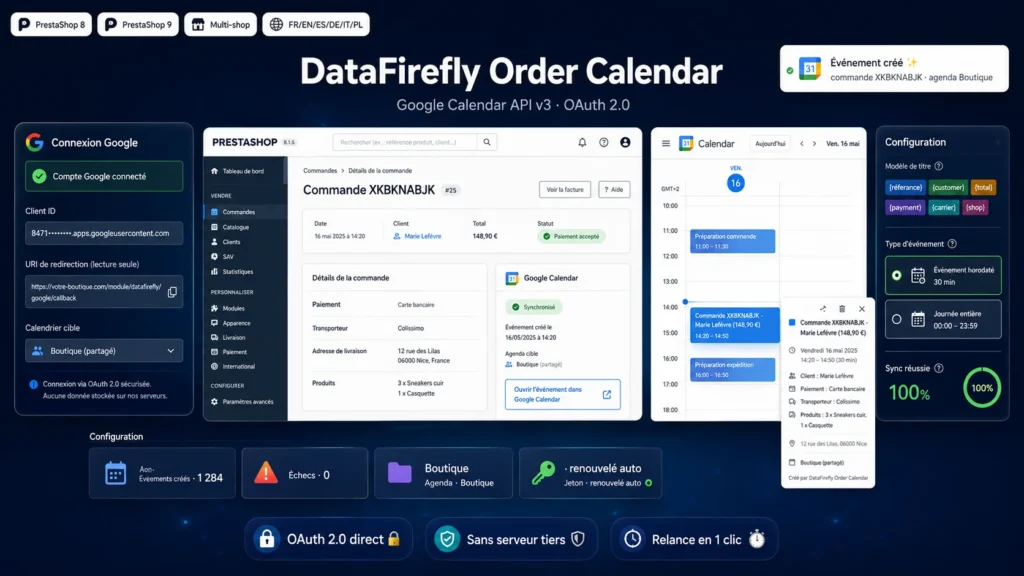
Packing, delivery rounds, workshops, click and collect: many merchants run their day from Google Calendar, not from the back office. This module bridges the two: every validated order shows up as an event in the calendar of your choice, with everything needed to act without opening PrestaShop: reference, customer, total, products and delivery address. On mobile, your calendar becomes a feed of the day's orders that the whole team can share.
A direct Google connection, no third-party server
The module talks directly to the Google Calendar API v3 over OAuth 2.0, using credentials you create in your own Google Cloud console. No order data ever passes through an intermediate server: calls go from your hosting to Google, tokens are stored in your shop database, and the access token refreshes automatically. The configuration shows the exact redirect URL to declare, and the connection takes one click.
Complete, customizable events
The event title follows a template with {reference}, {customer}, {total}, {payment}, {carrier} and {shop} variables, arranged however you like. The description details the order line by line, the delivery address fills the location field, and customer email and phone can be added optionally. Choose between a timed event at the order time, with adjustable duration and the shop timezone, or an all-day event. The target calendar is picked from every writable calendar on your account, including shared team calendars.
Never blocking, always traceable
An external API can go down: the module is built so this never affects your sales. Order validation never waits for Google, and every failure is logged with the exact error message returned by the API. The configuration panel lists failed orders and retries them in one click, a test button creates an event from the latest order, and every back-office order page shows a direct link to its event. Optionally, the order status is appended to the event title on every state change.
Built for PrestaShop 8 and 9
The module follows PrestaShop standards on both major versions, with no Composer dependency and no Google SDK: API calls rely on native cURL. It works on single shops and multistore setups, with an admin interface translated into English, French, Spanish, German, Italian and Polish. Installation takes a few minutes, the Google connection about ten more, with documentation to guide you.
There are no reviews yet.