



Everything you'd want to know before you install.
A detailed look at how Broken Link Checker PrestaShop 8 & 9 — Dead Links & Missing Images works, why we built it the way we did, and the thinking behind the features above.
A dead link costs you twice
It costs you first in search: Google follows the links in your descriptions, and a product description pointing at three 404s signals neglected content. It costs you again in conversion, when a customer clicks the size guide from a product page and lands on an error at the exact moment they were hesitating. The problem is that these links do not break the day you write them. They break six months later, when a partner rebuilds their site or a CMS page gets renamed, and nobody notices.
Two distinct problems, two detection methods
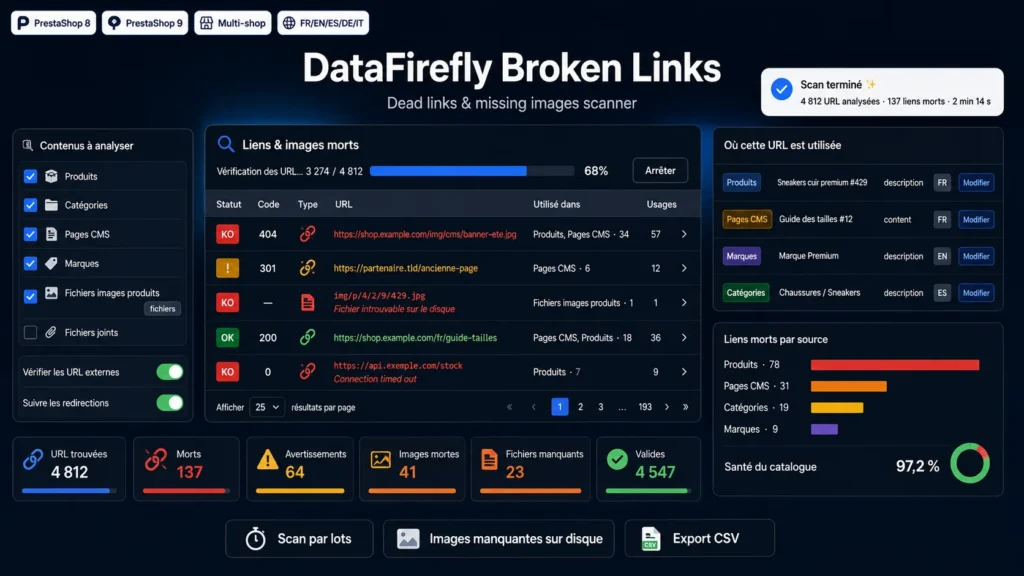
A dead link is found by HTTP request: the module calls the URL and reads the status code. A missing image file cannot be found that way. When a product image is referenced in the image table but the file has disappeared from the img/p folder, the HTTP request may well return a placeholder page with a 200. So the module reads the filesystem directly for every product, category, brand, supplier and store image, and for product attachments. That is the only way to find the images rendering as an empty box while nothing shows up in the logs.
What the module reads in your catalogue
Product descriptions and short descriptions, availability messages, category and CMS category descriptions, CMS page content, brand, supplier and store descriptions, and the footer link blocks managed by ps_linklist. In each of those fields it extracts a href links, img src images with their lazy-loading variants and srcsets, plus source, video, audio, iframe, embed, object, link and script tags, and background images declared in inline styles. Mailto, tel, bare anchors and data URIs are discarded outright, as are the Smarty or shortcode leftovers that sometimes survive in a copy-pasted description.
How the scan holds up on a large catalogue
The scan runs in two phases. Collection walks the content and extracts URLs. Verification queries them. Each phase advances in slices of a few seconds driven by AJAX from the browser, with a cursor saved to the database after every slice. Nothing depends on max_execution_time, and closing the tab midway does not lose the work already done. Two optimisations handle the rest: URLs are deduplicated by fingerprint for the duration of the scan, so a URL appearing 400 times is tested once, and local URLs pointing at a static file present on disk are validated by reading the filesystem, with no network request at all.
From result to fix
A result table sorted by severity lists every URL with its status, HTTP code, error message, redirect target where relevant and usage count. Opening a row shows the list of locations: source type, item name, field, language and anchor text. Each location has its own edit button that opens the product, category or CMS page at the right place. You can also recheck a single URL after fixing it, without rerunning the whole scan.
What the statuses mean
Healthy covers 2xx responses and local files present on disk. Warning covers redirects, 401 and 403 codes, and 429 rate limiting: the resource exists, but something deserves a look. Dead covers 404, 410, other 4xx, 5xx, timeouts, DNS errors and refused connections. Ignored and skipped correspond to your exclusions and to the URL categories you disabled in the settings.
Filtering out what should not be reported
Plenty of domains answer 403 to bots without the link being broken at all, particularly behind an application firewall. The module already classes those as warnings rather than dead links, but you can go further with an exclusion list: one pattern per line, as plain text for a substring match, with wildcards, or as a regular expression with a prefix. A URL can also be ignored in one click from the table, which keeps it out of subsequent scan results.
Installation and uninstallation
No external dependency, no Composer, no theme modification. Upload the ZIP through the module manager and install: four tables are created and a tab appears under Catalog. The module adds no front-office hook and does not touch how your shop renders, it works only from the back office. On uninstall, the four tables, the tab and the configuration are removed.
There are no reviews yet.